


A maintenance supervisor at a food processing plant pulled me aside during a site visit. "We spent $45,000 on mobile devices and CMMS licenses last year. Half my techs still carry paper. The other half enter everything at the end of their shift from memory. Our data quality is worse than before we went digital."
That's not an unusual situation. Organizations roll out mobile maintenance tools expecting immediate adoption, then watch experienced technicians find creative workarounds to avoid using them. Devices collect dust in truck cabs while work orders get updated hours late with minimal detail.
The problem isn't the technology. Most mobile rollouts ignore how maintenance work actually flows through different roles, skill levels, and daily routines. A senior HVAC tech troubleshooting chillers has completely different mobile needs than an apprentice doing PM rounds. Yet companies hand everyone the same device, play the same training video, and wonder why nothing sticks.
Why standard mobile rollouts fail maintenance teams
Mobile adoption in maintenance fails for specific operational reasons that generic change management doesn't address.
Maintenance work happens in bursts. A tech might complete three quick PMs, spend two hours on a complex repair, then get pulled into an emergency. Standard mobile workflows designed for consistent task completion break down when techs constantly switch between routine checks and deep troubleshooting. The context switching makes rigid interfaces feel like obstacles rather than tools.
Then there's the personal information problem. The senior electrical tech who's been keeping motor amp readings in a pocket notebook for fifteen years isn't being stubborn. That notebook contains trending data, personal observations, and equipment quirks that help him diagnose problems faster than any dropdown menu. Asking him to abandon that system feels like dumbing down his expertise—and from his perspective, it kind of is.
The physical environment adds another layer. A tech lying on their back under equipment can't easily navigate complex menus. Someone in thick gloves inside a freezer can't use standard touchscreens. Bright sunlight makes screens unreadable. Grease and chemicals destroy consumer-grade devices. These aren't edge cases in maintenance—they're Tuesday.
Most critically, maintenance teams run on informal knowledge networks. The experienced tech who knows which bearing sounds mean immediate replacement versus next PM cycle shares that knowledge through quick conversations and demonstration. Mobile systems focused only on data capture miss these knowledge transfer moments entirely.
The hidden cost of poor mobile data quality
Bad mobile adoption doesn't just mean techs complain about new devices. It systematically degrades maintenance operations in ways that compound over time.
Eliminate downtime with proactive maintenance.
Openfixit helps you plan, track, and complete maintenance efficiently—maximizing asset reliability.
- Centralized asset management
- Automated maintenance scheduling
- Inventory and parts tracking
No credit card required
When techs batch-enter work orders from memory at shift end, critical details disappear. "Replaced bearing" becomes the entire work description. Which bearing? What was the failure mode? Were there warning signs? How long did the repair actually take? That missing context means the next tech arrives blind, reliability engineers can't spot patterns, and parts planning becomes guesswork.
Labor tracking turns into fiction when mobile tools aren't used in real time. A tech who spent 30 minutes on a PM, got pulled into an emergency for an hour, then finished the PM might log it all as PM time. Or all as emergency time. Your maintenance metrics start showing impossible efficiency gains while overtime keeps climbing.
Equipment history gaps create expensive surprises. A compressor showing intermittent high temperature alarms might get reset multiple times by different techs who each assume it's a one-off issue—because previous instances were never logged properly. Six months later, catastrophic failure shuts down production for two days. The warning signs were there the whole time, just never captured.
The measurement problem becomes self-reinforcing. Managers see poor data quality and push harder for mobile compliance. Techs feel micromanaged and find new workarounds. Data quality drops further. Trust erodes on both sides. Eventually the mobile system becomes another checkbox exercise that everyone pretends works while real communication happens through text messages and hallway conversations.
Building role-specific mobile workflows that techs actually use
Generic mobile interfaces fail because maintenance roles have fundamentally different information needs and workflow patterns.
Apprentice/Helper workflows need extreme simplicity. These users perform routine tasks—meter readings, filter changes, basic PMs. Their mobile interface should be checklist-driven with heavy visual guidance. Show pictures of correct gauge readings. Use color coding for normal versus abnormal ranges. Make data entry binary when possible: good/bad, complete/incomplete, present/missing. An apprentice changing filters doesn't need access to criticality ratings or MTBF calculations.
Journeyman technician workflows require flexibility within structure. These techs handle diverse work from PMs to repairs to minor projects. Their interface needs quick task switching, easy access to equipment history, and efficient ways to capture unexpected findings. Let them dictate notes instead of typing. Allow photo attachments with markup capability. They should complete a standard PM in under 20 taps but still have depth available when troubleshooting.
Specialist/Senior tech workflows must respect expertise while capturing knowledge. These are your controls techs, vibration analysts, and senior mechanics who diagnose complex failures. Their mobile tool should feel like a technical assistant, not a data entry form. Give them trending displays, calculation tools, and direct access to technical documentation. Let them create custom inspection templates for specialized equipment. Make it easy to capture technical observations that go beyond fixed fields.
Supervisor workflows focus on coordination and exception management. They need real-time visibility into work status, tech location, and schedule disruption. Their mobile view should surface deviations—overdue PMs, techs stuck on long repairs, parts delays. Make reassignment simple. Show labor hours burning against budget. Let them approve work scope changes without digging through individual work orders just to understand what the team is doing.
Each role needs different default screens, different visible fields, different approval rights, and different notification settings. One interface trying to serve all roles serves none well.
Designing 5-minute training modules that stick
Traditional maintenance software training fails because it assumes techs have time to sit through hours of videos or classroom sessions. Real adoption happens through micro-learning during actual work.
Break every workflow into 5-minute skill modules completed on real work orders. Instead of "Complete Mobile Training," make it "Log Your First PM," "Attach Your First Photo," "Update Your First Part Usage." Each module teaches exactly one skill, practices it immediately, then confirms competency.
Module design should follow a consistent pattern: Show (30 seconds), Try (2 minutes), Apply (2 minutes), Confirm (30 seconds). For "Log Your First PM," show a 30-second screen recording of the workflow. Let them try it on a training work order. Have them apply it to their next real PM. System confirms correct completion.
Timing matters more than most people account for. Push training modules during natural work gaps—if a tech typically has 15 minutes between morning assignments, send one module then. Don't interrupt emergency repairs with training notifications. Don't require completion during overtime hours. The system should learn individual work patterns and suggest training when techs actually have bandwidth.
Here's a simple workflow for a 5-minute training module.
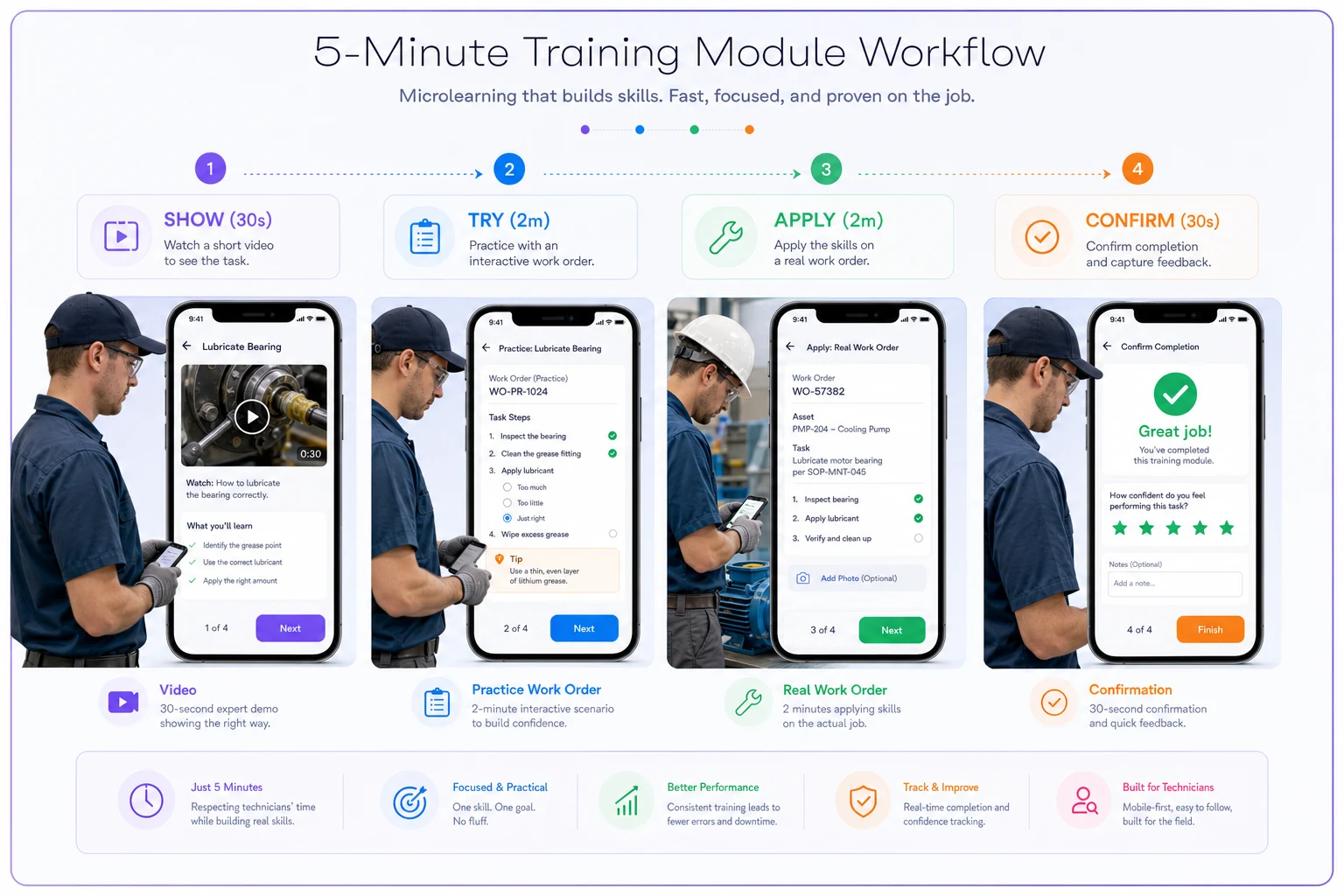
Push training modules during natural work gaps—don't interrupt emergency repairs.
Progressive complexity keeps things moving without overwhelming anyone. Week 1 covers basics: open work order, mark complete, add labor time. Week 2 adds photo attachment and basic notes. Week 3 introduces parts documentation. Week 4 covers failure codes. By week 8, techs are using conditional inspections and calculation tools. Each person progresses at their own pace based on role requirements.
Make competency visible but not punitive. Show a simple dashboard of completed modules per tech. Celebrate milestones—first 10 mobile work orders, first month of consistent usage, first detailed failure analysis. Avoid leaderboards that shame slower adopters or pressure techs to rush through modules just for the completion credit.
Creating meaningful incentives beyond compliance metrics
Standard mobile adoption incentives—gift cards for login streaks, pizza parties for compliance rates—miss what actually motivates maintenance technicians. Effective incentives align with professional pride and practical benefits.
Time-saving rewards resonate most. If mobile tools save a tech 30 minutes of paperwork daily, guarantee they get that time back rather than additional assignments. Make it explicit: "Mobile work order completion eliminates end-of-shift paperwork. Clock out when your last job completes." Techs who see real time savings become the best evangelists on the floor.
Professional development incentives create lasting engagement. Tie mobile tool competency to advancement opportunities. "Techs who complete advanced mobile diagnostics modules get priority for controls training." "Consistent failure code documentation qualifies you for reliability team rotation." Make mobile skills part of career progression, not just compliance.
Team-based recognition works better than individual competition for maintenance groups. "When all techs in an area hit 80% mobile completion, that area picks the next toolbox upgrade." This creates peer support instead of resentment toward high performers.
Problem-solving authority motivates senior techs more than almost anything else. "Techs who consistently document root causes can approve their own parts orders up to $500." Give experienced techs more autonomy when they provide good data—that trade-off makes immediate sense to them.
Practical perks matter more than abstract recognition. Priority parking for consistent mobile users. First pick of overtime opportunities for techs with complete documentation. New tool allowance for departments hitting data quality targets. Tangible benefits create immediate value.
Track what techs actually care about: rework rates, callback frequency, average repair time. Show them how their mobile data improves those numbers. "Your detailed failure notes reduced repeat failures on Line 3 by 40%" means more than "Your compliance rate is 95%."
The 60-day foundation: basic workflows and quick wins
The first 60 days determine whether mobile adoption succeeds or becomes another failed initiative. Focus entirely on simple, high-frequency workflows that deliver immediate value.
Start with PM completion only. Don't roll out repairs, projects, inventory, and inspections simultaneously. Get every tech comfortable completing basic PMs mobile-first—meter readings, filter changes, lubrication, simple inspections. Nothing complex, nothing controversial, just routine work that happens daily.
Set realistic targets based on role, not blanket percentages. Apprentices might hit 90% of PMs on mobile since their work is straightforward. Senior techs doing complex troubleshooting might land around 50% initially. Supervisors should focus on schedule review and reassignment, not detailed data entry. These differentiated targets prevent frustration while maintaining momentum.
Fix friction points fast. When techs report issues—screen too small, dropdown missing equipment, photos won't upload—resolve them within 48 hours or explain why it'll take longer. Nothing kills adoption faster than reported problems going nowhere. Create a visible issue board showing reported problems, current status, and resolution timeline.
Measure meaningful early indicators:
-
Login frequency (daily active users)
-
Task completion time (mobile vs. paper baseline)
-
Photo attachments per work order
-
Notes field usage (more than 5 words)
-
Time between task completion and documentation
These metrics show engagement quality, not just compliance. A tech who logs in daily, adds photos, and writes brief notes is building habits. One who batch-enters minimal data at shift end is just checking boxes.
Celebrate small, specific victories. "Mike's bearing photos helped day shift diagnose the pump issue in 10 minutes instead of an hour." "Sarah's PM notes caught the leak before it became a safety incident." Make success stories concrete and relevant to daily work.
By day 60, every tech should comfortably complete their most common task type on mobile. They might not love it yet, but muscle memory is forming. The devices are charged, accessible, and part of the routine.
The 90-day expansion: advanced features and knowledge capture
Days 61–90 expand from basic task completion to knowledge capture and team communication. This phase separates checkbox compliance from actual operational improvement.
Introduce failure coding and root cause fields, but keep them optional at first. Show techs how proper failure coding helps them personally: "Your bearing failure codes from last quarter showed 70% were contamination-related. Purchasing approved sealed bearing upgrades based on your data." Connect documentation to tangible improvements they'll actually experience.
Roll out photo markup tools and voice notes. These features change how techs communicate problems. Instead of writing "unusual wear pattern on gear," they can circle the exact wear area in a photo and record a 15-second explanation. The next tech arrives with clear visual guidance instead of vague text.
Add equipment-specific quick forms for common issues. A "Pump Vibration Check" form with fields for bearing temperature, seal condition, coupling alignment, and vibration readings at specific points. Pre-populate normal ranges. Make abnormal readings trigger automatic notifications to the reliability team. These targeted forms take 60 seconds but capture more useful data than generic work orders.
Enable tech-to-tech messaging within work orders. Let the day shift tech who started a repair leave notes for night shift. Allow supervisors to add clarifying information without creating new tasks. In-context communication reduces confusion and callbacks while keeping all information in one place.
Start measuring knowledge quality:
-
Average failure code completeness
-
Photos per repair work order
-
Voice note usage rate
-
Tech-to-tech message frequency
-
Custom form completion time
At day 90, mobile tools should feel like communication enhancers, not data collection forms. Techs are sharing information that helps colleagues work smarter. The maintenance team is building a searchable knowledge base through daily work, not special documentation projects.
The 180-day mastery: predictive insights and workflow optimization
Days 91–180 transform mobile tools from documentation systems into prediction and optimization platforms. This requires the clean data foundation built over the first 90 days.
Introduce personal performance dashboards showing each tech their own metrics—not for punishment but for professional development. "Your average PM completion time has dropped from 47 to 31 minutes." "You've caught 6 failures early this quarter." "Your repair documentation helped reduce similar failures by 30%." Make data personal and positive.
Roll out conditional workflows that adapt based on findings. If a PM inspection finds abnormal vibration, the mobile tool automatically generates a follow-up work order, reserves analysis equipment, and notifies the reliability engineer. If oil analysis shows contamination, it triggers a flush procedure and schedules resampling. These smart workflows eliminate the delays between problem detection and resolution.
Enable predictive alerts based on accumulated data. "This motor has failed 3 times in 18 months. Historical pattern suggests next failure in 6–8 weeks." "Temperature trending shows gradual increase over last 5 PMs. Schedule investigation." These insights come directly from the data techs have been entering—which makes the value of their documentation obvious and hard to argue with.
Implement skill-based routing where mobile data drives work assignment. Track which techs successfully complete specific repair types, average completion times, and rework rates. Route complex jobs to techs with proven success. Send training opportunities to those building new skills. This improves first-time fix rates while developing talent on the floor.
Create equipment story views that combine all mobile data into coherent timelines. Failure history, PM findings, repair notes, photos, and performance trends on a single view. Let techs see how their work connects to equipment lifecycle. That context turns isolated tasks into something that actually matters.
By day 180, measure operational improvements:
| Metric | Target Improvement |
|---|---|
| Mean time between failures | 20% improvement minimum |
| First-time fix rate | 15% increase |
| PM completion time | 25% reduction |
| Emergency work percentage | 30% decrease |
| Technician overtime hours | 20% reduction |
These aren't mobile adoption metrics—they're maintenance performance improvements made possible by quality mobile data.
Measuring what matters: data quality KPIs that drive operational value
Login rates and compliance percentages miss the point. Measure data quality indicators that directly impact maintenance operations.
Completeness rate tracks percentage of required fields populated, but weight fields by operational importance. Failure mode matters more than work order comments. Part number accuracy outweighs labor hour precision to the minute. Calculate weighted completeness scores that reflect real operational impact.
Timeliness index measures the gap between work completion and documentation. Real-time entry scores 100%. Same-day scores 80%. Next-day drops to 50%. Week-old batch entry scores 10%. This metric surfaces workflow bottlenecks and training needs before they become permanent habits.
Context richness score evaluates information quality beyond basic compliance. Count photos attached, voice notes recorded, failure codes selected, measurements documented, and tech-to-tech messages sent. Rich context prevents repeat failures and cuts diagnostic time.
Actionability rating assesses whether captured data actually drives decisions. Can a tech diagnose problems from historical notes? Do failure codes trigger appropriate PMs? Does parts usage data improve inventory? Rate each work order's data as actionable, marginal, or useless—and push for 80% actionable as the target.
Knowledge retention factor tracks how well mobile data preserves institutional knowledge. Compare problem resolution time for issues with rich documentation versus sparse documentation. Measure how often techs reference historical mobile data during repairs.
Create role-specific data quality dashboards:
-
Techs see their personal quality trends and peer averages
-
Supervisors view team quality by work type and equipment class
-
Managers track quality impact on operational KPIs
-
Reliability engineers monitor failure documentation completeness
Weight these metrics by operational criticality. Poor data on critical equipment matters more than perfect data on rarely-used assets. Complex repair documentation outweighs routine PM checkboxes.
Common adoption pitfalls and recovery strategies
Even well-planned mobile rollouts hit predictable problems. Recognizing and addressing them quickly prevents permanent adoption failure.
The "shadow system" problem emerges when techs maintain paper backups "just in case." They complete work on paper, then transfer to mobile later, defeating real-time benefits. Address this by gradually removing paper forms from trucks—one form type per week. Provide laminated quick reference cards for critical procedures but eliminate duplicate documentation systems.
Champion burnout happens when early adopters become the unofficial support desk for struggling colleagues. They spend more time helping others than doing their own work. Prevent this by rotating champion duties weekly, compensating champions with admin time, and creating clear escalation paths for complex issues.
Feature creep occurs when organizations keep adding mobile capabilities before basic workflows stabilize. "Since we're rolling out mobile, let's also add inventory, time cards, safety checklists, and training records." That kind of scope expansion kills adoption fast. Freeze new features for 90 days after initial rollout.
The "perfect data" trap sets unrealistic quality expectations that frustrate techs. Requiring 15 fields for a simple filter change or demanding detailed narratives for routine tasks creates resistance. Start with minimum viable data, then gradually increase requirements as habits form.
Generation gaps create adoption disparities when younger techs embrace mobile while senior techs resist. Bridge this by pairing tech generations for mutual benefit. Younger techs provide mobile guidance while senior techs share equipment knowledge. Make it collaborative, not competitive.
Recovery requires honest assessment and rapid adjustment. Survey techs anonymously about specific pain points. Fix the top three issues within two weeks. Show concrete improvements based on feedback. If adoption stalls, pause new rollouts and fix existing problems first.
Making mobile tools invisible through operational integration
The ultimate success metric for mobile technician adoption isn't usage rates—it's when mobile tools become invisible extensions of normal work. Techs stop thinking about using them the same way they stop thinking about using wrenches.
That invisibility comes from operational integration that makes mobile tools feel inevitable rather than imposed. When the device automatically surfaces the next task based on location, techs don't waste time searching. When voice notes capture findings faster than writing, documentation becomes natural. When photo history prevents repeat diagnosis, the value becomes undeniable.
The shift happens gradually. Month one feels awkward as techs fumble with unfamiliar interfaces. Month three brings basic competence but conscious effort. By month six, muscle memory takes over and techs reach for devices reflexively—the same way they'd feel uncomfortable going on the floor without safety glasses.
The role-based workflows, micro-training, progressive incentives, and 60/90/180-day roadmap described here turn resistance into reliance. More importantly, they generate the data quality that enables predictive maintenance, optimized scheduling, and institutional knowledge retention before the people who carry that knowledge retire.
Small improvements compound quickly. A 30-second reduction in PM documentation time saves roughly 8 hours monthly across a 20-tech team. Five-percent better failure code accuracy can prevent one critical breakdown per quarter. Ten additional photos per week build a visual history that cuts diagnostic time on repeat failures significantly.
Organizations that get mobile adoption right gain advantages beyond efficiency. They retain technical knowledge when senior techs retire. They onboard new technicians faster with rich equipment histories. They prove maintenance value with detailed operational data instead of anecdotes. They prevent failures through pattern recognition instead of reacting to breakdowns.
The path from paper to predictive isn't a technology problem—it's an operational one. Success requires understanding how maintenance work actually flows, respecting technician expertise, and building habits gradually. When mobile tools make techs' jobs easier instead of adding burden, adoption takes care of itself. When quality data drives better decisions, documentation stops feeling like overhead. And when the entire system reinforces mobile workflows, paper becomes the workaround nobody wants to use.
Ready to optimize your maintenance operations?
Join 2,000+ facilities using Openfixit to reduce unplanned outages, extend asset life, and improve operational efficiency.