

Walk into any facility maintenance office and pull up their CMMS. Click through a few work orders. You'll spot the problem immediately—one chiller listed as "CH-01," another as "ChillerUnit1," and a third as "HVAC-CHILLER-BLDG2." Three different techs entered the same type of equipment three different ways over the years.
Now multiply that across 500+ assets. Your maintenance manager spends 20 minutes hunting for equipment history that should take 20 seconds to find. Reports show different failure rates for what's actually the same equipment type. Your new tech can't figure out if "AHU-3" and "Air Handler West Wing" are the same unit or not.
The worst part? Everyone knows the asset naming convention CMMS problem exists. But nobody wants to tackle it because shutting down operations to rename everything feels impossible. So the mess keeps growing.
Why Asset Naming Turns Into Operational Chaos
Most facilities end up with naming chaos through natural growth, not negligence. A facility starts small—maybe 50 pieces of equipment. The maintenance supervisor creates names that everyone understands. Then the facility expands. New buildings get added. Different contractors install equipment using their own naming schemes. The company acquires another facility with its own established system.
-
Legacy equipment from the original building
-
Contractor-installed assets with manufacturer codes
-
Corporate-mandated naming from a recent standardization push
-
Quick-fix names techs created when adding emergency equipment
Each technician develops their own search workarounds. Some memorize alternate names. Others keep personal spreadsheets. A few just walk the floor until they find what they need. Meanwhile, your CMMS becomes less useful every day as duplicate entries multiply and maintenance history fragments across differently-named versions of the same asset.
The financial impact compounds quietly. A pharmaceutical facility I worked with discovered they'd been running two separate PM schedules for the same compressor system—listed under different names in their CMMS. Cost them roughly $18,000 annually in redundant maintenance work. Another manufacturing plant couldn't properly track bearing failures because bearings appeared under 14 different naming variations in their system.
The Migration Fear That Keeps Facilities Stuck
What stops most facilities from fixing their naming mess is the migration nightmare scenario. Maintenance managers imagine shutting down the CMMS for days, reassigning hundreds of work orders, breaking all their historical reports, and dealing with confused technicians who suddenly can't find anything.
Eliminate downtime with proactive maintenance.
Openfixit helps you plan, track, and complete maintenance efficiently—maximizing asset reliability.
- Centralized asset management
- Automated maintenance scheduling
- Inventory and parts tracking
No credit card required
They're not wrong about the risks. A water treatment facility attempted a full naming conversion over a holiday weekend. Come Tuesday morning, technicians couldn't locate critical equipment for scheduled PMs. Emergency work orders got assigned to the wrong assets. The maintenance manager spent three weeks untangling the mess while equipment failures spiked due to missed maintenance.
-
Report accuracy drops below 70%
-
Technician productivity falls by 15-20%
-
Duplicate work orders increase by 25%
-
New employee training takes 40% longer
-
Regulatory compliance documentation becomes nearly impossible to compile
A food processing plant discovered this during an FDA audit. Inspectors requested maintenance records for their critical control point equipment. The maintenance team spent 14 hours compiling documentation because the same equipment appeared under multiple names across different reports. They barely passed.
Building Your Template Framework Without Disrupting Operations
Instead of attempting a massive overnight conversion, successful facilities use a phased template approach that fixes naming problems gradually while keeping operations running.
Start with asset hierarchy structure. Most facilities need three to four hierarchy levels maximum:
Level 1: Location (Building/Area)
Level 2: System (HVAC, Electrical, Process)
Level 3: Equipment Type (Pump, Motor, Valve)
Level 4: Specific Asset (Sequential number or location modifier)
This creates names like: BLDG1-HVAC-PUMP-001 or PROD-ELEC-MOTOR-EAST2
Don't add more levels than that. A chemical plant tried implementing seven hierarchy levels to capture every possible detail. Technicians started skipping the naming convention entirely because entering new assets took too long. They reverted to three levels and saw far better adoption.
Your template needs clear rules for common variations:
| Scenario | Rule | Example |
|---|---|---|
| Multiple identical assets | Add sequential numbers | PUMP-001, PUMP-002 |
| Location-specific assets | Add location suffix | MOTOR-NORTH, MOTOR-SOUTH |
| Redundant systems | Add A/B designation | CHILLER-A, CHILLER-B |
| Temporary equipment | Add TEMP prefix | TEMP-PUMP-001 |
| Rental equipment | Add RENTAL prefix | RENTAL-COMP-001 |
Visualize this workflow to align your team.
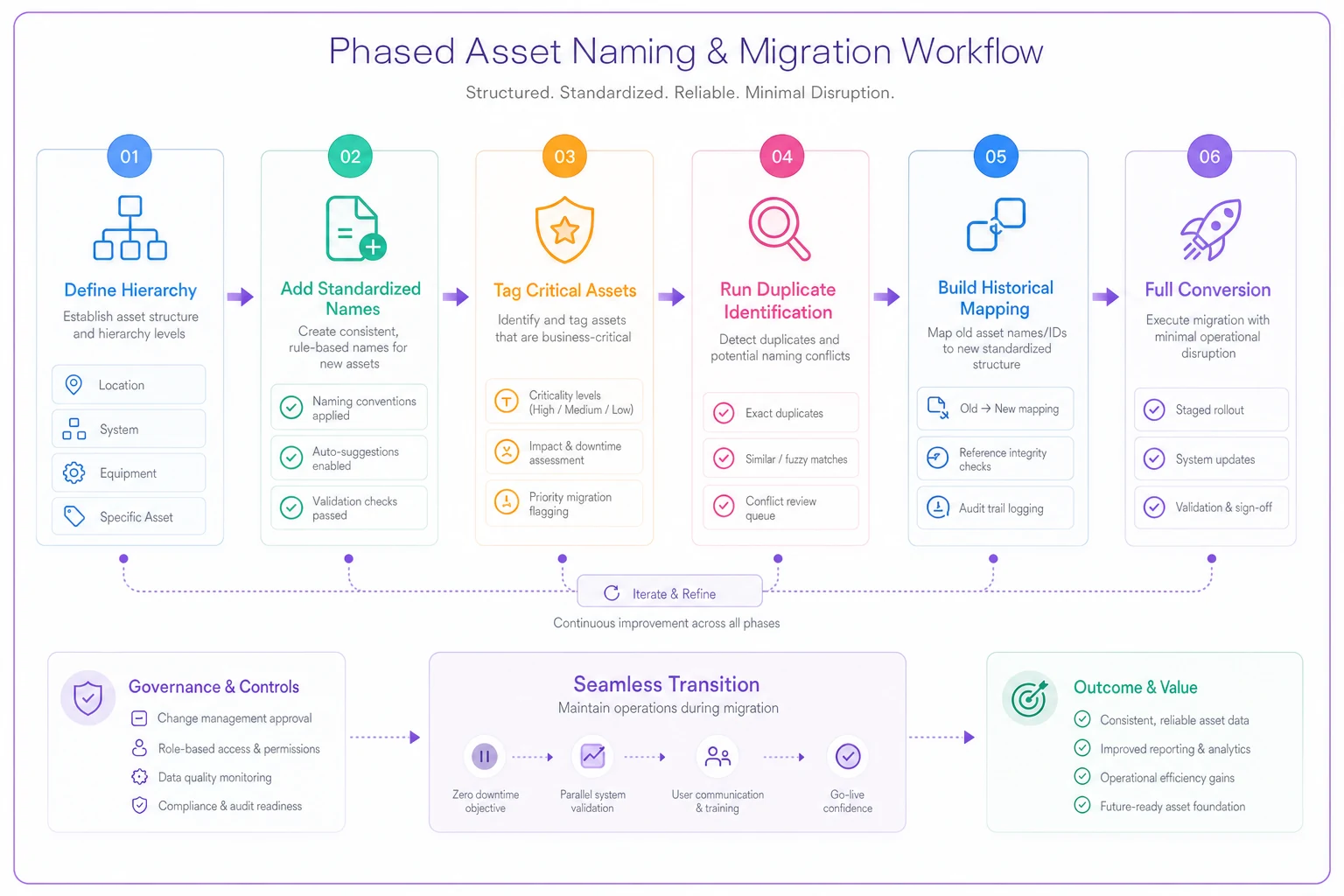
Keep the hierarchy simple and the rules clear so technicians adopt the template without friction.
The Phased Migration That Actually Works
Phase 1: Stop the bleeding (Week 1-2)
Don't touch existing assets yet. Implement your naming template for all new equipment additions only. Create a simple one-page reference sheet. Post it at every workstation. Make it the desktop background on maintenance computers. Train your team for 15 minutes at the next shift meeting.
Phase 2: Tag critical assets (Week 3-4)
Identify your top 20% most critical assets—the equipment that shows up most frequently in work orders. Add your new standardized name as an alternate ID or custom field in your CMMS. Don't delete or change the original name yet. This creates a searchable bridge between old and new naming.
During this phase, update physical asset tags to match. A facility with 1,200 assets typically needs around 40 hours to tag their critical 20%. Spread this across normal maintenance rounds to avoid dedicated tagging sessions.
Phase 3: Background cleanup (Month 2-3)
Run duplicate identification reports. Your CMMS likely contains the same equipment listed multiple times under different names. A hospital discovered their main air handler appeared seven times in their system—each entry holding partial maintenance history.
Consolidate duplicates one system at a time. Start with whatever system generates the most work orders. Merge maintenance histories. Update PM schedules. Delete redundant entries. Do this during slow periods, working through 10-15 assets per day.
Phase 4: Historical mapping (Month 3-4)
Build a translation table linking old names to standardized ones. This preserves your ability to search historical data without actually changing old records. Most modern CMMS platforms allow bulk updates using this mapping approach.
| Old Name | Standardized Name | Notes |
|---|---|---|
| Chiller Unit 1 | BLDG1-HVAC-CHLR-001 | Main building |
| CH-01 | BLDG1-HVAC-CHLR-001 | Duplicate entry |
| West Chiller | BLDG2-HVAC-CHLR-001 | West wing addition |
Phase 5: Full conversion (Month 4-6)
Only after the previous phases prove stable should you attempt full conversion. By this point, your team knows the new naming system. Critical assets already carry standardized names. Duplicates are gone.
Schedule the conversion during planned maintenance windows. Convert one building or system at a time. Run parallel naming for two weeks before removing old names. This gives technicians time to adjust without losing access to equipment.
Measuring Migration Success Without Expecting Perfection
Don't expect 100% naming compliance immediately. A realistic phased migration achieves:
-
60% compliance after one month
-
75% compliance after three months
-
90% compliance after six months
-
95% compliance ongoing
Track these specific metrics to gauge real progress:
Search time reduction: Measure how long it takes to locate asset history before and after standardization. A proper naming convention typically cuts search time by 60-70%.
Duplicate work order frequency: Count work orders accidentally created for already-scheduled maintenance. This should drop significantly within two months.
Report generation speed: Time how long monthly reports take to compile. Standardized naming usually reduces reporting time by around 50%.
New technician onboarding: Track how many days before new hires can independently locate equipment. Good naming conventions can cut this from two weeks down to three days.
A data center tracked these metrics during their migration. Search time dropped from 12 minutes to 3 minutes average. Duplicate work orders fell from 45 monthly to 8. Their monthly reporting process shortened from 6 hours to 2.
Common Migration Mistakes That Derail Progress
The perfectionist trap: One facility spent four months debating the perfect naming structure before starting. Meanwhile, techs added 200+ assets using random names. Start with a good-enough template and refine as you go.
Skipping physical tags: A manufacturing plant standardized names in their CMMS but never updated the actual tags on equipment. Technicians couldn't match what they saw in the field to what was in the system. Adoption failed within three weeks.
Forcing complex codes: An aerospace facility created 15-character asset codes trying to capture every detail. Something like "BLD1-FLR2-RM205-HVAC-AHU-MFG2019-SN4892." Technicians couldn't remember the structure and reverted to nicknames.
Ignoring contractor integration: Facilities often forget external contractors access their CMMS too. A hospital standardized all naming without training their contracted HVAC service. The contractor kept entering equipment under old names, slowly undoing months of cleanup work.
When Standardization Becomes Counterproductive
Not every facility needs complex asset hierarchies. Small operations with under 100 assets might work better with simple descriptive names. A boutique hotel with 30 pieces of equipment doesn't need "BLDG1-HVAC-PUMP-001" when "Lobby AC Pump" works perfectly fine.
Skip standardization if:
-
Your facility has fewer than 100 assets
-
Turnover is extremely low (same 3-4 techs for years)
-
You're planning a major CMMS replacement within 12 months
-
Assets rarely require historical analysis
Partial standardization makes sense for mixed facilities. A university campus standardized naming for all mechanical systems but kept simple names for furniture and fixtures. That focused effort where it actually mattered—complex equipment requiring detailed maintenance tracking.
The Reporting Transformation After Cleanup
Once naming standardization takes hold, analysis that used to be impossible becomes routine. A chemical processing facility couldn't identify pump failure patterns before standardization because different pumps appeared under dozens of name variations. After cleanup, they discovered all pump failures were concentrated on units installed by one specific contractor. They adjusted their procurement process and reduced pump failures by 40%.
Standardized naming enables:
-
Accurate MTBF calculations across equipment types
-
True cost-per-asset reporting
-
Vendor performance comparisons
-
Predictive maintenance modeling
-
Regulatory compliance documentation
The real value often appears in unexpected places. A hospital's standardized asset naming revealed they were spending $45,000 annually maintaining redundant backup generators serving the same critical systems. They decommissioned two units and redirected that budget toward upgrading the remaining ones.
Making Templates Stick Long-Term
The best naming convention fails if people don't use it consistently. Build adoption through process, not just training.
Embed naming rules directly into your CMMS workflows. Platforms with built-in AI automation can suggest standardized names as technicians enter new assets—when someone types "pump," the system proposes the correct hierarchical format based on location and system context. It's a small thing, but it eliminates a lot of the friction that causes people to just type whatever comes to mind.
Create naming validation rules. Set your CMMS to flag or reject entries that don't match your template pattern. A pharmaceutical facility reduced naming errors by 90% simply by requiring assets to start with valid building and system codes.
Assign a naming coordinator—typically someone from your planning team who reviews new asset additions weekly. They catch deviations before they spread and work with technicians who struggle with the convention. For a 500-asset facility, this usually runs 2-3 hours a week.
Schedule a short weekly review so the naming coordinator can catch and correct deviations before they proliferate.
Review and refine quarterly. Your initial template won't be perfect. A food processing plant discovered their original convention didn't account for mobile equipment that moved between production lines. They added a "MOBILE" location category after three months and it solved the issue.
The Hidden Efficiency of Boring Consistency
Standardized asset naming seems mundane compared to predictive maintenance or IoT sensors. But it's the foundation everything else depends on. You can't predict failures if you can't track history. You can't optimize PM schedules if you're unknowingly maintaining the same equipment twice under different names.
-
25% reduction in time spent searching for assets
-
30% improvement in report accuracy
-
50% faster new employee onboarding
-
60% reduction in duplicate work orders
-
40% improvement in regulatory audit preparation
More importantly, it transforms your CMMS from a necessary evil into an actual operational tool. Technicians stop keeping personal spreadsheets. Managers start trusting their reports. Planning becomes proactive instead of reactive.
The facilities that succeed with asset naming convention CMMS standardization share one trait: they start before they feel ready. They implement a decent template today rather than waiting for a perfect one. They clean up incrementally rather than holding out for the ideal migration window that never actually arrives.
Your maintenance team already knows which equipment causes confusion. They've built workarounds for your naming mess. Channel that knowledge into a phased cleanup plan. Start with new assets this week. Tag critical equipment next week. Build momentum through small wins rather than betting everything on a massive conversion.
The path from naming chaos to operational clarity doesn't require perfection or disruption. It requires a template that makes sense, a phased approach that keeps operations running, and the discipline to chip away at the problem rather than just living with it.
Ready to optimize your maintenance operations?
Join 2,000+ facilities using Openfixit to reduce unplanned outages, extend asset life, and improve operational efficiency.