

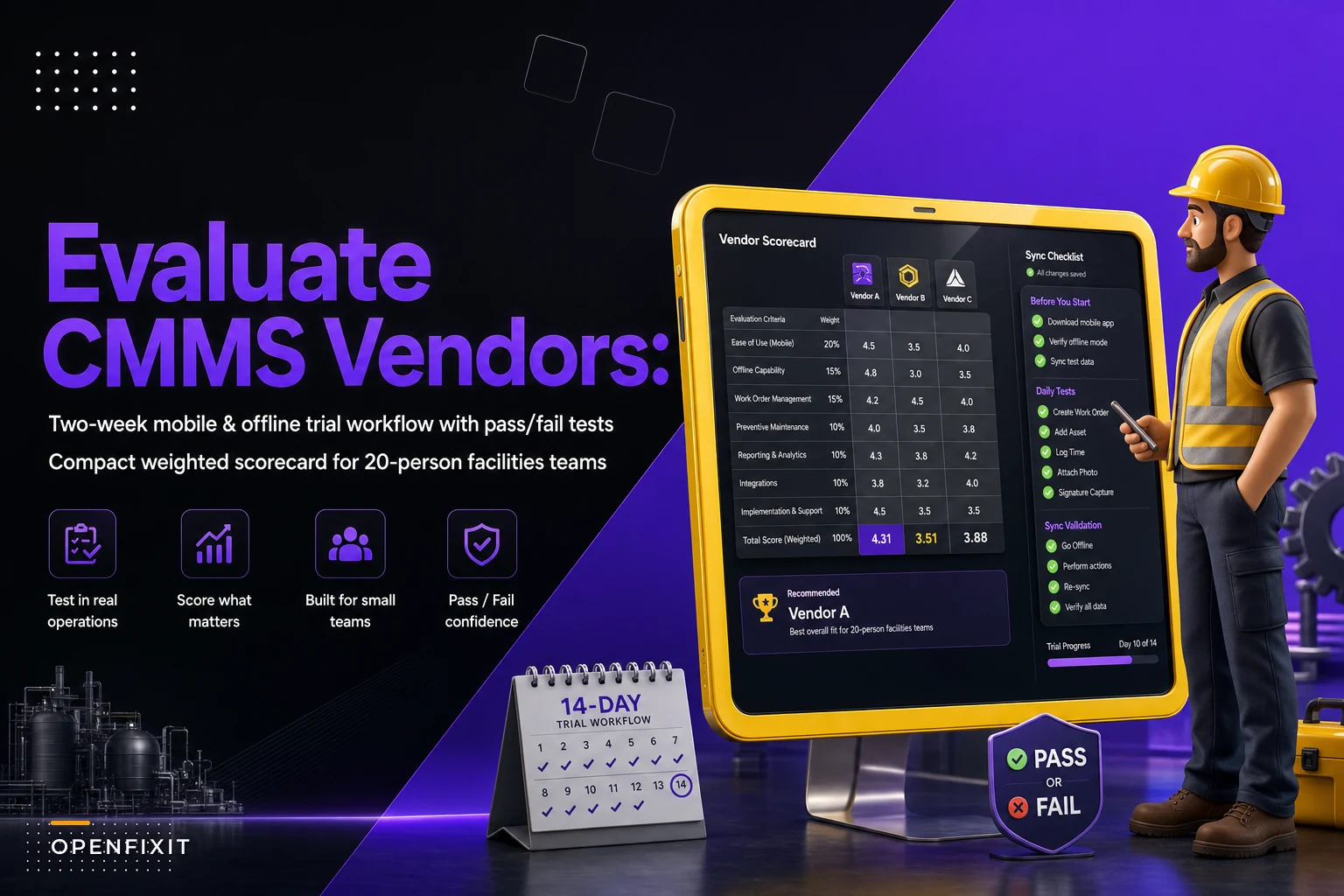

Most 20-person facilities teams don't fail at CMMS selection because they picked the wrong feature set. They fail because every vendor demo looked great, nobody scored them the same way, and three months later the team is arguing about whether the thing they bought actually works on a technician's phone in a boiler room with no signal.
A team your size has a specific problem: you're big enough that spreadsheets and sticky notes have already broken down, but small enough that nobody's writing 80-page RFPs. You need something in between — a structured way to compare two or three vendors objectively, with pass/fail tests you can actually run during a two-week trial.
This is that middle ground. A checklist you can print, a short weighted scorecard you can fill out during demos, the integrations you can't skip, and a mobile/offline trial plan that surfaces the problems vendors never show you during a polished presentation.
Why most trials produce useless comparisons
The pattern repeats constantly across small facilities teams. You book three demos. Vendor A has a slick mobile app and a smooth-talking rep. Vendor B is clunky but cheap. Vendor C has every feature imaginable. After the demos, people vote based on vibes — who had the nicer interface, who answered questions fastest, whose salesperson was most likable.
The problem is nobody ran the same test. Vendor A demoed on strong office WiFi. Vendor B skipped the integration conversation entirely. Nobody tried to close 15 work orders in a row or test what happens when a tech loses signal mid-inspection.
In real operations, the features that sink a CMMS aren't on the feature list. They're things like: how many taps to close a routine PM, whether photos actually sync when the phone comes back online, and whether your accounting export matches your GL codes without manual cleanup. None of that shows up in a comparison grid of checkmarks.
So the first rule of a usable CMMS evaluation checklist is that it has to force the same tests across every vendor, scored the same way, by the same people.
The core evaluation checklist
Run every vendor through these categories. Don't treat them as equal — that's what the scorecard weighting handles later. For now, this is what you're actually checking.
Eliminate downtime with proactive maintenance.
Openfixit helps you plan, track, and complete maintenance efficiently—maximizing asset reliability.
- Centralized asset management
- Automated maintenance scheduling
- Inventory and parts tracking
No credit card required
Mobile & field usability
-
Number of taps to open, update, and close a standard work order
-
Works on the actual phones your techs carry (not just the demo iPad)
-
Photo capture, annotation, and attachment to the correct asset
-
Barcode/QR scanning for assets and parts, if you use it
-
Readable in a dim mechanical room and usable with gloves on
Offline capability (the one vendors consistently oversell)
-
Can a tech open assigned work orders with zero signal?
-
Can they create a new work order offline?
-
Do photos and notes queue and sync automatically on reconnect?
-
What happens with a sync conflict — does it overwrite, merge, or warn?
Work order core
-
Priority and status workflow matches how you actually triage
-
Easy assignment and reassignment across a 20-person crew
-
PM scheduling with calendar and meter-based triggers
-
Parts/labor logging that doesn't require a laptop
Asset management
-
Asset hierarchy depth and naming flexibility
-
Full history on an asset in one view
-
Downtime and failure code capture
Reporting that a manager will actually open
-
Backlog, PM compliance, and MTTR out of the box
-
Export to CSV/Excel without a support ticket
-
Scheduled reports to email
Administration
-
How long to add a user, build a PM, or change a workflow without vendor help
-
Role-based permissions granular enough for techs vs. supervisors vs. finance
Support & onboarding
-
Who you call when it breaks, and their actual response window in writing
-
Data import help included or billed separately
-
Training format — self-serve, live, or sink-or-swim
Have whoever attends the demo mark each item as demonstrated, claimed but not shown, or couldn't do it to cut post-demo confusion.
Print this list. Have whoever attends the demo mark each item as demonstrated, claimed but not shown, or couldn't do it. That distinction alone kills half the confusion after the fact.
Integrations you can't skip
For a team your size, three integration failures cause the most post-purchase regret. Everything else is genuinely optional.
1. Accounting / ERP. Your parts costs and labor hours need to land in the system finance uses — QuickBooks, Sage, NetSuite, whatever you run. If this connection is manual, someone re-keys numbers every month and they drift. Ask specifically: does the export match our chart of accounts, or do we remap it every time?
2. Building automation / sensors. If you run a BAS or have any condition monitoring, you want alarms that can auto-generate or at least pre-fill work orders. Even a basic webhook connection matters here. Teams that skip this end up with two systems nobody reconciles — the BAS screams about a chiller, and the CMMS has no record of it.
3. SSO and user directory. With 20 people and normal turnover, manually managing passwords gets old fast. SSO through your existing Google or Microsoft accounts is worth more than it looks on the spec sheet.
A quick way to pressure-test integration claims: ask the vendor to show you the actual data flowing, not a slide that says "integrates with 200+ apps." Sometimes "integrates" means "we have a Zapier connector that breaks when they update the API." Make them demonstrate the specific connection you need, not a generic one.
The short weighted vendor scorecard
This is what turns opinions into comparable numbers. Keep it short — a scorecard with 40 line items never gets filled out honestly. Eight to ten weighted categories is the right range for a team your size.
| Category | Weight | Vendor A (1–5) | Vendor B (1–5) | Vendor C (1–5) |
|---|---|---|---|---|
| Mobile field usability | 20% | |||
| Offline reliability | 15% | |||
| Work order core workflow | 15% | |||
| Required integrations | 15% | |||
| Ease of self-administration | 10% | |||
| Reporting & dashboards | 10% | |||
| Support & onboarding | 8% | |||
| Total cost (3-year TCO) | 7% | |||
| Weighted total | 100% |
A few things worth noting from watching these get filled out badly:
-
Weight by pain, not by feature count. If your techs already hate the current mobile app, mobile usability deserves more than 20%. The scorecard should reflect where you're actually losing time, not what sounds important in a demo.
-
Score cost as value, not cheapness. A 5 means "fair price for what we get," not "lowest number." The cheapest CMMS nobody actually uses costs more in the long run than the mid-priced one people stick with.
-
Fill it out within an hour of the demo. Memory decays fast and vendors blur together. Scoring from memory a week later is almost as useless as not scoring at all.
The goal isn't to let the spreadsheet make the decision for you. It's to make sure that when Vendor C wins, you know why, and you can defend it to whoever signs the check.
The mobile and offline trial plan
This is where most evaluations fall apart — teams run the trial on a laptop in the office, the exact opposite of where the software lives in real life. Your techs work in basements, rooftops, parking structures, and mechanical rooms. If you're heading into summer, the stakes get higher fast; the guide on locking down HVAC uptime for the heat dome covers why field responsiveness matters most exactly when conditions are worst.
Here's a two-week trial sequence that surfaces real problems. Run it identically for each shortlisted vendor.
-
Load real data, not sample data. Import 20–30 of your actual assets and a handful of real recurring PMs. Demo data hides naming and hierarchy problems that your actual messy data will expose immediately.
-
Put it on the actual phones. Install on the real devices your crew uses — including the three-year-old Android nobody wants to replace. If it's sluggish or crashes there, that's your answer.
-
Run the dead-zone test. Have a tech walk into your worst-signal location — a sub-basement, an elevator machine room — open their assigned work orders, add notes and two photos, close the order, and walk back out. Watch whether everything syncs. This single test eliminates more vendors than anything else on the list.
-
Run the sync conflict test. Have two people edit the same work order simultaneously — one offline, one online — then reconnect. A solid system warns or merges. A bad one silently overwrites someone's work, which you'll discover the hard way in month two.
-
Time the routine close-out. Have a tech close ten standard work orders and count the taps and seconds. If closing a simple PM takes 90 seconds and a dozen taps, techs won't do it in the field. They'll batch it later, badly, or not at all.
-
Test admin self-service. Have your facility manager — not the vendor — build a new PM from scratch and add a new user. If they can't do it without a support call, you're buying a system you can't maintain independently.
-
Pull the three reports you'll live by. Generate backlog, PM compliance, and work-order history. Export them. See if the numbers make sense and the export is clean.
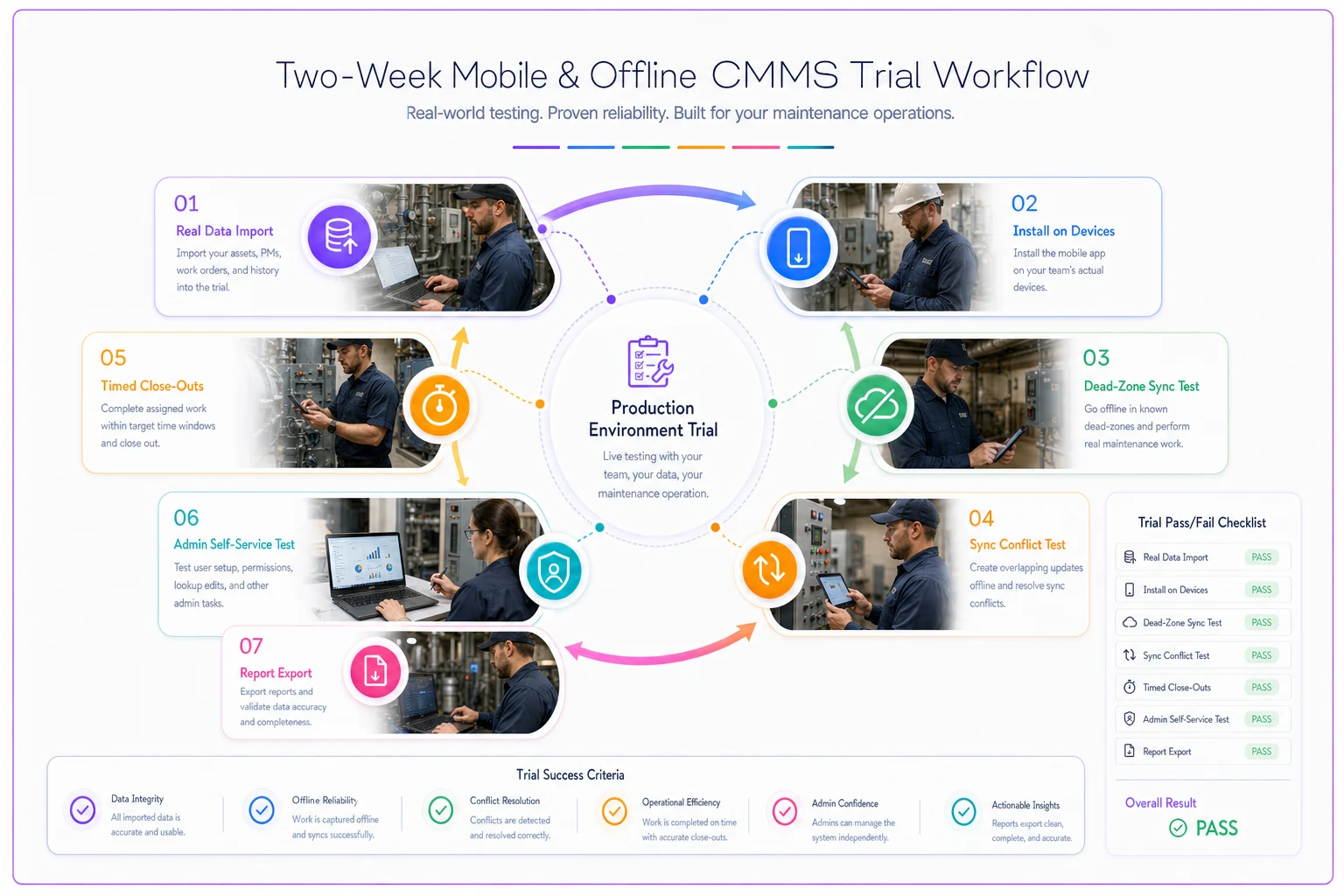
A quick diagram of the two-week trial workflow.
Each step gets a clear pass/fail. "The dead-zone sync lost one photo" is a fail — and it's measured the same way for every vendor you test.
When this process is overkill — and when it's not enough
When a lighter version makes sense: If you're genuinely small — under ten assets of any real complexity and no integrations — you can cut the scorecard to five lines and skip the formal trial. The structure here is built for teams managing real asset counts across one or a few buildings.
When you need more than this: If you're multi-site with regulatory audit requirements, a dozen integrations, or union work rules baked into your workflows, treat this as a starting layer, not the whole process. You'll need deeper security and data-governance evaluation on top. That said, even then — running these core field tests first will save you from shortlisting vendors that look great on paper and fall apart in the mechanical room.
Who should not run a trial yet: Teams that haven't agreed on what "good" looks like. If your supervisors and techs disagree on how work gets triaged or what a closed work order should contain, fix that before you buy anything. A CMMS doesn't create process — it enforces whatever process you bring to it. Buy before you've aligned, and you'll just automate the chaos.
A real scenario: property management team, three buildings
A facilities team running three commercial buildings — around 18 techs and two supervisors — had been managing work on a shared spreadsheet and a group text thread. They short-listed three CMMS vendors and nearly bought the one with the best-looking app.
Then they ran the dead-zone test. Two of the three buildings had sub-basements with no cell signal, and the app with the nicest interface couldn't open assigned work orders offline — it needed a connection just to load the list. The "best" demo vendor was functionally useless in roughly a third of their actual work locations.
The vendor that won the scorecard wasn't the prettiest. But it passed offline work order access cleanly, synced photos reliably on reconnect, and let their supervisor build a new PM in about ten minutes without calling support. Routine close-out went from a batch job done at the end of the week to something techs handled on the spot.
Within a couple months, PM compliance went from something nobody could measure to somewhere in the low 80s — mostly because work was getting logged where it happened instead of reconstructed from memory on Friday afternoon. No dramatic turnaround story — just less re-keying, fewer dropped tasks, and a backlog number that finally meant something.
Making the final call
Once the scorecards are filled in and the trial tests are scored, the decision should be close to obvious.
If it isn't — if two vendors are within a few points of each other — don't flip a coin. Go back to your two highest-weighted categories and let those break the tie. Whatever you weighted heaviest is, by your own definition, where it hurts most.
And resist the urge to pick the vendor whose salesperson you liked best. The rep disappears after the contract signs. What stays is the app your tech opens 15 times a day in a hot mechanical room and the export your finance person reconciles every month. Score those honestly, run the field tests for real, and the right choice usually scores itself.
Ready to optimize your maintenance operations?
Join 2,000+ facilities using Openfixit to reduce unplanned outages, extend asset life, and improve operational efficiency.