

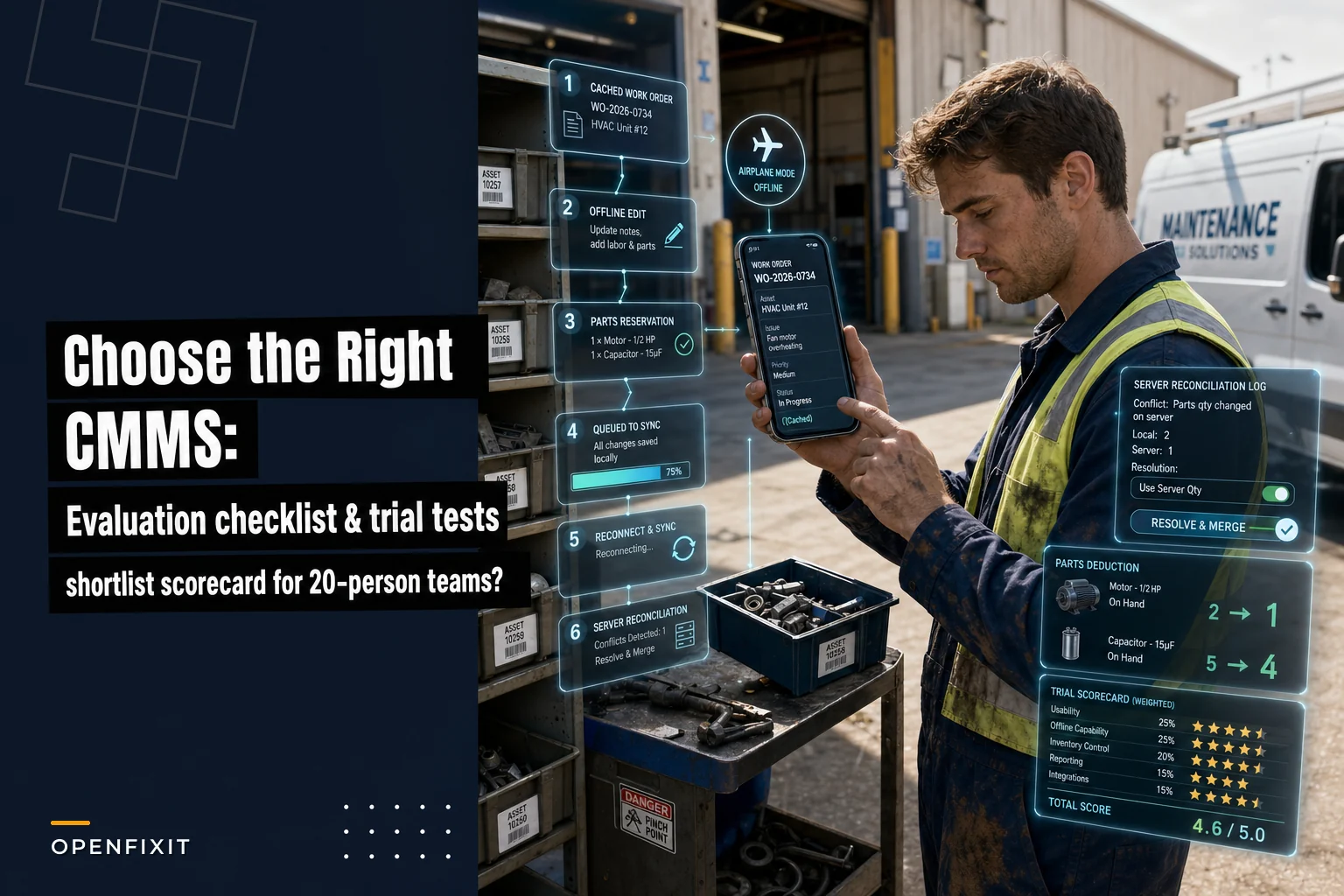

Most CMMS buying decisions for small teams go wrong in the demo. The vendor drives, the environment has perfect connectivity, the parts data is already clean, and every screen loads instantly. You nod along, score it an 8, and then three months after go-live a tech is standing in a mechanical room with no signal, trying to close a work order that won't save, with a parts count that's already wrong.
This guide flips the usual approach. Instead of reading feature lists, you run the software through the exact situations that cause pain on a 20-person team — then score what you actually saw, not what the sales engineer promised. You get a weighted scorecard, pass/fail gates, trial scripts you can hand to a tech, and a worked example ranking three vendors.
One thing upfront: this is a selection and trial guide. It deliberately skips emergency triage steps (that belongs in your operational playbooks, like the prep work covered in locking down HVAC uptime before a heat surge). The point here is making sure whatever CMMS you pick can support those playbooks through tested integrations and mobile behavior that actually holds up.
What matters for a 20-person team (and what doesn't)
Enterprise CMMS buying guides over-index on things small teams never touch: multi-plant reliability modeling, complex approval chains, 15 custom dashboards. On a 20-person team, two or three people handle admin work part-time, techs are in the field most of the day, and nobody has bandwidth to babysit the system.
The priorities compress down fast.
Tier 1 — Non-negotiable (fails here, it's out):
-
Offline mobile work orders that create, edit, and complete without signal
-
Asset tracking you can navigate quickly (QR/barcode lookup in the field)
-
PM scheduling that doesn't generate duplicate or orphaned WOs
-
Parts inventory with reservation and auto-deduction tied to work orders
Tier 2 — Important but has workarounds:
-
Integrations (BAS/IoT alerts, ERP/purchasing, SSO)
-
Reporting that answers the five questions your boss actually asks
-
Role-based permissions
Tier 3 — Nice to have:
-
Advanced analytics, predictive modules, custom portals, vendor marketplaces
The common mistake is letting a slick Tier 3 feature — a predictive dashboard that looks great in the demo — pull your attention away from a Tier 1 failure like offline sync that silently drops photos. Score the boring stuff hard.
The weighted scorecard
Each category gets scored 0–5, then multiplied by a weight. The weights below are tuned for a 20-person team where mobile and parts are the daily grind.
Eliminate downtime with proactive maintenance.
Openfixit helps you plan, track, and complete maintenance efficiently—maximizing asset reliability.
- Centralized asset management
- Automated maintenance scheduling
- Inventory and parts tracking
No credit card required
| Category | What you're scoring | Weight |
|---|---|---|
| Mobile / offline behavior | Create/edit/complete WOs offline, sync, conflict handling | 25% |
| Inventory & parts workflows | Reservation, auto-deduction, pick/return, reorder points | 20% |
| Core features | Asset hierarchy, PM scheduling, WO lifecycle | 20% |
| Integrations | BAS/IoT→WO, ERP/purchasing, SSO/LDAP, access systems | 15% |
| Reporting | PM compliance, backlog, parts usage, mobile close time | 8% |
| Security | SSO, role permissions, audit trail, data ownership | 7% |
| Support & pricing | SLA, onboarding, hidden add-on costs | 5% |
How to score 0–5:
-
0 = feature absent or broke during the trial
-
1–2 = exists but clunky, needs workarounds
-
3 = works, acceptable
-
4 = works well, minor friction
-
5 = genuinely strong, no notes
Weighted total = sum of (score × weight). Max possible is 5.0.
Pass/fail gates (checked before weighting)
-
Techs can create, edit, and complete a work order fully offline, then sync without losing data
-
Parts auto-deduct from inventory when a WO is closed (not a manual second step)
-
You own your data and can export assets, WOs, and parts history in a usable format (CSV/API), no exit fee
-
SSO or at minimum LDAP works with your identity provider
-
A clear, written offline-support SLA and sync-conflict behavior exists (not "it just works")
Fail any gate → disqualified, regardless of score.
Shortlist cutoff
-
Weighted total ≥ 3.8 AND all gates passed → shortlist
-
3.2–3.79 → backup only, revisit if top picks fall through on price
-
< 3.2 or any gate failed → drop
Three or four vendors in, you'll usually have one or two clean shortlist candidates. That's the goal — not a ranked list of nine.
Trial scripts: test the failure modes, not the happy path
Don't let the vendor run the demo. Ask for a sandbox and run these yourself, ideally with an actual tech holding the phone. Preload the sample data listed in each script so you're testing against realistic volume, not three clean records.
Script 1 — Offline mobile work order (the most important test)
Setup:
-
Load the mobile app, log in, let it cache
-
Put the phone in airplane mode (or walk into a known dead zone)
-
Preload
25 open WOs, 5 assets with photos, a parts catalog of roughly 40 items
Run it:
-
Create a new corrective WO against an asset, offline
-
Add a photo, a note, and a timestamp
-
Reserve 2 parts against it
-
Mark it complete with labor hours
-
Edit an existing WO that was already downloaded
-
Reconnect and watch the sync
Success criteria:
-
Everything entered offline appears server-side after sync — no dropped photos, no lost parts reservations
-
The completed WO deducts parts correctly
-
Sync finishes in under 60 seconds for this data volume
-
No duplicate WOs created
What to measure: time from reconnect to full sync, number of records lost or duplicated, whether photos uploaded at full resolution or got silently compressed or dropped.
Some apps let you create offline but not complete offline. Others queue the WO but drop attachments over a certain size on low bandwidth. You only find this by actually trying it — the demo environment won't show you either.
Here's a simple visual of the offline trial workflow.
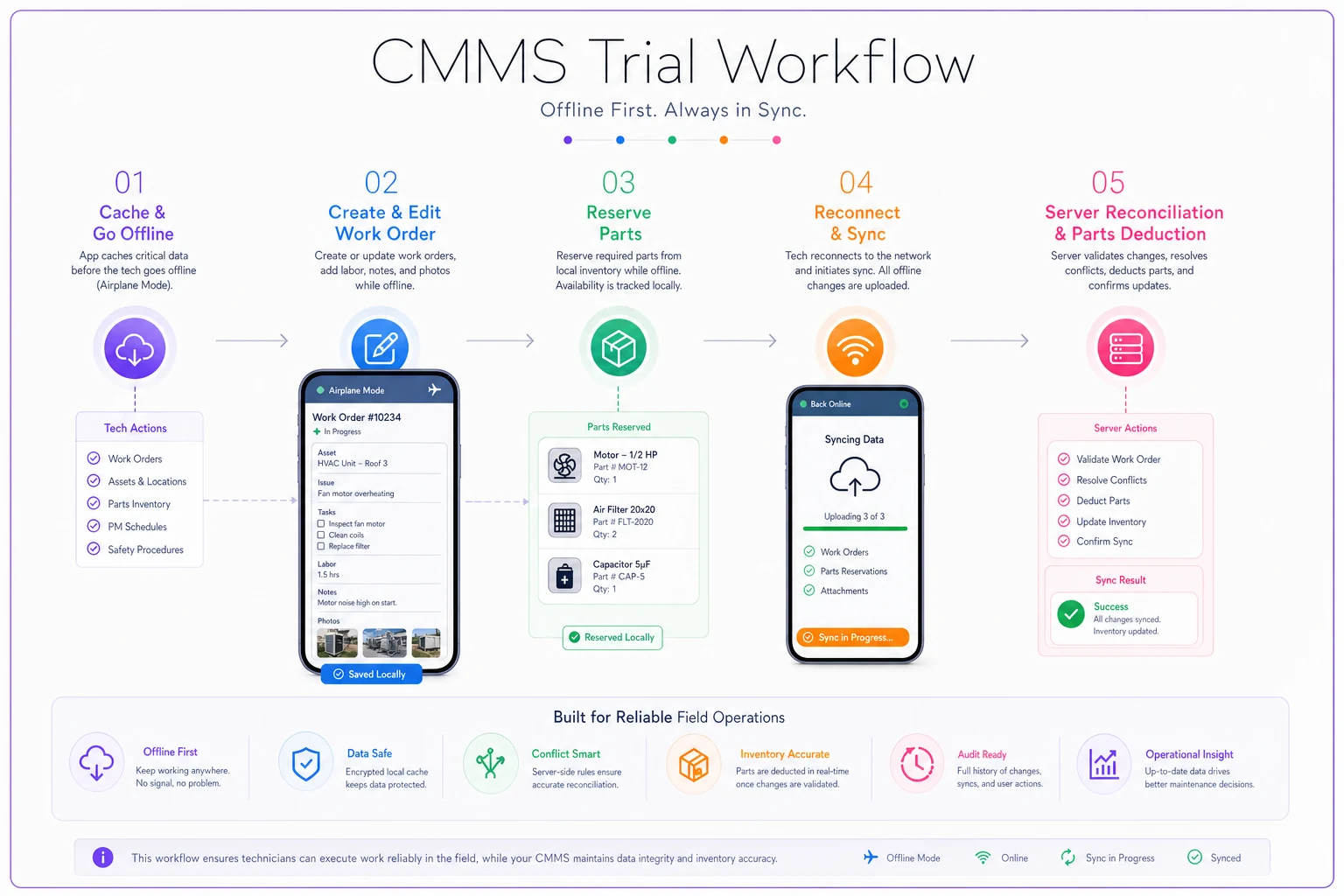
Run the mobile scripts with an actual tech using a cheap or cracked phone to reproduce real field conditions.
Script 2 — Sync conflict resolution
Setup: Have two people open the same WO — one on mobile (offline), one in the web app.
Run it:
-
Offline user changes status to "complete" and adds parts
-
Web user, simultaneously, reassigns the WO and changes the priority
-
Offline user reconnects and syncs
Success criteria: The system either merges cleanly or flags the conflict and prompts a human to resolve it. What you do not want is a silent overwrite where one person's work disappears.
What to measure: does it warn, merge, or overwrite? If it overwrites, which side wins — and is that behavior predictable and documented?
This is the test most teams skip and most regret. Silent overwrites destroy trust in the data within weeks.
Script 3 — QR/barcode scanning for asset lookup
Setup: Print 10 QR or barcode labels for sample assets. Stick them on things around the office.
Run it: Walk around and scan each one, pulling up the asset record and its open WOs.
Success criteria: Scan-to-record under 2 seconds, works in low light, works on a cheap or cracked phone, works offline against cached assets.
What to measure: scan success rate out of 10, average time, whether it handles the barcode format you actually use (Code 128, QR, etc.).
Script 4 — Parts reservation and auto-deduction
Setup: Load a parts catalog with real reorder points. Pick 3 parts with on-hand counts of, say, 8, 3, and 1.
Run it:
-
Reserve parts against three different WOs
-
Complete one WO (parts should deduct)
-
Cancel one WO (reserved parts should release back)
-
Watch the part that drops to reorder point — does it flag?
Success criteria: on-hand counts update correctly, reservations hold stock without deducting, cancellation releases cleanly, reorder alert fires at the threshold.
What to measure: whether reserved-vs-available is visible to techs (so two people don't claim the last part), and whether the reorder trigger is automatic or requires someone to run a report.
Script 5 — PM creation from a sensor/BAS alert
Setup: Ask the vendor to simulate an inbound alert from BAS or IoT — a temperature threshold trip, a runtime hour trigger. If they can't simulate it, that's already a data point.
Run it: Fire the alert and watch what happens.
Success criteria: a correctly templated WO generates automatically, assigned to the right asset with the right priority — and it doesn't spawn a duplicate if the alert fires again within a set window.
What to measure: latency from alert to WO, whether de-duplication works, whether the WO carries the alert context (which sensor, what value).
Script 6 — SSO and API connectivity
Setup: Have IT provision a test SSO login and an API key.
Run it: Log in via SSO. Then hit the API to pull a list of assets and push a new WO.
Success criteria: SSO works with your IdP (Okta, Azure AD, whatever you run). API returns clean, documented responses. You can create and read WOs programmatically.
What to measure: API rate limits (get the number in writing), auth method, whether the docs are current or a PDF from four years ago.
Integrations to validate during the trial
Don't take "we integrate with that" at face value. Validate each of these live, with your actual systems where possible:
-
BAS / IoT → automated WO generation — the Script 5 test; confirm de-dup and context passing
-
Purchasing / ERP — can a reorder trigger push a PO, or at minimum a requisition, into your finance system?
-
Inventory ↔ purchase order link — when a PO receives, does on-hand update automatically?
-
SSO / LDAP — covered in Script 6
-
HR / scheduler — can crew availability feed assignments, or does someone re-key the schedule?
-
Ticketing — if facilities requests come through a helpdesk or email, do they land as WOs cleanly?
-
Building access systems — contractor arrival and badge verification tied to a WO
Worth watching: a lot of "integrations" are really one-way CSV exports on a nightly batch. Fine for some things, useless for others. A nightly export of parts counts means your techs are working off yesterday's inventory all day long.
Mobile feature tests and acceptance thresholds
Beyond the scripts, run a focused set of mobile checks and hold the vendor to measurable thresholds. Write these into the contract if you can.
The tests:
-
Offline create / edit / complete a WO (full lifecycle, no signal)
-
Attach photo + capture location + timestamp
-
Parts pick and return from mobile
-
Local caching limits — how many WOs and assets cache before it degrades?
-
Sync conflict handling (Script 2)
-
Background sync and low-bandwidth behavior (throttle to 3G and watch)
Thresholds to hold:
| Metric | Acceptable | Good |
|---|---|---|
| Offline WO save (local) | < 2 sec | instant |
| Full sync after reconnect (25 WOs) | < 60 sec | < 20 sec |
| Photo upload on low bandwidth | completes, no drop | retries automatically |
| Scan to asset record | < 2 sec | < 1 sec |
| Sync conflict | flagged, never silent overwrite | clean merge |
| Local cache before degradation | ≥ 100 WOs | ≥ 500 WOs |
If a vendor can't hit the "acceptable" column on offline save and sync, nothing else on the scorecard matters. A tech who can't close a WO in a basement won't use the system, and your data quality degrades from there.
Worked example: ranking three vendors
Here's how this plays out with three hypothetical vendors after running the scripts. Scores are 0–5, weighted per the table above.
| Category (weight) | Vendor A | Vendor B | Vendor C |
|---|---|---|---|
| Mobile/offline (25%) | 4 | 2 | 5 |
| Inventory/parts (20%) | 3 | 4 | 4 |
| Core features (20%) | 4 | 5 | 3 |
| Integrations (15%) | 3 | 4 | 4 |
| Reporting (8%) | 3 | 5 | 3 |
| Security (7%) | 4 | 4 | 3 |
| Support/pricing (5%) | 4 | 3 | 2 |
| Weighted total | 3.56 | 3.59 | 3.95 |
Gates:
-
Vendor A — passed all gates
-
Vendor B — failed the offline-complete gate. The mobile app creates WOs offline but can't complete them until reconnected. That 2 on mobile isn't arbitrary.
-
Vendor C — passed all gates
On raw weighted score, the three are close. A naive buyer picks Vendor B because it has the best core features and reporting and the second-highest total.
But Vendor B is disqualified by the gate. Its reporting is gorgeous and its mobile is broken — which is exactly backwards for a field-heavy team. Drop it.
That leaves A (3.56) and C (3.95). Vendor C wins on the thing that matters most — a clean 5 on offline mobile — and clears the 3.8 shortlist cutoff. Vendor A is a solid backup but falls just under cutoff and has weaker mobile.
Decision: shortlist Vendor C, keep Vendor A as backup if pricing comes back ugly.
The weighted total gets you in the ballpark, but the gates and the highest-weight category do the real work. Don't let a strong overall score paper over a broken fundamental.
Red flags and procurement questions
Ask these directly and get answers in writing. Vagueness here is itself a red flag.
-
Who owns the data? If the answer isn't "you do, unconditionally," stop.
-
What export formats? CSV and API access to assets, WOs, parts history, and attachments. "We can export it for you" (manual, on request) is a trap.
-
What's the offline-support SLA? Not general uptime — specifically, what happens when sync fails and how fast is it resolved.
-
What are the API rate limits? Get the number. "Generous" is not a number.
-
What costs extra? Inventory module, mobile seats, additional sites, API access, extra photo storage. Small-team CMMS pricing is where add-ons hide. A $29/user base price can double once mobile and inventory are "premium."
-
What happens to our data if we leave? Export window, format, any fee.
-
Is the offline mode real or a thin cache? Script 1 answers this, but ask anyway and compare their answer to what you observed.
The pricing pattern to distrust: cheap base price, but every Tier 1 feature is a paid add-on. You end up paying enterprise prices for the things you actually need, bundled with Tier 3 features you'll never open.
Pilot KPIs, duration, and dataset
Once you've shortlisted, run a real pilot — not another demo. One site or one crew, real work orders, real parts.
Duration: 4–6 weeks. Shorter than four and you won't hit a full PM cycle or catch sync issues that only surface under load. Longer than six and you've basically done an unpaid implementation.
Dataset to load:
-
Around 150–200 assets with a real hierarchy
-
A parts catalog of roughly 300 items with real on-hand counts and reorder points
-
Your actual PM schedule for the pilot assets
-
At least one live integration (BAS alerts or SSO)
KPIs to track:
-
Time to close a mobile WO — from field open to completed. Watch whether it drops over the pilot as techs get comfortable, or stays flat (friction signal).
-
PM compliance % — did scheduled PMs generate and get closed on time, without duplicates?
-
Parts reserved vs. actually used — large gaps mean reservation isn't trusted or isn't being released properly.
-
Sync failure rate — percentage of sync attempts that errored or dropped data. This should be near zero. Anything creeping above a couple percent and you have a field-trust problem developing.
If sync failures are climbing and mobile close times aren't improving by week four, that's your answer — regardless of how good the dashboards look.
A realistic scenario
A mid-size commercial property group ran this process across two shortlisted vendors for an 18-tech team spread over four buildings. Their old system was web-only, so techs filled out paper in mechanical rooms and re-keyed everything at the end of the day. PM compliance was sitting around 60%, and inventory counts were off often enough that they kept shadow stock in a filing cabinet.
During the trial, the front-runner — better reporting, cheaper sticker price — failed the offline-complete gate in Script 1. Techs could start a WO in a basement but not finish it. That killed it, even though the admin team loved the dashboards.
The vendor they ended up with scored lower on reporting but passed the mobile and parts tests cleanly. Over the six-week pilot, mobile WO close time dropped from end-of-day re-keying to closed-on-the-spot. PM compliance climbed into the high 80s, and the gap between parts reserved and parts used tightened enough that they trusted the on-hand numbers and ditched the shadow stock. Sync failures stayed under 1%.
Nothing dramatic. Just the right tool passing the tests that mattered, and a buying team disciplined enough not to get seduced by the prettier demo.
Bringing it together
The whole point of this process is to move your decision out of the conference room and into the mechanical room. Vendors win demos with clean data and perfect connectivity. You win go-lives by testing the exact moments that break — offline completion, sync conflicts, parts auto-deduction, alert-to-WO latency — and scoring what you actually saw.
Use the gates to disqualify ruthlessly. Use the weighted scorecard to separate the close calls. Run a real pilot with real data for four to six weeks and watch the sync failure rate and mobile close time more than anything else.
Keep the selection separate from your emergency operations. A CMMS doesn't run your heat-event or outage response — your playbooks do. What a well-chosen system does is make sure that when those playbooks fire, the mobile app works in the basement, the parts are actually on the shelf, and the alert that should have created a work order actually did.
Keep the selection separate from your emergency operations. A CMMS doesn't run your heat-event or outage response — your playbooks do. What a well-chosen system does is make sure that when those playbooks fire, the mobile app works in the basement, the parts are actually on the shelf, and the alert that should have created a work order actually did.
Ready to optimize your maintenance operations?
Join 2,000+ facilities using Openfixit to reduce unplanned outages, extend asset life, and improve operational efficiency.