

Most maintenance leaders don't get stuck on what to do. They know they should run preventive maintenance, track failures, and keep spares in stock. The trouble shows up in sequencing, in trade-offs, and in figuring out which decisions actually move the needle versus which ones just look busy on a dashboard.
So this isn't a glossary. It's a decision guide. If you're staring at a mess of reactive work, an overdue backlog, and a CMMS that half your team ignores, this walks through where to put your energy first — and where you're probably wasting it.
Start with the trade-off nobody frames honestly
Every maintenance strategy is really a bet about when you want to spend money.
-
Reactive means you pay later, usually at the worst possible time, often at a premium.
-
Preventive means you pay on a schedule, whether the asset needs it or not.
-
Predictive/condition-based means you pay right before failure, if your data is good enough to see it coming.
-
RCM means you decide the above per-asset, based on what failure actually costs you.
The part people miss: the "best" strategy is almost never uniform across a facility. A rooftop unit serving a data closet and a rooftop unit serving a rarely-used storage mezzanine do not deserve the same treatment. Yet plenty of teams run identical PM intervals on both because that's how the CMMS templates were set up on day one.
What shows up across a lot of facilities is that maybe 15–20% of assets drive the majority of downtime cost. If you apply predictive effort or tightened PMs everywhere equally, you spread your best people thin and get mediocre results on the assets that actually matter. Sort your assets by consequence of failure before you argue about strategy. The strategy falls out of that ranking almost automatically.
A quick way to decide strategy per asset class
| Asset consequence | Failure is predictable? | Reasonable default strategy |
|---|---|---|
| High cost / safety / downtime | Yes (degrades gradually) | Condition-based / predictive |
| High cost / safety / downtime | No (fails suddenly) | Preventive + redundancy |
| Low cost / easily swapped | Either | Run-to-failure (reactive, on purpose) |
| Medium cost, moderate downtime | Yes | Preventive with interval tuning |
The "run-to-failure on purpose" row trips people up. Deliberately letting a cheap, non-critical, easy-to-replace component fail is a legitimate strategy — not negligence. The mistake is running things to failure by accident because nobody decided.
KPIs: measure fewer things, but measure them honestly
Dashboards fail more often from too many metrics than too few. A wall of gauges tells you nothing about what to do Monday morning.
Eliminate downtime with proactive maintenance.
Openfixit helps you plan, track, and complete maintenance efficiently—maximizing asset reliability.
- Centralized asset management
- Automated maintenance scheduling
- Inventory and parts tracking
No credit card required
The metrics that actually drive decisions are a short list:
-
MTBF (Mean Time Between Failures) — trending down means something is degrading systemically. Watch the trend, not the absolute number.
-
MTTR (Mean Time To Repair) — often reveals a parts or skills problem more than a machine problem. Long MTTR with short diagnostic time usually means you're waiting on spares.
-
PM compliance % — but only if your PMs are worth doing. High compliance on useless PMs is just organized waste.
-
Backlog (in ready-to-schedule hours) — measured in labor-hours, not work-order count. Fifty small tickets and fifty engine rebuilds are not the same backlog.
-
Cost per asset / cost as % of replacement value — the number finance actually cares about.
A subtle trap: MTTR looks great when technicians close work orders fast and sloppy. If closure quality is bad, your MTBF quietly gets worse three months later because the "repair" didn't fix the root cause. These two metrics have to be read together, never in isolation.
The measurement problem underneath the metrics
None of these numbers mean anything if your data hygiene is weak. If technicians log "fixed" with no failure code, no parts used, and no time captured, you're computing precise averages from garbage. In real operations, the gap between a useful KPI program and a decorative one is almost entirely about what gets captured at the point of work — which is a workflow and adoption problem, not an analytics problem.
Work orders: the workflow patterns that actually hold up
Every work order needs a real requestor, a real asset, and a real priority — before it's accepted. The most common backlog inflation comes from vague tickets: "AC not working" with no location, no unit tag, no severity. Someone has to chase that down, which burns time and delays actual repairs.
A workflow that holds up under load usually looks like this:
-
Intake — request captured with mandatory fields (asset, location, symptom, requestor).
-
Triage — assigned a priority and SLA target within a fixed window (say, 2 hours for anything safety-related).
-
Planning — parts checked, skills matched, scheduled into a slot.
-
Execution — technician logs time, parts, and a failure/cause code at completion.
-
Review — a quick close-out check for data quality before it's marked done.
-
Feedback — recurring failures flagged for deeper analysis.
That step 5 — the close-out check — is the one everyone skips, and it's the one that keeps your data usable. It doesn't have to be heavy. A supervisor spot-checking 10% of completed work orders is enough to keep quality honest, because technicians know the check exists.
One pattern worth naming: teams that let anyone set priority end up with everything marked "urgent."
A supervisor spot-checking 10% of completed work orders is enough to keep quality honest, because technicians know the check exists.
Priority has to be assigned by triage, not by the person submitting the request. Otherwise the priority field becomes noise within a month.
Staffing, roles, and the skills gap you can't hire around fast
The staffing conversation usually starts with headcount. It should start with skills coverage.
A facility with six technicians and only one who can work on the chillers has a single point of failure that no amount of PM scheduling fixes. When that person is on vacation and a chiller goes down, you're paying emergency contractor rates and waiting.
Map your critical assets against who can actually work on them. If any high-consequence asset has only one qualified person, that's a bigger operational risk than a slightly understaffed roster. Cross-training two people on the top few critical systems often buys more resilience than hiring a seventh generalist.
-
A planner/scheduler who isn't also swinging a wrench. When your best technician is also doing the scheduling, both jobs get done at 60%.
-
A data owner responsible for CMMS hygiene, asset naming, and close-out quality. Without one, the system slowly rots.
-
A reliability-minded lead who reviews recurring failures instead of just clearing tickets.
Small teams often can't justify these as full roles — but the responsibilities still need an owner, even if it's part-time.
Budgeting and lifecycle cost: stop arguing per line item
Maintenance budgets get shredded because they're presented as costs instead of risk decisions. "We need $40k for pump overhauls" invites cutting. "Deferring these overhauls raises our failure probability, and an unplanned failure costs roughly 3–4x the planned repair plus a production hit" reframes the conversation entirely.
-
Track cost per asset against replacement value. When annual maintenance creeps past 3–5% of replacement value on a given asset, it's a repair-vs-replace flag.
-
Separate run-rate (predictable PM and consumables) from variable (reactive, emergencies). If variable spend is climbing quarter over quarter, your strategy mix is drifting reactive.
-
Build a small contingency line for the emergencies you know are statistically coming, even if you can't name them yet.
The team that walks into a budget review with asset-level history and a repair-vs-replace argument gets funded. The team asking for "more or less the same as last year" gets trimmed.
CMMS selection: a checklist that filters out the wrong tools fast
Most CMMS buying regret comes from choosing on feature lists instead of on whether the tool fits how your team actually works. A platform can have every feature and still fail if technicians won't touch it.
Requirements to nail down before you talk to any vendor
-
Mobile-first execution. If technicians can't complete a work order, log parts, and attach a photo from their phone in under a minute, adoption dies. Non-negotiable.
-
Asset hierarchy support that matches your real structure (site → building → system → component).
-
Preventive maintenance scheduling with calendar and meter/runtime triggers.
-
Reporting you can actually configure without a consultant on retainer.
-
Integration paths to your building systems, sensors, and accounting/ERP.
-
Permission and role controls so triage, planning, and close-out stay separated.
Evaluation criteria, weighted
| Criteria | Why it matters | Weight |
|---|---|---|
| Technician ease-of-use (mobile) | Drives adoption and data quality | High |
| Reporting/analytics flexibility | Determines KPI usefulness | High |
| Total cost (licenses + implementation + training) | Real cost is 2–3x the license quote | High |
| Integration capability | Avoids data silos | Medium |
| Vendor support & onboarding | Make-or-break in first 90 days | Medium |
| Scalability across sites | Matters if you'll expand | Medium/Low |
Cost model reality check
The sticker price is the license. The real number includes implementation, data migration, training time (your team's hours, not just fees), and ongoing admin. A reasonable rule of thumb: whatever the annual license quote is, budget roughly two to three times that for year one all-in. Vendors who won't give you a clear implementation and migration estimate are telling you something.
A related discipline that quietly determines whether any CMMS pays off is how you structure and govern the information inside it. Consistent asset naming, taxonomy, and documented procedures matter more than any single feature — and if you run multiple sites, it's worth working through a proper approach to that, like the one laid out in this guide to designing a multi-site maintenance knowledge-management system. A great tool loaded with inconsistent data is still a mess.
Implementation: pilot before you scale, always
The fastest way to torch a CMMS rollout is to configure it for six months, launch everywhere at once, and hope. Rollouts that stick almost always start small and prove value before spreading.
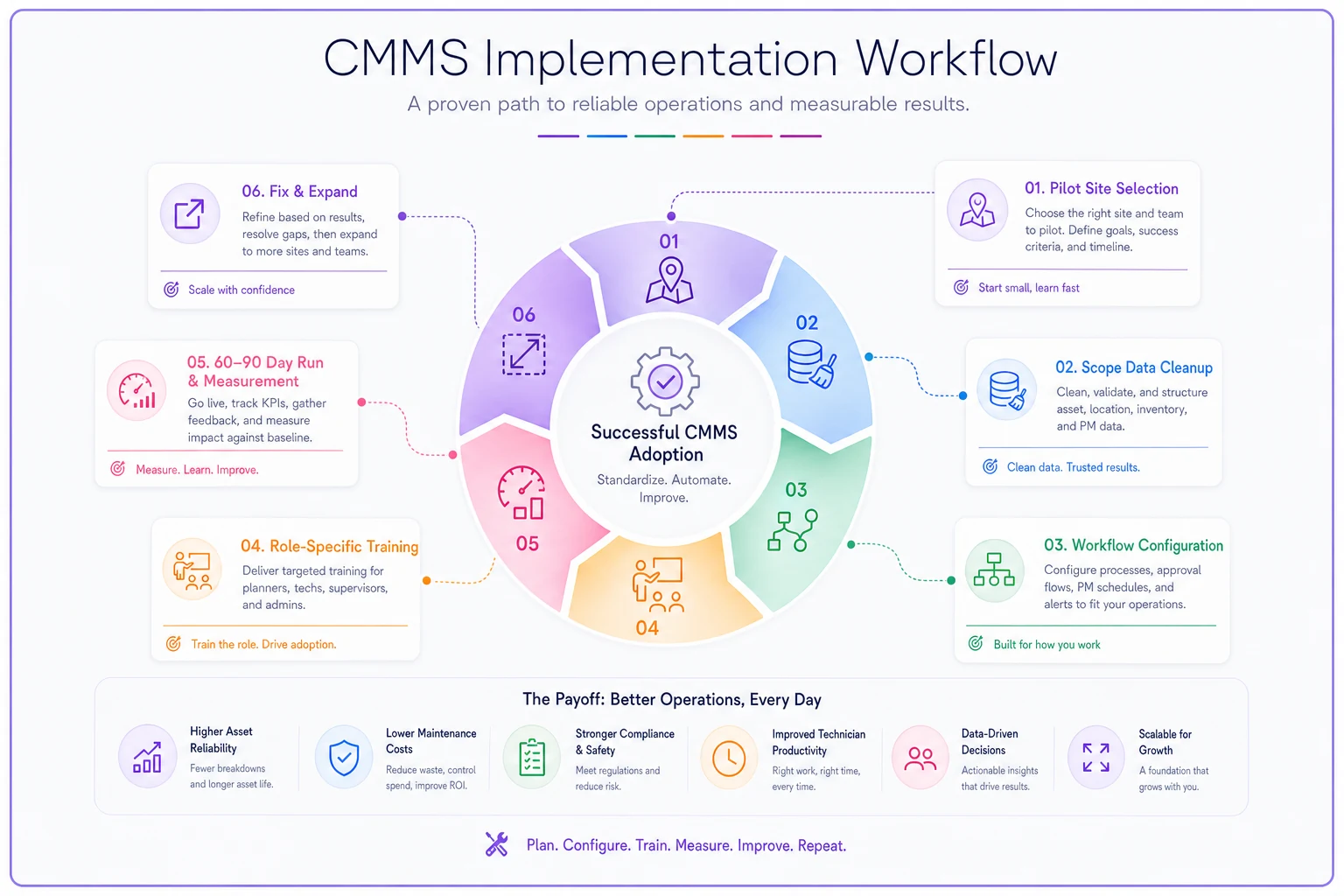
A sane implementation sequence:
-
Pick one pilot site or one critical asset group. Small enough to manage, important enough that success is visible.
-
Clean the data for just that scope. Correct asset names, hierarchy, and PM schedules for the pilot only. Don't try to fix everything.
-
Configure workflows to match how the pilot team actually works — not an idealized process nobody follows.
-
Train in short, role-specific sessions. A technician needs 30 minutes on mobile work-order completion, not a three-hour full-platform tour.
-
Run for 60–90 days and measure. PM compliance, data completeness, technician usage rate.
-
Fix what broke, document what worked, then expand to the next site.
A simple visual of the pilot-to-scale sequence helps align stakeholders.
Change management is the part that gets underfunded. Technicians resist tools that feel like surveillance or extra paperwork. The framing that works: this system reduces the repeat visits and the "why wasn't this logged" arguments — it makes their day less annoying, not more monitored. When the tool visibly saves them time (parts info at hand, no duplicate paperwork), adoption stops being a fight.
When a big-bang rollout is a bad idea
Basically always. But especially if your data is dirty, your team is skeptical, or you don't have a dedicated person owning the rollout. If any of those are true, force yourself into a pilot even when leadership wants everything live yesterday.
Common pitfalls and the quick wins that beat them
Pitfalls that show up over and over:
-
Running identical PM intervals on every asset regardless of criticality.
-
Measuring 20 KPIs and acting on none.
-
Letting requestors set their own priorities.
-
Buying a CMMS on features, then never enforcing data quality.
-
Treating the backlog as a single number instead of sorted by risk and labor-hours.
Quick wins you can start this quarter:
-
Add mandatory fields to work-order intake. Kills vague tickets immediately.
-
Introduce a 10% close-out spot check. Data quality improves fast because people know.
-
Rank your top 20 assets by failure consequence and review their strategy. You'll find a few obvious mismatches.
-
Cross-train a second person on your single most critical, single-expert asset.
-
Split backlog reporting into safety / critical / routine. Suddenly the number is actionable.
Split backlog reporting into safety / critical / routine. Suddenly the number is actionable.
A short real-world scenario
A mid-sized property management outfit running about a dozen commercial buildings had a maintenance operation that was maybe 70% reactive. Their CMMS existed but was mostly a ticket dumping ground — vague requests, no failure codes, PM schedules copied identically across every HVAC unit.
Rather than overhaul everything, they picked two buildings as a pilot. They ranked assets by consequence, retuned PM intervals (loosening a few over-serviced units, tightening the critical rooftop systems), added mandatory intake fields, and started a light close-out review.
Over roughly four months, reactive work in the pilot buildings dropped noticeably — from around two-thirds of all work orders to closer to 45%. Emergency contractor callouts fell, which was where the real money was; they'd been spending a few thousand a month on after-hours vendor rates that mostly disappeared. PM compliance data finally became trustworthy enough to use in budget conversations.
Nothing exotic happened. No new sensors, no predictive analytics, no fancy platform. They just sequenced the fixes right, proved it on a small scope, and expanded. That's the whole game most of the time.
Where to focus first
If you take one thing from this: maintenance management improves fastest when you stop treating every asset, every metric, and every rollout the same. Rank by consequence, measure fewer things honestly, fix intake and close-out quality, pilot before scaling, and reframe budget as risk.
The teams that struggle aren't lacking effort — they're spreading it evenly across things that deserve unequal attention. Concentrate on the assets and decisions that actually move downtime and cost, and most of the other problems get quieter on their own.
The teams that struggle aren't lacking effort — they're spreading it evenly across things that deserve unequal attention. Concentrate on the assets and decisions that actually move downtime and cost, and most of the other problems get quieter on their own.
Ready to optimize your maintenance operations?
Join 2,000+ facilities using Openfixit to reduce unplanned outages, extend asset life, and improve operational efficiency.