


Managing maintenance knowledge across multiple facilities feels like running separate departments that never talk to each other. Your Chicago facility has a brilliant troubleshooting guide for their chiller system buried in someone's email. Your Atlanta team developed a perfect PM checklist for their HVAC units that would save the Phoenix location hours of trial and error. Meanwhile, your newest technician in Dallas is about to make the same expensive mistake that three other sites already learned from last year.
I spent about six months helping a property management company with 23 buildings untangle this exact mess. They had maintenance procedures in Excel files, work instructions in PDF folders, equipment manuals in SharePoint, troubleshooting notes in personal notebooks, and critical safety procedures that only existed in senior technicians' heads. When their most experienced HVAC tech retired, they lost 20 years of equipment-specific knowledge overnight. The replacement tech spent three weeks figuring out quirks that could have been documented in a two-page guide.
The real problem isn't just scattered information—it's that maintenance teams create knowledge differently than they consume it. A technician fixing a broken pump at 2 AM needs specific, searchable, mobile-friendly instructions. But that same technician documents the fix in a work order close-out note that nobody will ever find again. Building a maintenance knowledge management system means solving both sides of that equation while keeping your governance light enough that people actually follow it.
Why traditional knowledge management breaks down in maintenance operations
Most knowledge management approaches come from IT or engineering departments where people work at desks and have time to follow complex documentation standards. Maintenance is different. Your technicians document things while standing on a ladder, wearing gloves, with equipment alarms going off in the background. They need information while troubleshooting critical failures at 3 AM when nobody else is available.
Maintenance departments generate three distinct types of knowledge that each need different handling:
Procedural knowledge covers your standard operating procedures, PM checklists, and safety protocols. This stuff changes slowly and needs formal approval processes. A facilities director once told me about discovering their locations were using seven different lockout/tagout procedures, each slightly different, because nobody knew which version was official. That's a compliance nightmare waiting to happen.
Troubleshooting knowledge accumulates through experience. It's the stuff like "if compressor 3 makes a clicking sound, check the contactor first—it fails every 18 months." This knowledge develops organically through work orders but rarely gets captured systematically. One organization I worked with had solved the same chiller problem fourteen times across different sites because nobody documented the root cause fix.
Asset-specific knowledge includes quirks, workarounds, and institutional memory about particular equipment. Maybe your building's main air handler needs a specific startup sequence after power outages, or the freight elevator requires a special reset procedure that isn't in any manual. This knowledge typically lives in someone's head until they leave.
Traditional document management systems fail here because they treat all knowledge the same way. They focus on storage and retrieval but ignore how maintenance teams actually create and use information in the field.
The hidden cost of knowledge gaps in multi-site operations
Knowledge gaps in maintenance don't just cause inefficiency—they cascade into operational failures that hit your bottom line from multiple angles. Wrong parts ordered, unnecessary contractor callouts, equipment damage from incorrect procedures, compliance violations from outdated documentation.
Eliminate downtime with proactive maintenance.
Openfixit helps you plan, track, and complete maintenance efficiently—maximizing asset reliability.
- Centralized asset management
- Automated maintenance scheduling
- Inventory and parts tracking
No credit card required
A regional healthcare system I analyzed estimated their knowledge gaps were costing them roughly $400K annually across eight facilities. The breakdown was sobering:
-
Emergency contractor calls for problems their own staff could have fixed
$145K
-
Incorrect parts ordered due to wrong model documentation
$78K
-
Extended downtime from troubleshooting known issues
$95K
-
Rework from following outdated procedures
$82K
The scariest part was a near-miss during a Joint Commission inspection. They had three different versions of their medical gas system shutdown procedure floating around, and the inspector caught it. Only quick thinking from their facilities manager prevented a citation that could have threatened their accreditation.
Multi-site operations amplify these problems. Each site develops its own tribal knowledge, its own shortcuts, its own documentation standards (or lack thereof). Experienced technicians become information gatekeepers, and when they're out sick or on vacation, operations slow down. New technicians take months to become productive because half their time goes to hunting down information that should be at their fingertips.
Building your taxonomy: Categories that match how technicians actually think
Creating a taxonomy for maintenance knowledge sounds academic, but it's really about organizing information the way your technicians' brains work when they're trying to fix something. The classification system you spent weeks designing means nothing if a technician can't find the compressor rebuild procedure while standing in a mechanical room with their phone.
Start with the basic hierarchy that matches how technicians approach problems:
System > Equipment > Component > Procedure
A technician with a cooling issue thinks: HVAC system → Chiller → Compressor → Startup procedure. Your taxonomy should follow that same mental path. Don't organize by document type (PDFs, videos, checklists) or by department (operations, safety, compliance). Those might make sense in a corporate office, but they're useless in the field.
For multi-site operations, add a location layer—but make it smart. Some knowledge is universal (how to replace a pump seal), some is site-specific (the quirky startup sequence for Building A's boiler), and some is regional (cold-weather procedures for Midwest facilities). Tag knowledge accordingly so technicians see relevant information without wading through procedures for equipment they don't have.
The critical mistake is over-categorization. One company had 47 different document types and 200+ tags. Their technicians just gave up and called experienced staff instead. Keep your primary categories under ten, your document types under six, and your tags focused on findability, not comprehensiveness.
Here's what actually works:
| Category | Description | Examples |
|---|---|---|
| Emergency Procedures | Immediate response guides for critical failures | Power loss recovery, flood response, gas leak protocol |
| Troubleshooting Guides | Diagnostic trees for common problems | No cooling flowchart, pump cavitation diagnosis |
| PM Procedures | Step-by-step preventive maintenance tasks | Monthly filter changes, quarterly belt inspections |
| Equipment Manuals | Manufacturer documentation and specs | O&M manuals, parts catalogs, wiring diagrams |
| Safety Protocols | Job-specific safety requirements | Confined space entry, arc flash procedures |
| Repair Instructions | Detailed repair and rebuild procedures | Bearing replacement, control board swap |
Keep your primary categories under ten, your document types under six, and your tags focused on findability, not comprehensiveness.
The key is making knowledge discoverable through multiple paths. That compressor rebuild procedure should be findable by searching "compressor," browsing to HVAC > Chiller > Compressor, or filtering by repair procedures. If technicians can't find it in under 30 seconds on their phone, the taxonomy has failed.
Governance without the bureaucracy: Practical editorial controls
The word "governance" makes maintenance managers run for the hills, and honestly, for good reason. They've seen governance frameworks that require three approvals to fix a typo and committee meetings to add a troubleshooting tip. But without some structure, your knowledge base becomes a dumping ground of outdated, conflicting, and sometimes dangerously wrong information.
You need just enough structure to maintain quality without killing contribution. Three levels of editorial control:
Level 1: Field contributions — Any technician can add troubleshooting notes, equipment observations, and lessons learned. These go into a staging area where they're visible but marked as "field notes" until reviewed. This captures knowledge immediately while it's fresh but doesn't treat it as gospel.
Level 2: Procedure updates — Experienced technicians and supervisors can update existing procedures and create new ones. These need a technical review by someone who actually knows the equipment but shouldn't require multiple sign-offs. One reviewer who understands the work is better than three managers who don't.
Level 3: Safety and compliance — Anything touching safety, environmental, or regulatory compliance needs formal approval. This is where you actually want bureaucracy. Lock these down tight with version control and approval workflows.
Assign editorial roles based on expertise, not org charts. Your night shift lead who's rebuilt every pump in the facility should be able to approve pump procedures, even if they're not a manager. Your junior tech who's surprisingly good at writing clear instructions should be able to draft procedures regardless of seniority. Skills-based assignments work better than hierarchy-based ones.
For multi-site operations, you need local editors and global coordinators. Local editors know their building's equipment and can approve site-specific content. Global coordinators ensure consistency across sites and identify knowledge that should be shared system-wide. That bearing replacement technique your Phoenix team developed? The global coordinator makes sure Chicago hears about it.
Set expiration dates on everything. Procedures don't age like wine—they go stale and dangerous. Mark critical procedures for annual review, standard procedures for bi-annual review, and troubleshooting guides for review after major repairs. When something expires, it doesn't disappear, but it gets flagged and shows a warning to users.
Version control that actually works in the field
Version control in maintenance is tricky because people need the current version right now, not after checking a document management system. But you also can't have technicians following outdated procedures that could damage equipment or hurt someone. The solution isn't more complex versioning systems—it's smarter distribution and clearer change communication.
Abandon the idea that everyone will always check for the latest version before starting work. They won't. Instead, push updates to where technicians actually look. When procedures change, update the QR code on the equipment, push a notification to their mobile work order app, and flag it in the next PM schedule. Make the new version impossible to miss.
Keep version histories simple. Instead of "Version 2.3.5 revised per change order 2847," use clear descriptions: "Added cold weather startup steps - November 2024" or "Updated torque specs after bearing failure - March 2024." Technicians need to know what changed and why, not your document control numbering system.
For critical changes, use a sunrise period. Don't flip from old to new overnight. Mark the new version as "Effective December 1" and show both versions during the transition. Send alerts, require acknowledgment for safety-critical changes, and track who's been trained on the new procedure. One facility manager told me they prevented a serious accident because their sunrise period caught that night shift hadn't been trained on new lockout procedures yet.
Track version adoption through your CMMS. When work orders reference procedures, log which version was used. This tells you if people are finding updated content and helps during incident investigations. If something goes wrong, you need to know exactly which version the technician was following.
Field knowledge capture: Getting information from wrench to database
The best maintenance knowledge comes from the field, but capturing it is like trying to bottle lightning. A technician who just spent four hours diagnosing an intermittent fault knows exactly what the problem was, but by the time they're back at a desk (if they even have one), half the details are gone. Your knowledge capture system needs to work in the moment, not after the fact.
Build capture directly into work order close-outs. Don't just ask "what did you do?"—prompt for specific knowledge worth preserving:
-
What was the actual problem vs. reported symptoms?
-
What didn't work that you tried first?
-
What special tools or techniques were needed?
-
Would different parts have worked better?
-
What should the next technician know?
Make it easy to add photos and videos. A 30-second video of the weird noise a bearing makes before it fails is worth a thousand words in a troubleshooting guide. A photo showing exactly where to measure clearance saves hours of confusion. Your knowledge system needs to handle media as easily as text, and technicians need to upload from their phones without jumping through hoops.
Create templates for common knowledge types. Give technicians fill-in-the-blank structures:
-
Problem
[Equipment] was [symptom]
-
Root cause
[Component] failed due to [reason]
-
Fix
Replaced [part] using [procedure]
-
Prevention
Recommend [action] every [frequency]
Voice-to-text helps a lot here too. Technicians can explain something verbally much faster than typing on a phone with greasy hands. Let them dictate their notes and clean up the transcription later. The raw information is what matters, not perfect grammar.
For major repairs or genuinely interesting problems, do quick debriefs immediately after. Don't wait for the monthly meeting. Grab the technician while the details are fresh—15 minutes of conversation captures insights that would otherwise disappear.
CMMS integration: Making knowledge flow with work
Your CMMS and knowledge management system can't be separate worlds. When a technician opens a work order, they need relevant procedures, history, and troubleshooting guides right there—not in another system that requires a different login and doesn't work on mobile.
Link knowledge directly to asset records. Every piece of equipment in your CMMS should connect to its relevant procedures, manuals, and troubleshooting guides. When someone creates a work order for Chiller #3, all Chiller #3 knowledge should be immediately accessible. This seems obvious, but most organizations have their CMMS pointing to a shared drive where nothing is organized by asset.
Build knowledge triggers into workflow rules. When specific failure codes appear, automatically attach relevant troubleshooting guides. When PM work orders generate, include updated procedure links. When safety permits are required, push the current safety protocols. The knowledge should find the technician, not the other way around.
Track knowledge usage through work orders. Every time a procedure is accessed through a work order, log it. This tells you which knowledge is actually useful versus what's just taking up space. One organization discovered their most-accessed troubleshooting guide was three years out of date—they fixed it and immediately saw repair times drop.
Use work order patterns to identify knowledge gaps. When the same problem takes wildly different amounts of time to resolve across technicians, you're probably missing documentation. Your RCA process should feed directly back into knowledge creation.
Here's the integration architecture that actually works:
| CMMS Component | Knowledge Link | Automatic Action |
|---|---|---|
| Asset Record | Equipment manuals, specs, history | Display on work order creation |
| PM Schedule | Current PM procedures | Attach to PM work orders |
| Failure Code | Troubleshooting guides | Suggest based on symptoms |
| Work Order Close | Capture template | Prompt for knowledge worth saving |
| Safety Permit | Safety protocols | Require acknowledgment before work |
| Parts Catalog | Installation instructions | Link to parts used in repairs |
A simple workflow can illustrate how CMMS triggers surface relevant knowledge during the work order lifecycle.
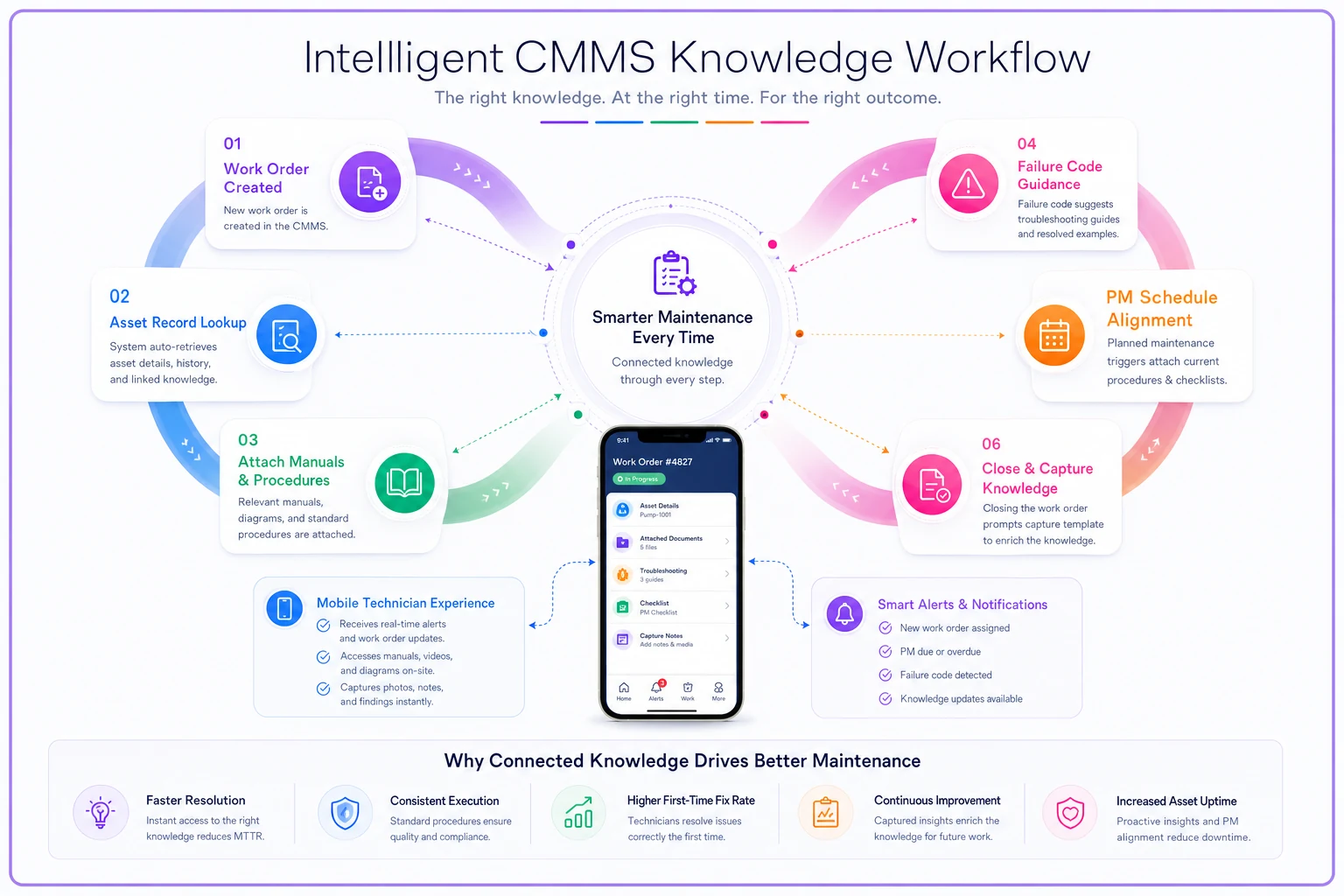
Track access and adoption through the CMMS so you know which articles are used and which need work.
Measuring what matters: Knowledge system health metrics
Most organizations measure their knowledge management system by counting documents or tracking page views. That's like measuring maintenance effectiveness by counting work orders. The real question is whether your knowledge system is making operations better, safer, and more efficient.
Start with search success rate. If technicians search for something, do they find it? Track searches that return no results or where users immediately search again with different terms. These failed searches reveal your knowledge gaps. One facility found "centrifugal pump vibration" was searched dozens of times with no good results—they created a guide and likely prevented several pump failures in the process.
Measure time-to-resolution impact. Compare repair times when procedures are accessed versus when they're not. If following your documented procedure doesn't actually make repairs faster, the procedure needs work. A property management company found their HVAC troubleshooting guides were increasing repair time because they were so generic. They rewrote them with equipment-specific steps and cut average repair time by around 35%.
Track contribution velocity. How much new knowledge is being added each month? If contributions dry up, either your capture process is too hard or your team doesn't see the value. Set targets like "one new troubleshooting guide per major repair" or "update one procedure per PM cycle." Knowledge systems die from stagnation.
Monitor version currency. What percentage of your procedures have been reviewed in the last year? If more than 20% of your content is stale, your governance process is failing. Set up dashboards that surface outdated content before it causes problems.
Watch for knowledge heroes and hoarders. If one person creates the vast majority of your content, you have a single point of failure. If senior technicians aren't contributing despite solving complex problems regularly, they're hoarding knowledge. Both situations need to be addressed directly.
Rolling out knowledge management without disrupting operations
Launching a knowledge management system in a running maintenance operation is like changing tires on a moving car. You can't stop operations to implement it, but half-implementing it doesn't work either.
Start with a single critical system at one site. Pick something that breaks often enough to matter but isn't so critical that mistakes during rollout could shut down operations. HVAC systems are usually perfect—they fail regularly, everyone needs to know how to fix them, and there's some redundancy if things get messy during the learning curve.
Build your initial knowledge base with the 20% of procedures that handle 80% of your work. Don't try to document everything before launch. Get your emergency response procedures, top PM tasks, and most common repairs documented well, then add the rest over time.
Use knowledge gaps as teaching moments. When something breaks and you don't have documentation, make creating it part of the repair process. "While you're fixing this, document what you're doing so the next person doesn't struggle." This builds the knowledge base organically and ensures you're capturing what actually matters.
Create early wins for skeptics. Find the technician who complains most about not having good documentation and have them write the first procedure for something they know well. When other technicians use it successfully, your biggest skeptic becomes your best advocate. It works more often than you'd think.
Month 1-2: Emergency procedures and safety protocols at pilot site
Month 3-4: Common repairs and PM procedures for critical equipment
Month 5-6: Expand to second site, refine based on lessons learned
Month 7-9: Roll out to all sites with local champions trained
Month 10-12: Full implementation with governance and metrics in place
Don't declare victory after initial rollout. Knowledge management systems need constant feeding and pruning to stay healthy. Build review cycles into your annual calendar, knowledge capture into your work order process, and content quality into your performance metrics.
The compound effect of systematized knowledge
When maintenance knowledge management actually works, the effects compound in ways that change your entire operation. That troubleshooting guide created in Seattle prevents a failure in Miami six months later. The PM procedure refined in Dallas reduces repair frequency across all locations. The safety protocol updated after a near-miss in Phoenix prevents an injury in Chicago.
A retail chain with 45 locations implemented this kind of knowledge management approach. After 18 months, they saw mean time to repair drop by roughly 28%, contractor calls reduce by 40%, and safety incidents fall to zero for documented procedures. The biggest win was harder to measure—technicians stopped dreading weekend on-call because they knew whoever picked up could actually handle problems with solid documentation behind them.
Modern AI-powered operational platforms can accelerate a lot of this. Instead of manually categorizing every piece of knowledge, natural language processing can automatically tag and link related content. Rather than hoping technicians document their work properly, AI-assisted platforms can extract insights from work order notes and suggest knowledge articles to create. When someone searches for a problem, the system can surface not just exact matches but related issues and solutions that a human search might miss entirely. Over time, the platform becomes a living maintenance brain that gets more useful with every work order closed and every procedure updated.
Start small, focus on what breaks most often, and build from there. Your future maintenance team will thank you when they can solve problems in minutes instead of hours, prevent failures instead of reacting to them, and actually go home on time because the knowledge they need is right at their fingertips.
Ready to optimize your maintenance operations?
Join 2,000+ facilities using Openfixit to reduce unplanned outages, extend asset life, and improve operational efficiency.