

Your best HVAC tech keeps getting sent to fix electrical panels. Your electrical specialist wastes afternoons on basic filter replacements. Meanwhile, that complex chiller repair sits in the queue because nobody tracked who actually knows variable refrigerant flow systems.
This misalignment between technician skills and work assignments creates a vicious cycle. Techs struggle with unfamiliar equipment, leading to incomplete repairs. Incomplete repairs trigger callbacks. Callbacks eat into scheduled maintenance windows. Overtime balloons. Morale tanks.
The fix isn't hiring more people or working longer hours. It's building a technician competency matrix that feeds directly into your CMMS routing rules.
Why skills-based routing fails without proper documentation
Most facilities have some informal understanding of who's good at what. Dave handles boilers. Sarah knows controls. Mike does electrical. But this tribal knowledge breaks down fast when Dave calls in sick, Sarah transfers departments, or Mike takes vacation during a critical breakdown.
Without documented competency levels, dispatchers make gut-feel assignments. They send whoever's available, not whoever's qualified. Or worse, they default to sending their most experienced techs to every call, burning them out on simple tasks while complex issues pile up.
The disconnect shows up in predictable ways. The same equipment failing repeatedly. Work orders marked "complete" that generate follow-up tickets within days. Senior techs spending the majority of their time on routine tasks that junior staff could handle. Overtime costs that spike whenever specific equipment types break down.
A proper technician competency matrix changes this. Instead of guessing who can handle what, you have clear proficiency ratings for every tech across every equipment type. Your CMMS uses these ratings to automatically route work orders to the most appropriate available technician.
Building your competency assessment framework
Start with equipment categories, not individual assets. Break your facility into major equipment types: chillers, boilers, air handlers, pumps, controls, electrical distribution. Under each category, list the specific models or configurations you maintain.
Eliminate downtime with proactive maintenance.
Openfixit helps you plan, track, and complete maintenance efficiently—maximizing asset reliability.
- Centralized asset management
- Automated maintenance scheduling
- Inventory and parts tracking
No credit card required
For each equipment category, define four proficiency levels: Level 1 - Helper: Can assist and observe, perform basic PMs under supervision Level 2 - Basic: Can handle routine maintenance and simple repairs independently Level 3 - Advanced: Can diagnose complex issues and perform most repairs Level 4 - Expert: Can handle any repair, train others, write procedures
Now comes the assessment piece. Don't rely on self-reporting or manager assumptions. Pull actual work order history from your CMMS. Look at completion rates, callback frequencies, and time-to-complete metrics by technician and equipment type.
Here's what a basic competency matrix looks like for a 6-person maintenance team:
| Technician | Chillers | Boilers | Air Handlers | Pumps | Controls | Electrical |
|---|---|---|---|---|---|---|
| Dave M. | 4 | 4 | 3 | 3 | 2 | 2 |
| Sarah K. | 2 | 2 | 3 | 2 | 4 | 3 |
| Mike R. | 1 | 2 | 2 | 3 | 2 | 4 |
| Tom S. | 3 | 3 | 4 | 4 | 2 | 3 |
| Lisa P. | 2 | 1 | 3 | 3 | 3 | 2 |
| John W. | 1 | 1 | 2 | 2 | 1 | 3 |
Proficiency alone doesn't tell the full story though. You also need to track certifications, training dates, and equipment-specific qualifications. A tech might be Level 3 on chillers generally but only Level 2 on your specific York centrifugal units.
Creating enforceable proficiency SOPs
Documentation without enforcement creates false confidence. You need standard operating procedures that make competency assessments systematic, not subjective.
Your proficiency assessment SOP should define:
Initial Assessment Process New hires complete a skills inventory during onboarding. They demonstrate basic competencies through supervised work orders over their first 90 days. After three months, their supervisor assigns initial proficiency ratings based on observed performance.
Ongoing Evaluation Triggers
-
Quarterly performance reviews include competency updates
-
Training completion automatically upgrades relevant skills
-
Three successful solo repairs on an equipment type triggers a proficiency review
-
Two callbacks on the same equipment type triggers a proficiency downgrade review
Verification Requirements Level 3 and 4 ratings require demonstration, not just discussion. The technician must successfully complete specific diagnostic and repair scenarios. For critical equipment, they need to walk through troubleshooting procedures with the maintenance manager.
Documentation Standards Every proficiency change gets logged with date, reason, and verifying supervisor. Training certificates get scanned and attached to the technician's competency profile. Work order performance metrics automatically feed into quarterly competency reviews.
Make the process transparent. Techs should see their own ratings and understand exactly what they need to demonstrate to advance. Post the team competency matrix where dispatchers can reference it. Update it monthly, not annually.
Programming CMMS routing rules that actually work
Most CMMS platforms support some form of skills-based routing, but the default configurations rarely match real-world maintenance operations. You need routing rules that balance competency with availability, urgency, and cost.
Start with basic competency matching. For each equipment type in your CMMS, assign a minimum proficiency level:
-
Routine PM
Level 2 minimum
-
Standard repair
Level 3 minimum
-
Complex diagnosis
Level 4 required
-
Safety-critical repair
Level 3 minimum, Level 4 preferred
Then layer in practical constraints. Your routing rules need to account for:
Availability Windows Don't route a 4-hour chiller rebuild to someone with 2 hours left in their shift. Build buffer time into competency-based assignments.
Geographic Efficiency If two techs have the same competency level, route to whoever's already in that building or zone. A Level 3 tech on-site beats a Level 4 tech across campus for non-critical repairs.
Workload Balance Track assignment distribution to prevent burnout. If your only Level 4 chiller tech has handled the last eight chiller calls, route the next moderate-complexity job to a Level 3 tech instead.
Training Opportunities For non-urgent Level 2 work, occasionally route to Level 1 techs with Level 2+ oversight. Build competency development into your routing logic.
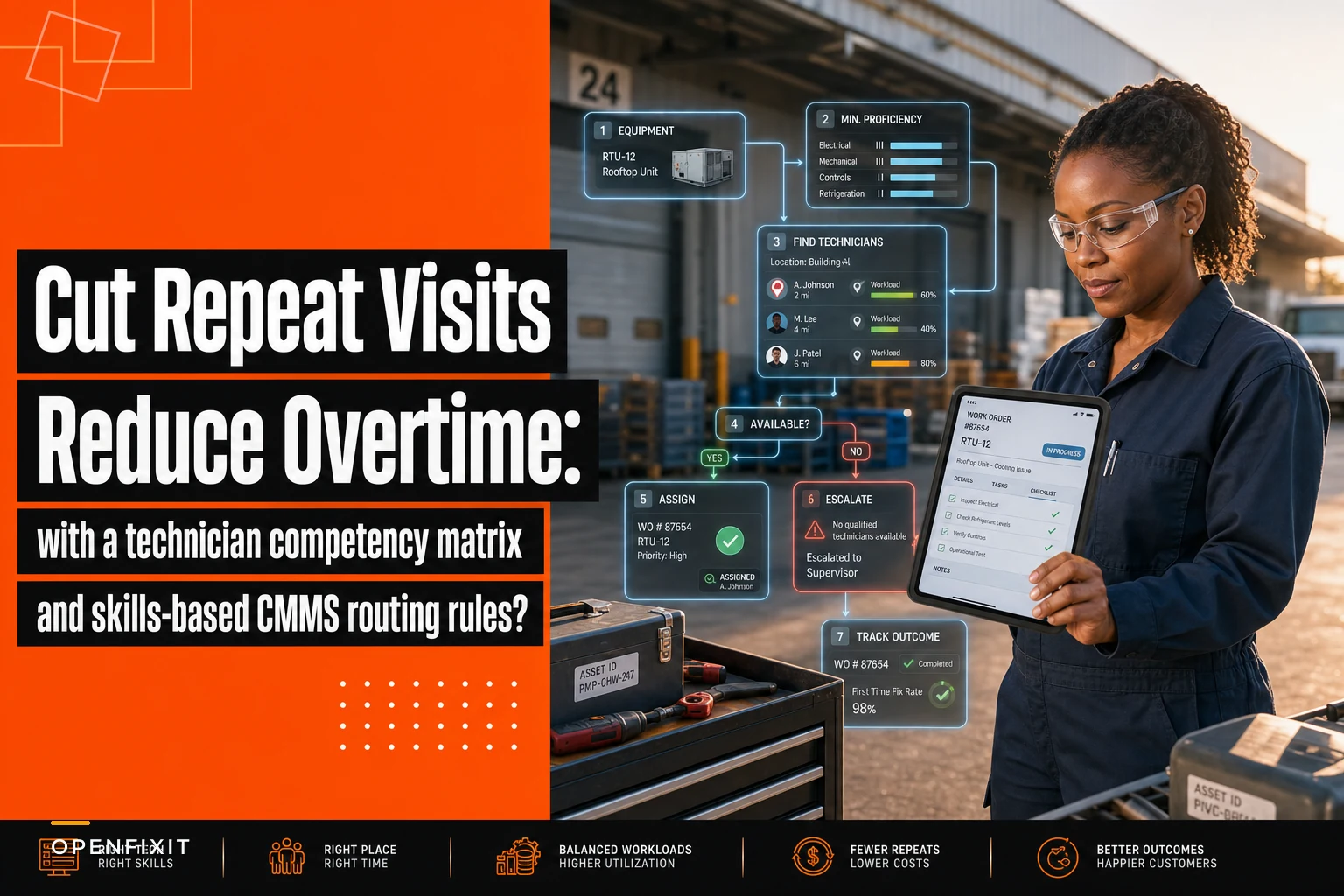
Here's what the routing decision tree looks like in practice:
-
Work order created → System identifies equipment type
-
Equipment type → System pulls minimum proficiency requirement
-
Proficiency requirement → System identifies qualified available techs
-
If multiple qualified → Check current location and workload
-
If none qualified → Escalate to supervisor or schedule for when qualified tech is available
-
Assignment made → Track outcome for competency verification
Build buffer time into competency-based assignments.
The key is making these rules automatic, not suggestions. When a dispatcher tries to assign an unqualified tech, the system should require override authorization and documentation of why standard routing was bypassed.
The decision tree below outlines the routing workflow.
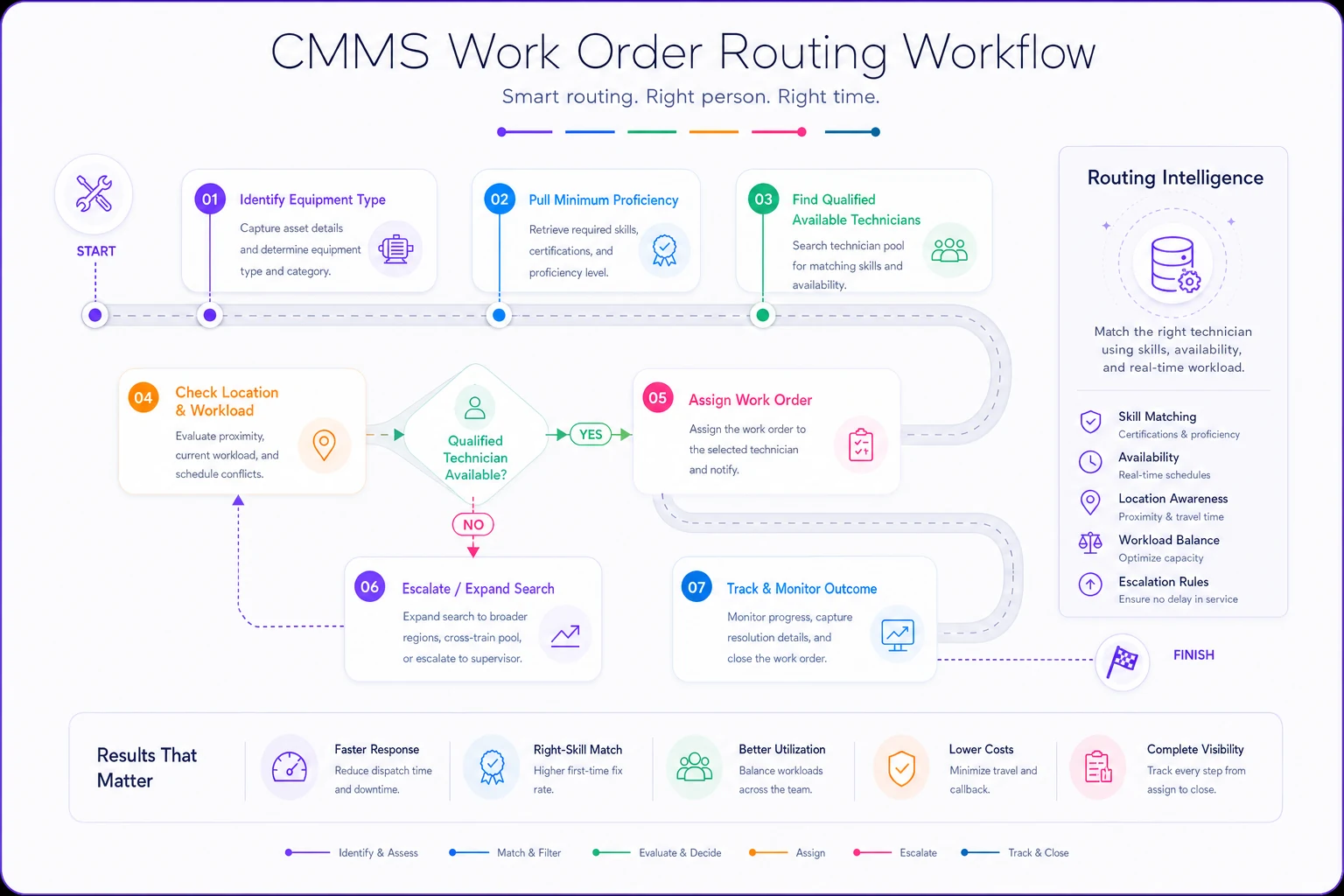
When a dispatcher tries to assign an unqualified tech, the system should require override authorization and documentation of why standard routing was bypassed.
Common routing mistakes that create more problems
Over-specialization happens when you route every chiller call to your one chiller expert. They become a bottleneck, and nobody else develops chiller competency. Route simple chiller PMs to Level 2 techs occasionally, with Level 4 oversight when needed.
Under-utilization occurs when you only consider primary skills. That electrical specialist might also be Level 3 on pumps. When electrical work is slow, your routing rules should be tapping into those secondary competencies.
Rigid adherence during emergencies causes delays. If production is down and your Level 4 tech is off-site, sending a Level 3 tech immediately beats waiting two hours for the expert. Build emergency override workflows that still track competency gaps.
Ignoring soft skills leads to complaints. Some techs excel technically but struggle with communication. For work in occupied spaces or requiring coordination with operations staff, factor in customer-facing abilities alongside technical competency.
Failing to update after training wastes development investments. When you send a tech to controls training, immediately schedule them for supervised controls work orders to reinforce it. Update their competency rating within 30 days of training completion.
Measuring the impact on callbacks and overtime
The real test of skills-based routing shows up in your maintenance metrics. Within 60 days of implementation, you should see measurable improvements in:
Callback Rate: Track repeat work orders on the same equipment within 30 days. Proper skill matching typically cuts callbacks by around 35-40%.
First-Time Fix Rate: Monitor what percentage of work orders actually get resolved on the first visit. Competency-based routing should push this above 85%.
Mean Time to Repair: When the right tech handles the job from the start, diagnosis happens faster and repairs stick. MTTR often drops 20-25%.
Overtime Distribution: Instead of the same three techs working every weekend, overtime spreads across qualified staff. No individual should be regularly exceeding 15% overtime.
Training ROI: Track how quickly newly trained competencies get utilized. If someone completes boiler training but doesn't touch a boiler for six months, your routing rules need adjustment.
Pull these metrics monthly and share them with the team. Technicians need to see that competency development leads to more interesting work and better outcomes. Managers need confirmation that the time invested in assessments and training actually pays off.
A mid-sized hospital in Phoenix implemented competency-based routing for their 12-person maintenance team. Previous callback rates on their critical cooling equipment ran around 18%. After mapping competencies and updating CMMS routing rules, callbacks dropped to 7% within three months. Overtime costs decreased by roughly $8,500 monthly because work was getting completed correctly during regular hours.
Maintaining matrix accuracy as teams evolve
Competency matrices decay without active maintenance. People forget procedures they don't practice. New equipment arrives with different requirements. Experienced techs retire, taking institutional knowledge with them.
Build review cycles into your maintenance planning:
Monthly: Review any work orders that required a competency override. Did the assigned tech succeed? Should their rating be adjusted?
Quarterly: Analyze callback patterns by technician and equipment type. Consistent callbacks suggest competency gaps.
Annually: Conduct full team competency assessments. Include new equipment types added during the year. Remove equipment types you've decommissioned.
After major changes: When you hire, lose, or transfer maintenance staff, update routing rules immediately. Don't wait for the quarterly review.
Track competency trends over time. If multiple techs are losing proficiency on certain equipment, you might have a training gap or insufficient hands-on practice. If nobody advances beyond Level 2 on specific systems, consider bringing in specialized training or hiring for that skill set.
Your standardized naming conventions make competency tracking much cleaner — techs know exactly which equipment categories they're qualified for when everything follows consistent terminology.
When skills-based routing makes sense (and when it doesn't)
Not every facility needs complex competency matrices and automated routing rules. Small maintenance teams where everyone knows everyone's capabilities might find formal systems add unnecessary overhead.
Skills-based routing delivers the most value when:
-
You have 8+ maintenance technicians
-
Equipment complexity varies significantly
-
Callback rates exceed 10%
-
Overtime costs are climbing
-
You're training new technicians regularly
-
Multiple shifts or locations need coordination
It's overkill when:
-
Your team is fewer than 5 people
-
Most equipment is similar complexity
-
Everybody cross-trains on everything
-
You have dedicated specialists who only work their specialty
For facilities in the middle — say 5-8 techs with moderate equipment diversity — start simple. Build the competency matrix first. Use it for manual dispatch decisions for three months. If you see clear patterns where better matching would prevent problems, then invest in CMMS automation.
Setting up automated escalation paths
Even the best competency matrix hits situations where no qualified tech is available. Your system needs clear escalation rules that maintain quality standards while keeping operations running.
Create tiered escalation triggers:
Tier 1 - No Level 3+ tech available for standard repair
-
System notifies maintenance supervisor
-
Supervisor can assign Level 2 tech with remote support
-
Work order gets flagged for quality review
Tier 2 - No Level 2+ tech available for routine PM
-
System delays PM if within acceptable window
-
If PM is critical, system requests overtime authorization
-
Supervisor can pull tech from lower-priority work
Tier 3 - Emergency repair exceeds all available competencies
-
System immediately alerts maintenance manager
-
Triggers vendor call-out procedure
-
Documents competency gap for training planning
Tier 4 - Pattern of competency gaps emerging
-
System identifies recurring situations with no qualified staff
-
Generates monthly report for maintenance planning
-
Feeds into hiring and training decisions
These escalations protect both equipment and technicians. Nobody gets pushed into repairs they can't handle safely. Equipment doesn't suffer from repeated amateur attempts. And management gets clear data on where competency investments would eliminate costly workarounds.
The role of AI in optimizing technician routing
Modern AI-powered operational platforms can take a basic competency matrix and turn it into something more dynamic. Instead of static if-then rules, these systems learn from actual work order outcomes and continuously refine assignments over time.
The patterns they surface are ones humans tend to miss — certain techs working faster on specific equipment during morning shifts, callback rates spiking when particular tech combinations work adjacent systems, seasonal competency requirements that shift with weather patterns. Variables that traditional CMMS routing simply ignores.
As facilities adopt AI automation for work order routing, the competency matrix becomes less of a static document and more of a living profile. The system tracks every repair outcome and adjusts proficiency signals based on real performance. When a Level 2 tech consistently completes Level 3 work without callbacks, that gets flagged for a competency upgrade review. When callback patterns suggest a gap, it can automatically schedule verification assessments before the next similar job lands.
This kind of routing intelligence also helps facilities clear maintenance backlogs more efficiently — every work order goes to the most appropriate available resource based on proven performance patterns, not just paper qualifications.
Making competency development part of daily operations
The most effective competency programs embed skill development into regular work rather than treating it as a separate training event. Every work order becomes a potential learning opportunity when routed intentionally.
Pair junior techs with seniors on complex repairs, but give the junior tech specific diagnostic responsibilities. Route simpler versions of complex equipment work to advancing techs. Create stretch assignments where Level 2 techs attempt Level 3 work with backup available.
Document these development opportunities in your CMMS. When a Level 1 tech assists on a boiler repair, note what they observed and practiced. After five assisted boiler repairs, they're ready for supervised solo work. After five successful solo repairs, they earn Level 2 certification.
This approach costs almost nothing extra — you're doing the work anyway — but systematically builds team depth. Within 12-18 months, you'll have significantly more coverage at Level 3 and 4 competencies, reducing your dependence on any single expert.
Conclusion
A technician competency matrix isn't just another spreadsheet to maintain. It's the foundation for eliminating the chaos of mismatched assignments that drive callbacks, overtime, and frustration across the team. When every work order routes to someone actually qualified to handle it, first-time fix rates improve and the firefighting slows down.
The setup investment pays back quickly. Facilities seeing 35-40% callback reduction aren't anomalies — they're just matching skills to work systematically instead of hopefully. Same techs, same equipment, same CMMS — but with routing rules that put the right expertise in front of each problem.
Start with a basic matrix. Track real proficiency levels based on actual performance, not assumptions. Build simple routing rules that respect those competencies. Measure the impact on callbacks and overtime. Then gradually add sophistication as your team sees the value in accurate skills documentation.
The goal isn't perfect optimization. It's ending the expensive cycle of unqualified attempts, incomplete repairs, and emergency callbacks that burn out your best technicians while simpler work sits unassigned. Get the basics right, and the shift from reactive scrambling to predictable execution tends to follow naturally.
Ready to optimize your maintenance operations?
Join 2,000+ facilities using Openfixit to reduce unplanned outages, extend asset life, and improve operational efficiency.