
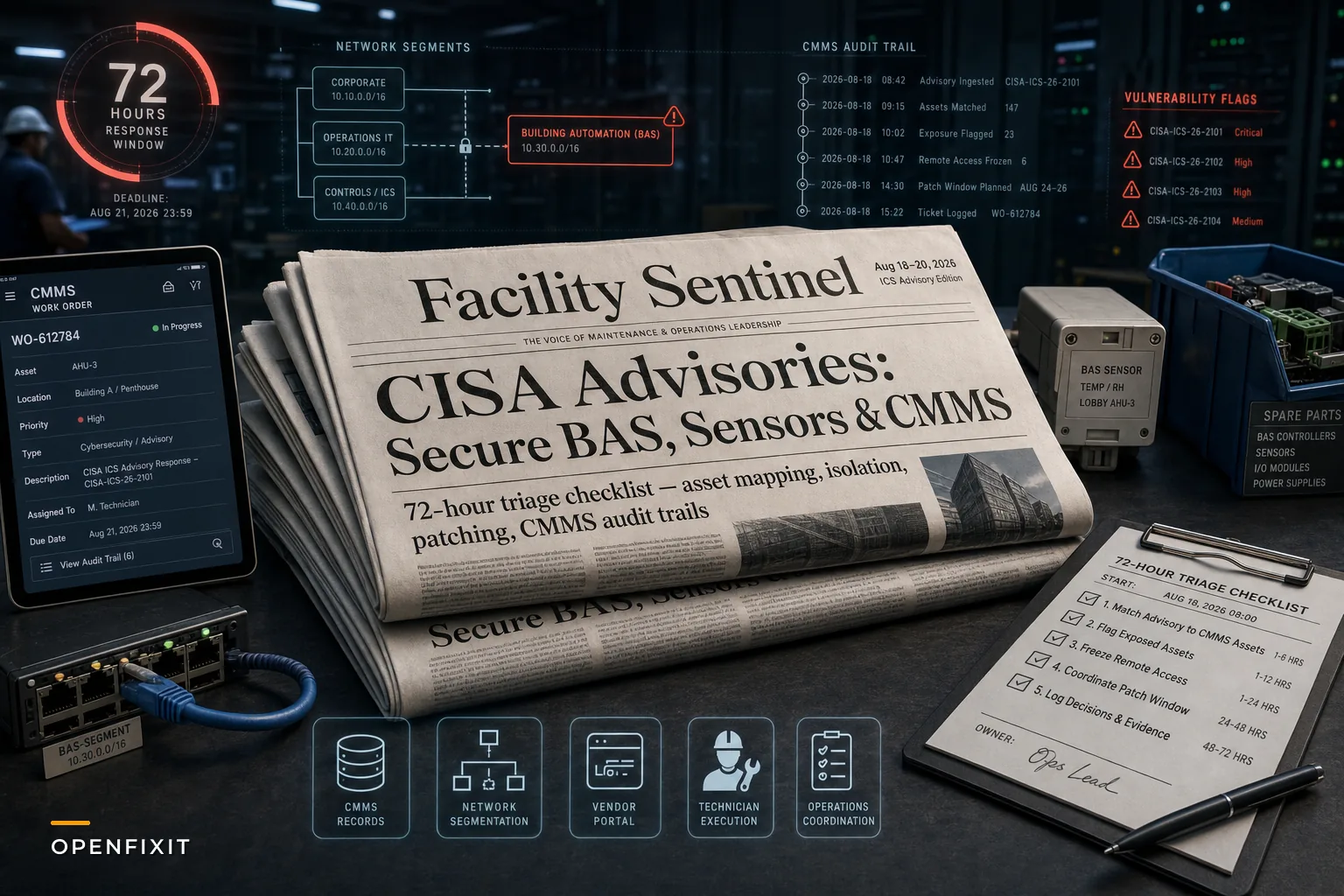

Most maintenance leaders don't find out about an ICS vulnerability from a security bulletin. They find out when a vendor tech shows up for a scheduled patch window and casually mentions the controller "needs a firmware bump because of something CISA put out." That gap — between when the advisory drops and when the person who actually manages the asset hears about it — is the real problem this month's news exposes.
On August 20, 2026, CISA published a batch of Industrial Control Systems advisories, including one covering Johnson Controls' Simplex Incident Manager, alongside new foundational guidance on logging and operational visibility. If you run BAS, fire panels, metering, or any sensor network that talks to your CMMS, these aren't abstract IT problems. They land squarely on your desk, because the assets named are the ones your technicians touch every week.
This isn't a news recap. It's a working checklist for turning an ICS advisory response into something your maintenance team can actually execute — without treating it like a fire drill every single time.
Why maintenance owns more of this than they think
There's a persistent assumption that anything with the word "cyber" in it belongs to IT. In practice, the asset records, the vendor relationships, the patch scheduling, and the physical access to the panels all sit with maintenance. IT might own the network segment. They almost never own the knowledge of which AHU controller runs which firmware, or which contractor has a remote-access account that nobody's audited in two years.
That's the underlying issue. An advisory like the Simplex one assumes you can quickly answer three questions:
-
Do we have this product, and where?
-
What version is running on each unit?
-
Who can reach it remotely, and how?
Most facility teams cannot answer all three within a day. And that's not a security failing — it's a records failing. The asset hierarchy in the CMMS was built to schedule PMs, not to track firmware exposure. So when an advisory hits, people end up walking the building with a clipboard trying to reconstruct an inventory that should have existed already.
The first 72 hours: a triage sequence that doesn't melt your schedule
The instinct when an advisory lands is to drop everything and patch. That's usually wrong. Patching a live BAS controller during peak cooling load, or a fire panel without a fire-watch plan, creates more risk than the vulnerability itself in the short term. The goal in the first three days is assessment and containment, not remediation.
Eliminate downtime with proactive maintenance.
Openfixit helps you plan, track, and complete maintenance efficiently—maximizing asset reliability.
- Centralized asset management
- Automated maintenance scheduling
- Inventory and parts tracking
No credit card required
A sequence that's worked for teams juggling multiple sites:
-
Match the advisory to your asset list. Pull every asset record tied to the named product family. If your CMMS doesn't track model and firmware, this step tells you exactly where your data gaps are — write them down, you'll fix them later.
-
Flag exposure, not just presence. A vulnerable controller sitting on an air-gapped VLAN with no remote access is a different priority than one reachable through a contractor's cloud portal. Rank by reachability first.
-
Freeze remote access to affected units. Temporarily disabling vendor VPN or portal access buys time and costs almost nothing. This is the single highest-leverage containment move most teams skip.
-
Coordinate the patch window with operations, not around them. A chiller controller patch during a shoulder-season weekend is a non-event. The same patch during a heat event is a liability.
-
Log the decision, even if the decision is "wait." "We assessed, isolated, and scheduled remediation for the next maintenance window" is a defensible position. Silence in the record is not.
Patching is step four, not step one. The teams that get burned are the ones who rush a firmware update onto a critical life-safety system without a rollback plan and take the panel offline in a way they can't quickly reverse.
A visual of the triage sequence can help align stakeholders quickly.
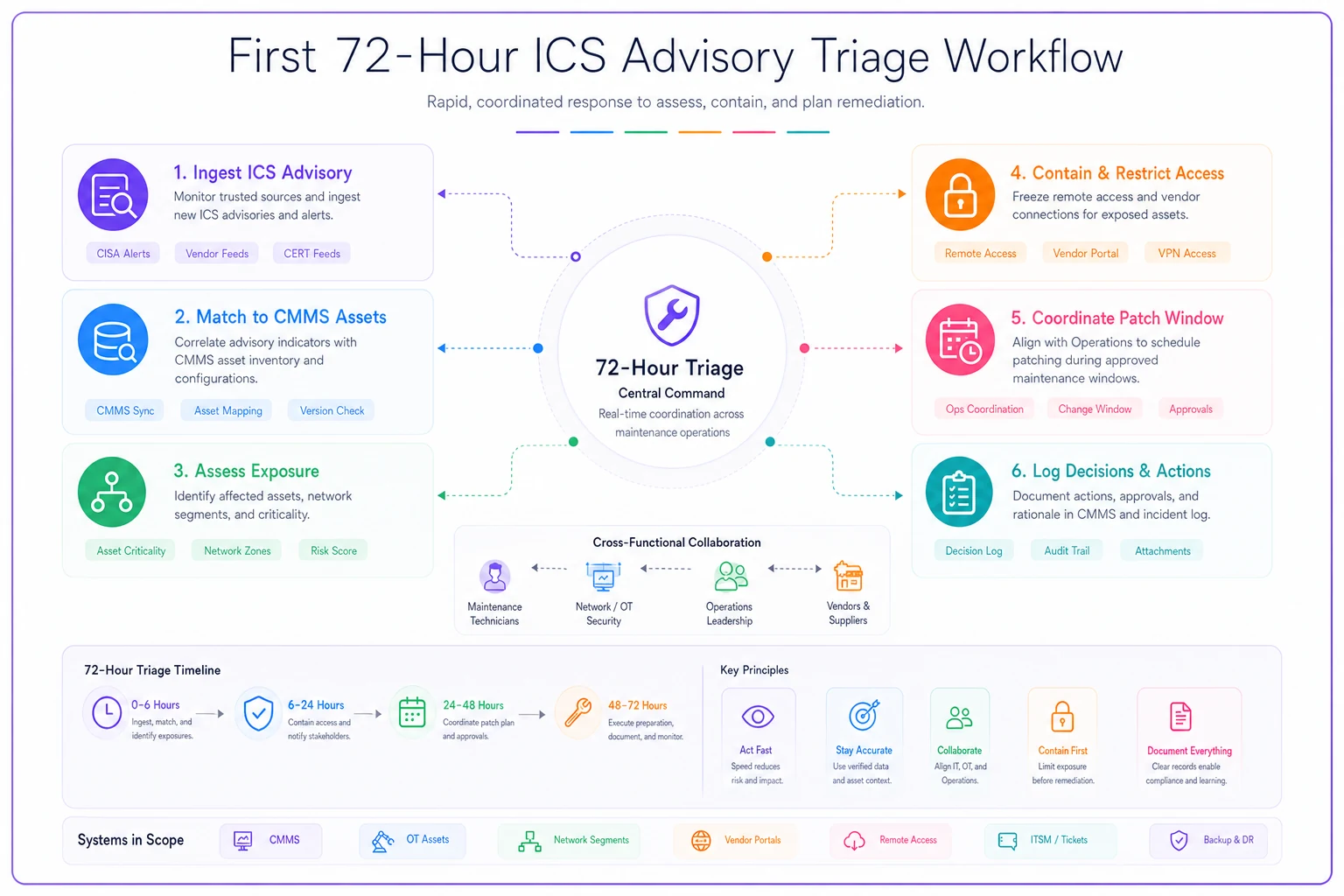
Use this flow to keep assessments fast and safe.
Where CMMS integrity quietly falls apart
The advisories put a spotlight on something maintenance leaders already half-know: the CMMS is only as useful as the fields nobody bothered to fill in. Model number, firmware version, IP address, network segment, remote-access method, responsible vendor — these are the fields that turn a two-week manual audit into a two-hour query.
A rough breakdown of what typically exists versus what's actually needed:
| Data Point | Usually in the CMMS? | Needed for ICS advisory response? |
|---|---|---|
| Asset name / location | Yes | Yes |
| PM schedule | Yes | Indirectly (patch windows) |
| Manufacturer / model | Sometimes | Critical |
| Firmware / software version | Rarely | Critical |
| Network segment / IP | Almost never | Critical |
| Remote-access method & owner | Almost never | Critical |
| Last patch / update date | Almost never | Critical |
The bottom half of that table is where the pain lives. The fix isn't glamorous — it's a data-cleanup effort tied to your next round of PMs. When a technician is already at the panel for a scheduled inspection, capturing the firmware version and confirming the network path adds maybe five minutes. Do that across a PM cycle and you've built the inventory you wished you had when the advisory dropped.
When a technician is already at the panel for a scheduled inspection, capturing the firmware version and confirming the network path adds maybe five minutes.
This is also where CMMS platforms with AI-assisted data validation earn their keep in a low-key way. When a technician logs an asset with a missing firmware field, an automated check can flag the gap and route a follow-up task, so the record actually gets completed instead of sitting half-empty for another year. It's not flashy — it's just the difference between a CMMS that helps you respond and one that becomes another thing you have to reconcile by hand.
The logging problem CISA is actually pointing at
The new logging guidance is easy to dismiss as a federal compliance thing. It's not. The practical takeaway for facility teams is simpler: when something goes wrong on your OT network, can you reconstruct what happened?
Most BAS deployments log alarms and setpoint changes for troubleshooting HVAC problems. Very few log who connected remotely, when, and what they changed. So if a controller behaves strangely after a contractor's remote session, there's no clean record to tell you whether it was a legitimate change, a misconfiguration, or something worse.
The connection to maintenance is direct. Every remote session tied to a work order should leave a trail. If your vendor governance already links contractor arrivals and actions to work orders, extending that to remote OT sessions is a small step. If it doesn't, this is the nudge to build it.
A workable approach: remote-access events get captured at the network layer by IT, but the context — which work order, which vendor, which asset, what the intended change was — lives in the CMMS. Neither system tells the whole story alone. Tie them together and you can answer, months later, "why did this controller's config change on August 22nd?" without guessing.
A real scenario: mid-size portfolio, three affected panels
A facilities group managing about a dozen commercial properties got wind of an ICS advisory covering a fire-panel product they'd deployed at several sites. Their initial estimate to locate every affected unit was "maybe a week, once we get people out there." Reality: it took closer to nine days, because two sites had panels that never made it into the CMMS after a renovation, and one had firmware that predated any record they could find.
The exposure itself turned out modest — most panels were on isolated segments. But one site had a remote-monitoring connection through a contractor portal that hadn't been reviewed since installation. That account had broad access and a password that had never rotated. Disabling it took ten minutes. Finding it took most of the nine days.
After the scramble, they did the boring but correct thing: added firmware and network fields to their asset template and captured them during the next PM sweep. The following advisory — a few months later — took them under a day to triage. Same team, same tools, just records discipline that finally matched the risk. The cost of the fix was a few extra minutes per PM over one cycle. The cost of not having it was nine days of reactive scrambling and a genuinely exposed account.
When to patch immediately — and when patching is the wrong first move
Not every advisory demands the same urgency, and treating them all as emergencies burns out your team and your credibility with operations.
Patch fast when:
-
The asset is internet-reachable or on a shared business network
-
The vulnerability allows remote code execution or authentication bypass
-
The system is life-safety related and the vendor confirms a stable patch
Slow down and contain first when:
-
The asset is genuinely isolated with no remote path
-
The patch is unproven or the vendor hasn't validated it on your firmware line
-
Patching requires taking a critical system offline during peak demand with no rollback plan
Who should not rush this at all: teams without a tested rollback procedure for the affected controller. Bricking a chiller controller with a bad firmware push during summer is a worse outcome than a contained, monitored vulnerability you patch two weeks later on a planned window.
Building the muscle so the next advisory is routine
The real win isn't surviving this month's advisories. It's making the next one a Tuesday task instead of an all-hands scramble. That comes down to a few durable habits:
-
Maintain a live asset inventory with model, firmware, network segment, and remote-access owner as required fields.
-
Review vendor remote-access accounts quarterly — tie each one to an active work order or kill it.
-
Segment OT from the business network so a single vulnerability doesn't have a clear path to everything else.
-
Link remote sessions to work orders so every change has context and an owner.
-
Keep a standing patch-window calendar so remediation slots into normal operations instead of interrupting them.
None of this is exotic. It's the same records and governance discipline that makes every other part of maintenance run better — it just happens to also make security response manageable. If you want the fuller framework behind this, the maintenance cyber-physical security standard for BAS, sensors and CMMS lays out the roles, cadence, and enforcement structure that keeps this from decaying back into clipboard audits.
Where this leaves you
CISA's August advisories are a reminder that the line between "maintenance system" and "attack surface" barely exists anymore. The controllers, panels, and sensors your team maintains are computers on a network, and they need the same records discipline you'd apply to any critical asset — plus a bit more, because the failure modes now include someone reaching them from outside the building.
The teams that handle these advisories well aren't the ones with the biggest security budgets. They're the ones whose CMMS actually reflects reality: what's installed, what version it runs, who can reach it, and when it was last touched. Get those fields right during your normal PM work, and an ICS advisory response stops being a crisis and becomes what it should be — a query, a containment step, and a scheduled patch window. The advisory will always come. Whether it costs you nine days or nine minutes depends entirely on the records you kept before it arrived.
Ready to optimize your maintenance operations?
Join 2,000+ facilities using Openfixit to reduce unplanned outages, extend asset life, and improve operational efficiency.