

Most facility teams don't think about cybersecurity until something weird happens. A BAS schedule flips on its own at 2am. A row of temperature sensors goes dark on the same VLAN. A contractor's laptop touches the controls network and now nobody's sure what changed. By then you're not doing security — you're doing damage control, and your CMMS is the only place with any hint of what actually happened.
Building automation systems, field sensors, and the CMMS that ties them together have quietly become one of the softest attack surfaces in most organizations. Not because facility teams are careless, but because these systems were designed for uptime and convenience — not for a world where the thermostat has an IP address and the pump VFD talks to a cloud dashboard.
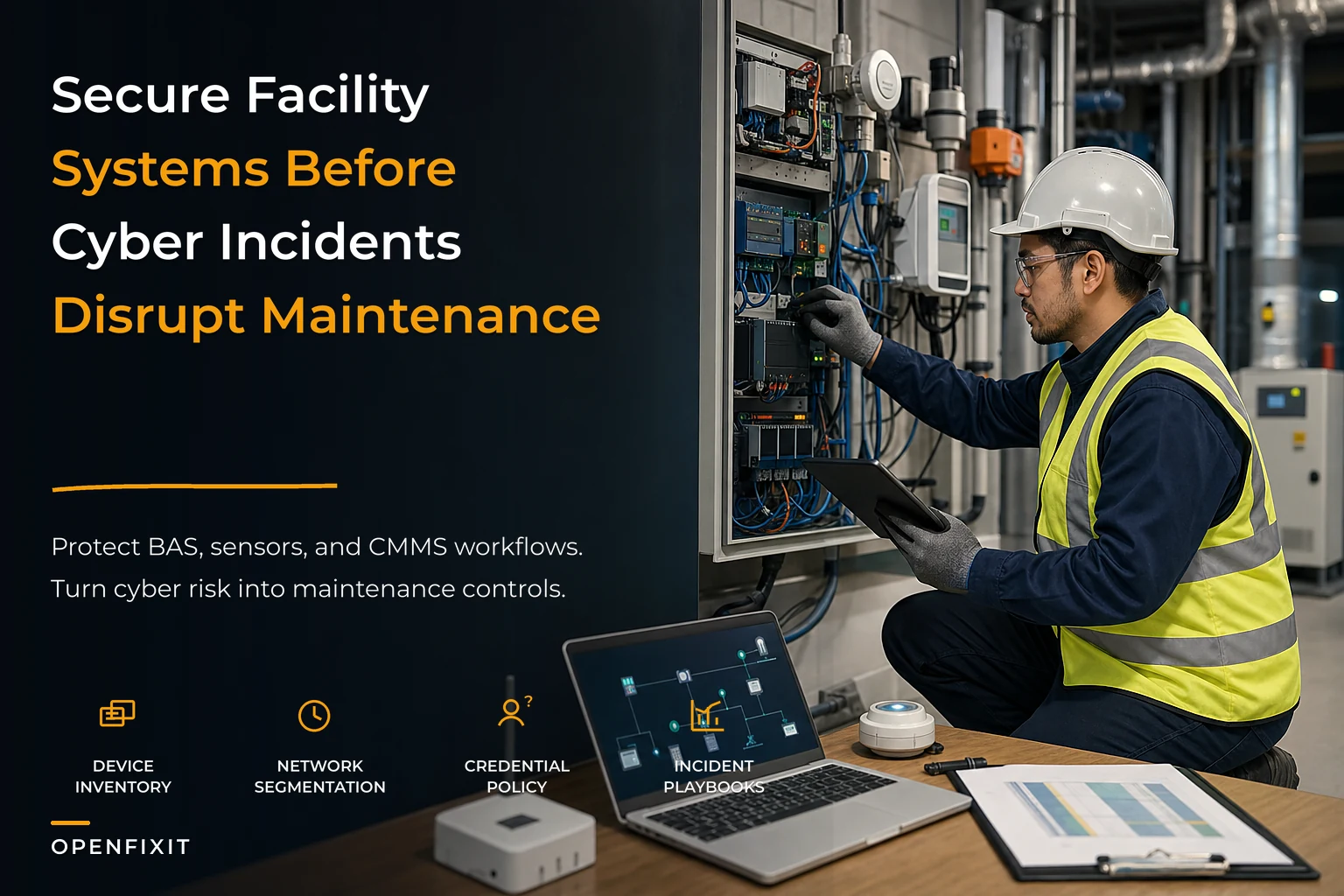
This is a working standard for maintenance cyber-physical security — one that treats risk the way maintenance already treats it: by asset criticality, by failure consequence, and by the workflows people actually follow. It's not a rewrite of NIST or IEC 62443. It's a translation of those ideas into device inventories, network layout, credential rules, and incident playbooks that map directly to CMMS records and maintenance work.
Why facility systems break differently than IT systems
When IT gets breached, data leaks. When a facility control system gets compromised, physical things happen — a chiller trips, a door unlocks, a boiler runs past setpoint, a smoke damper doesn't close. The consequence isn't a spreadsheet, it's a comfort call, a safety event, or a six-figure equipment failure.
That difference changes everything about how you approach security here. IT can patch aggressively and reboot on a Tuesday night. You can't reboot a BAS controller during a heat event without risking occupant complaints or a compressor fault. IT can enforce password rotation across thousands of accounts overnight. Your integrators are still logging into JACE controllers with a shared password that hasn't changed since 2016.
-
Flat networks. BAS, sensors, cameras, and sometimes guest Wi-Fi all sit on the same subnet because the original install "just needed to work."
-
Ghost devices. Nobody has a complete list of what's actually on the controls network. The as-built drawings are three retrofits out of date.
-
Vendor backdoors. Integrators keep remote access open indefinitely so they can "help faster." Half the time the facility team doesn't even know the tunnel exists.
-
CMMS blind spots. The system that tracks every physical asset has no field for firmware version, no record of who has network credentials, and no work-order type for a security incident.
That last one is the gap this standard is built to close. Your CMMS already knows your assets, their criticality, their maintenance history, and who works on them. It's the natural home for security context — you just have to structure it deliberately.
The four pillars, and why they have to connect
Cyber-physical security for facilities tends to get sold as four separate projects: an inventory project, a network project, a credential project, and an incident-response binder. Run separately, they drift apart within months. The inventory goes stale, the segmentation gets bypassed by the next vendor, and the incident playbook sits in a shared drive nobody opens.
Eliminate downtime with proactive maintenance.
Openfixit helps you plan, track, and complete maintenance efficiently—maximizing asset reliability.
- Centralized asset management
- Automated maintenance scheduling
- Inventory and parts tracking
No credit card required
The point of a standard is that these four things reinforce each other. Here's how each pillar maps to maintenance reality.
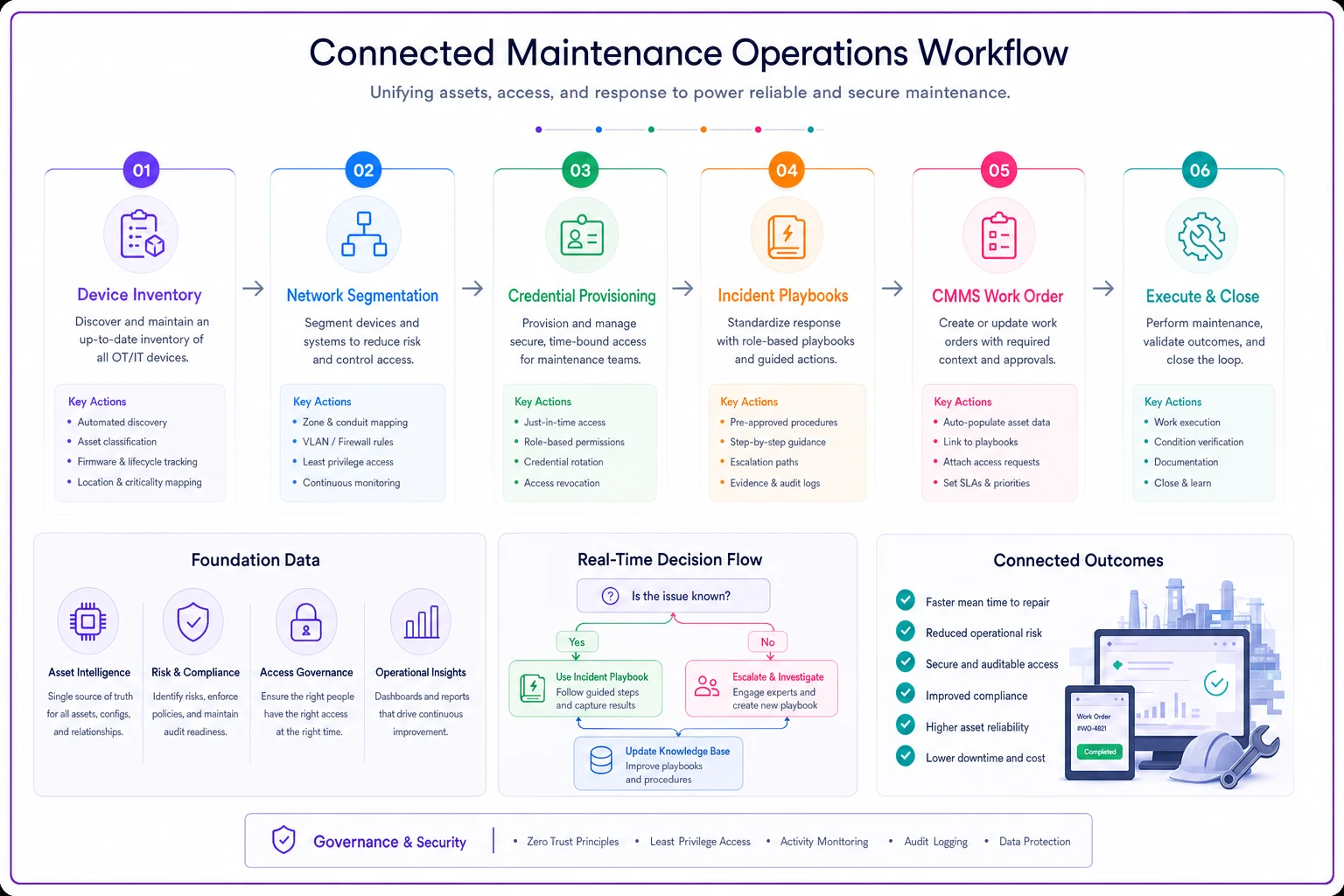
Short diagram below shows how the pillars map to CMMS and maintenance workflows.
1. Device inventory that lives where your assets already live
You don't need a separate cybersecurity asset database. You need to extend the asset records you already maintain. Every networked device — controller, sensor, gateway, VFD, smart meter, IP camera tied to facilities — should exist as an asset or sub-asset in the CMMS with a handful of security-relevant fields.
-
IP/MAC address and the VLAN or segment it belongs to
-
Firmware/OS version and last update date
-
Vendor and support contact
-
Criticality tier (same tier you'd use for maintenance priority)
-
Remote access method, if any
-
Default credential status (changed / not changed / unknown)
Tie inventory reconciliations to scheduled work orders so discovered devices are routed into maintenance workflows rather than lingering as "unknowns."
The insight most teams miss: an unknown device is a maintenance problem and a security problem at the same time. If a sensor isn't in your CMMS, you're not PMing it, you're not tracking its failures, and you can't tell whether it belongs on the network. Closing the inventory gap fixes both problems at once.
A realistic starting point — run a passive network scan, export the device list, and reconcile it against your CMMS asset register. That first reconciliation typically surfaces 15–30% more networked devices than anyone expected. Old sensors from a retrofit, a spare controller left plugged in, a "temporary" gateway that became permanent.
2. Network segmentation mapped to asset criticality
Segmentation isn't about drawing a hundred VLANs. It's about making sure a compromise in one area can't walk straight into your critical mechanical systems. The maintenance-friendly way to think about it is by consequence tier.
| Segment | What lives here | Blast-radius goal | Maintenance access |
|---|---|---|---|
| Critical controls | Chiller/boiler plant, life-safety interfaces, main BAS supervisors | No inbound from anywhere except a jump host | Named accounts only, logged |
| Standard controls | Zone controllers, VAV boxes, general BAS | Isolated from IT and guest | Named accounts, role-based |
| Sensing/telemetry | Environmental sensors, meters, non-critical IoT | Read-mostly, no lateral path to controls | Read access for most techs |
| Vendor/temporary | Integrator remote sessions, commissioning gear | Time-boxed, monitored, killed on completion | Approved per work order |
The pattern to watch for: segmentation that exists on paper but gets defeated by convenience. Someone plugs a laptop into the wrong switch port, or a vendor "temporarily" bridges two segments and never unbridges them. Segmentation only holds if it's tied to a process — which is where the credential and incident pillars come in.
3. Credential policy that survives contractor turnover
Shared passwords are the norm in this industry, and they're the single easiest thing to fix that nobody actually fixes. The reason it stays broken is workflow: integrators rotate staff, jobs get subcontracted, and a shared login is just easier than provisioning named accounts every time.
-
No shared accounts on critical or standard control segments. Named accounts only, even for vendors.
-
Vendor access is provisioned per engagement and expires automatically. Tie the account lifecycle to the work order — access opens when the WO is scheduled and closes when it's completed.
-
Default credentials get changed at commissioning, and the CMMS records that it happened. "Default changed: Y/N" is a mandatory field before a device asset can be marked active.
-
Remote access requires an approval that references a work order. No open-ended tunnels.
-
Quarterly credential review cross-checks active accounts against active vendors and current staff.
The connective tissue here: if vendor access is tied to work orders, your credential policy, inventory, and incident logging all update from the same event. When a contractor closes out a job, their access dies and there's a timestamped record of who touched what. That's the kind of accountability that also cleans up disputes on the maintenance side — two problems solved with one process.
4. Incident playbooks written for maintenance impact
Generic incident-response plans tell you to "contain, eradicate, recover." Fine for a laptop. Nearly useless when the affected asset is a running chiller in July. Facility incident playbooks have to answer a different question first: what happens to the physical system if we isolate this device?
-
Detect & classify — what tripped the alert, which asset/segment, what's the criticality tier.
-
Assess physical impact — can we isolate without losing heating/cooling/life-safety? If not, what's the interim manual control?
-
Contain — pull the segment or device, fail systems to a safe manual state.
-
Log in CMMS — open a security-incident work order tied to the affected asset(s), capture timeline and evidence.
-
Recover — restore known-good firmware/config, verify setpoints, confirm normal operation.
-
Review — root-cause the entry point, update inventory and segmentation, close the loop.
The step teams almost always skip: logging it as a work order against the asset. Six months later, when you're investigating a recurring controller fault, the fact that it was compromised in the spring is exactly the context you'll wish you had on record.
What breaks as you scale from one building to a portfolio
At a single site, you can hold a lot of this in your head. One BAS, one integrator, a switch closet you personally know. The standard feels like overkill.
At ten sites, it falls apart fast. Different integrators used different conventions. Some sites are segmented, some are flat. Firmware versions are all over the place. A vendor with portfolio-wide remote access becomes a portfolio-wide risk — compromise one credential and you're into every building.
The failure mode at scale is almost never a sophisticated attack. It's inconsistency. Site A changed default credentials, Site D never did. Site B has a real jump host, Site C left a modem plugged in for "emergencies." An attacker — or even a curious contractor — finds the weakest site and works from there.
This is why the standard has to be enforced through repeatable process, not tribal knowledge. Consistent asset records, consistent segment definitions, and consistent vendor-access rules are what let you say "every site meets tier-2 baseline" instead of just hoping. A well-structured multi-site maintenance knowledge-management system is where those conventions live — the naming standards, the segment definitions, the credential SOPs that keep every site speaking the same language.
Where integration is the actual risk
Most cyber-physical incidents in facilities don't start with a hacker. They start with a bad integration. A new sensor package gets installed, the integrator opens a port to make the cloud dashboard work, and nobody checks what that port actually exposes. Or a CMMS-to-BAS integration passes credentials in plain text because that was the fastest way to get data flowing.
Every time you connect a new device or system, you're changing your attack surface — and usually nobody verifies it. Security verification belongs in your commissioning workflow, right alongside functional verification. Before a new integration goes live, confirm the segment it lands on, the credentials it uses, and the ports it opens. The same post-install discipline that keeps you from shipping bad integrations — verification queries, latency checks, sanity tests — should include a short security pass: is this on the right VLAN, are default credentials changed, is remote access scoped and logged.
A real scenario
A regional operator with about a dozen mixed-use buildings ran everything flat. BAS controllers, roughly 400 sensors, and the CMMS integration all shared address space with the office network at several sites. Their integrator had a permanent VPN into the controls at every location — one shared login, no expiration.
The trigger wasn't an attack. It was an insurance renewal that asked, point-blank, for a device inventory and a segmentation diagram. They had neither.
The cleanup took about a quarter. First pass: passive scan and reconciliation, which turned up close to 60 networked devices not in the CMMS at all — mostly leftover sensors and two forgotten gateways. They tiered every asset by criticality, moved critical plant controls behind a jump host, and split sensing traffic onto its own segment. The shared integrator VPN was replaced with named, work-order-tied access that expires on WO completion.
The measurable outcome wasn't dramatic in a headline way, and that's kind of the point. No breach, no downtime event, and the insurance renewal went through without the surcharge they'd been quoted — somewhere in the low five figures annually. The quieter win: their CMMS now shows firmware versions and credential status on every networked asset, so the next audit is a report, not a fire drill.
When this level of rigor makes sense — and when it doesn't
When it's clearly worth it:
-
Multiple sites with different integrators and inconsistent setups
-
Any life-safety or critical-plant systems on the network
-
Insurance, regulatory, or client contracts that require it
-
You've already had a "we don't know what changed" incident
When you can scale it down:
-
A single small building with a truly isolated BAS and no remote access
-
Very few networked devices, all from one vendor, all documented
Who should not treat this as a pure IT handoff: Facility teams that assume corporate IT "has the building covered." IT rarely understands the physical consequence of isolating a controller mid-summer, and they almost never have the asset context. This has to be a joint standard — IT owns the network primitives, maintenance owns the asset criticality, physical impact, and the work-order records.
A pragmatic starting checklist
If you're building this from zero, don't try to boil the ocean.
Start here:
-
Run a passive network scan at your highest-risk site
-
Reconcile discovered devices against CMMS assets; create records for the gaps
-
Add security fields to your device assets (VLAN, firmware, credential status, remote access)
-
Tier every networked asset by criticality using your existing maintenance priorities
-
Identify and kill every open-ended vendor tunnel; re-provision as work-order-tied access
-
Change default credentials on critical devices and record it in the CMMS
-
Draft one incident playbook for your single most critical system
Roll the same standard to the next site using the same conventions
Bringing it together
Cyber-physical security keeps falling through the cracks in facilities because it gets framed as an IT problem — and IT doesn't own the assets. Your maintenance team already runs a system that tracks every asset, its criticality, its history, and who works on it. Layering security context onto that — inventory fields, segment mapping, credential rules tied to work orders, incident playbooks that account for physical impact — turns a scary, unbounded IT project into an extension of work you already do.
You don't secure a building by buying a firewall. You secure it by knowing exactly what's on the network, controlling who can reach the critical stuff, tying access to actual work, and having a plan that respects the fact that these systems keep people warm, cool, and safe. Do that consistently across every site, and cyber-physical security stops being the thing you scramble on during an audit — and becomes just another part of running the building well.
Cyber-physical security keeps falling through the cracks in facilities because it gets framed as an IT problem — and IT doesn't own the assets. Your maintenance team already runs a system that tracks every asset, its criticality, its history, and who works on it. Layering security context onto that — inventory fields, segment mapping, credential rules tied to work orders, incident playbooks that account for physical impact — turns a scary, unbounded IT project into an extension of work you already do.
You don't secure a building by buying a firewall. You secure it by knowing exactly what's on the network, controlling who can reach the critical stuff, tying access to actual work, and having a plan that respects the fact that these systems keep people warm, cool, and safe. Do that consistently across every site, and cyber-physical security stops being the thing you scramble on during an audit — and becomes just another part of running the building well.
Ready to optimize your maintenance operations?
Join 2,000+ facilities using Openfixit to reduce unplanned outages, extend asset life, and improve operational efficiency.