

Your maintenance supervisor calls Monday morning. The weekend crew had seventeen duplicate PM work orders for the same chiller. Nobody caught it until the third tech showed up to grease the same bearing. The automation rule deployed Friday afternoon created a cascading mess that took four hours to untangle.
CMMS automation rules break in predictable ways. After watching facilities teams struggle with broken automations across manufacturing plants, hospitals, campus buildings, and distribution centers, the patterns become pretty obvious. A rule that works perfectly in test suddenly generates hundreds of duplicate tickets in production. An auto-assignment formula sends every emergency work order to the tech who's on vacation. A PM suppression rule accidentally skips critical monthly inspections.
The problem isn't that CMMS automation rules are inherently complex. It's that most teams deploy them without proper testing frameworks, rollback procedures, or any real monitoring. You change one condition in a workflow rule and three weeks later discover it's been silently failing on every asset ID that has a hyphen in it.
Why automation rules fail in production environments
CMMS platforms give you powerful automation capabilities but minimal safety nets. You can build rules that trigger on work order creation, status changes, date conditions, meter readings, or custom field values. Each rule has triggers, conditions, and actions that seem straightforward until they meet messy production data.
A pharmaceutical facility built auto-assignment rules based on skill codes and shift schedules. Worked great for two months. Then daylight savings hit and every Sunday night work order got assigned to techs who weren't scheduled until Monday morning. The rule logic didn't account for the timestamp conversion between the CMMS server and the scheduling system.
The real killer is data quality variation. Your test environment has clean, consistent asset naming. Production has equipment tagged as "HVAC-01," "hvac_01," "HVAC Unit 1," and "Building A Chiller." A rule that matches on asset type works on maybe 60% of equipment. The other 40% gets ignored until someone notices the PM schedules look incomplete.
Most teams find out through angry phone calls. Techs arrive to find work already done. Critical PMs get skipped. Emergency work orders sit unassigned for hours. By then, trust in the system has already taken a hit.
The compound effect of broken rules on team productivity
When automation fails, it doesn't just create extra work—it multiplies problems. That duplicate PM issue wasted three techs' time on the same task, but it also meant three other PMs didn't get done, parts got pulled unnecessarily, and your completion metrics are now meaningless.
Eliminate downtime with proactive maintenance.
Openfixit helps you plan, track, and complete maintenance efficiently—maximizing asset reliability.
- Centralized asset management
- Automated maintenance scheduling
- Inventory and parts tracking
No credit card required
When auto-assignment rules break, work orders pile up in the unassigned queue while techs sit idle. Supervisors spend their morning manually distributing tasks instead of reviewing quality issues. High-priority jobs get buried under routine requests. Planned maintenance turns into reactive firefighting.
The trust problem hits harder than the operational mess. Techs stop believing the system and create their own workarounds—spreadsheets, text threads, verbal handoffs. Now you're running parallel systems where the CMMS becomes a compliance checkbox rather than an actual operational tool.
A hospital facilities team lost three weeks of PM history when a suppression rule inadvertently closed work orders without recording completion data. They found out during Joint Commission audit prep. The fix took around forty hours of manual reconstruction from paper logs and technician memory.
Building your automation rule library
Rather than learning through failure, start with proven rule templates that include built-in safety checks. Below is a library of twelve automation rules with specific test procedures and rollback steps.
Each rule follows the same basic structure: what the rule does, what conditions it checks, how to test it, and what to do when it breaks. That consistency matters when you're troubleshooting at 6am before shift start.
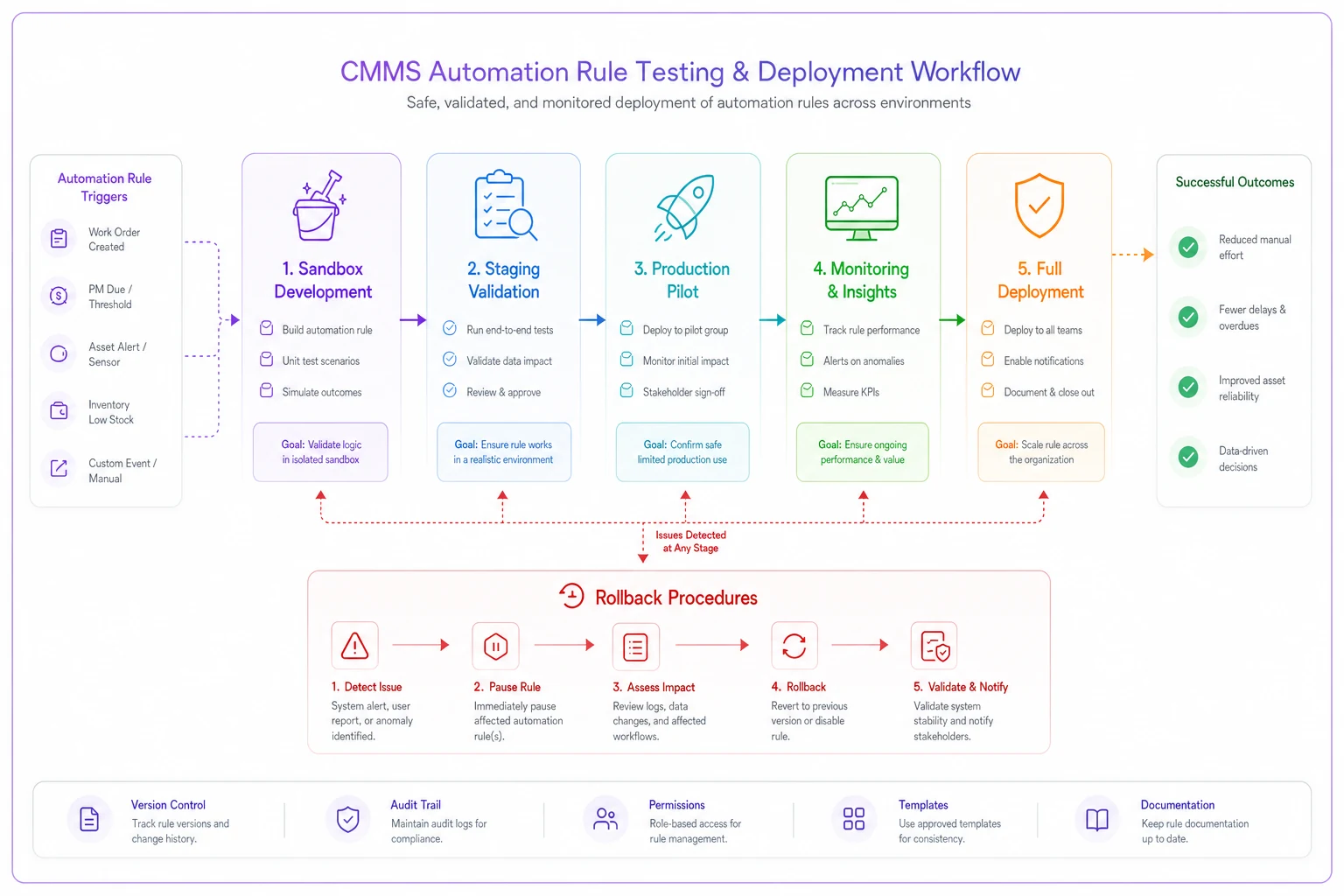
Visual overview of the rule testing and deployment workflow.
1. Duplicate PM Suppression
Rule Logic: When a PM work order generates, check if an identical PM exists within X days for the same asset.
Conditions to check:
-
Asset ID matches exactly
-
PM template ID matches
-
Existing work order status is not "Cancelled" or "Closed"
-
Date range is within threshold (typically 7-14 days)
Test steps:
-
Create test asset with PM schedule
-
Manually generate PM work order
-
Trigger PM generation again
-
Verify suppression message appears
-
Check audit log for suppression event
Rollback procedure:
-
Disable rule immediately
-
Query for all suppressed PMs in date range
-
Review suppression log for false positives
-
Manually generate missed PMs
-
Document pattern causing false suppressions
2. Skills-Based Auto-Assignment
Rule Logic: Match work order skill requirements to available technicians with matching certifications.
Conditions to check:
-
Tech has required skill code active
-
Tech is scheduled during work window
-
Tech workload is below daily threshold
-
Asset location matches tech territory
Test steps:
-
Create work orders with different skill requirements
-
Verify assignment to qualified techs only
-
Test with tech on PTO status
-
Test with maxed-out workload
-
Verify reassignment when tech unavailable
Common failure point: Skill codes on work orders don't match skill codes on tech profiles due to naming inconsistencies.
3. Emergency Work Order Escalation
Rule Logic: Escalate unacknowledged emergency work orders after X minutes.
Conditions to check:
-
Priority = "Emergency" or "Urgent"
-
Status remains "Unassigned" or "Assigned but not acknowledged"
-
Time elapsed exceeds threshold
-
Escalation hasn't already triggered
Test steps:
-
Create emergency work order
-
Let timer expire without acknowledgment
-
Verify escalation notification sends
-
Confirm supervisor receives alert
-
Test acknowledgment stops escalation
Rollback procedure:
-
Set escalation timer to 999 minutes (effectively disabling)
-
Clear escalation queue
-
Review notification logs for spam issues
-
Adjust timer threshold based on feedback
4. Meter-Based PM Generation
Rule Logic: Generate PM when equipment meter exceeds threshold since last PM.
Conditions to check:
-
Current meter reading - last PM meter > threshold
-
No open PM exists for asset
-
Meter reading is validated (not negative, not extreme jump)
-
PM template is active
Test with these scenarios:
-
Normal meter progression
-
Meter rollback (replacement)
-
Extreme jump (data entry error)
-
Multiple meters on same asset
-
Meter reading gaps
5. Work Order Aging Alerts
Rule Logic: Alert supervisors when work orders exceed age limits by priority.
Conditions to check:
-
Age calculation from creation date
-
Priority-based thresholds (Emergency
4 hours, High: 24 hours, etc.)
-
Exclude "On Hold" status
-
Exclude completed but not closed
-
Check business hours vs calendar time
Test steps:
-
Create work orders of each priority
-
Advance system time or wait for real aging
-
Verify alerts trigger at correct thresholds
-
Test "On Hold" exclusion
-
Confirm multiple alerts don't spam
6. Parts Auto-Reservation
Rule Logic: Reserve parts when PM work order generates based on task requirements.
Conditions to check:
-
Parts in stock meet minimum quantity
-
Parts not already reserved
-
Work order scheduled date within parts lead time
-
Substitutes available if primary out of stock
Failure scenario to test: Part gets reserved for a PM scheduled 30 days out while an emergency repair needs it today.
7. Completed Work Order QA Sampling
Rule Logic: Flag a random percentage of completed work orders for quality review.
Conditions to check:
-
Work order status = "Complete"
-
Random selection meets percentage target
-
Exclude self-performed QA
-
Include all techs proportionally
-
Track sampling distribution
Test validation:
Run rule on 100 test work orders, verify sampling percentage within 5% of target.
8. Vendor Work Order Routing
Rule Logic: Route specialized work orders to approved vendors based on asset type and warranty status.
Conditions to check:
-
Asset type matches vendor specialty
-
Warranty status is current
-
Vendor contract is active
-
Vendor has capacity (based on open work orders)
-
Cost threshold requirements met
Test scenarios:
-
In-warranty equipment
-
Expired warranty
-
No approved vendor for asset type
-
Vendor at capacity limit
-
Mixed warranty status on multi-asset work order
9. PM Schedule Conflict Detection
Rule Logic: Identify and flag PM scheduling conflicts before work order generation.
Conditions to check:
-
Multiple PMs scheduled same day/week for asset
-
Shutdown requirements conflict
-
Resource requirements exceed availability
-
Seasonal restrictions apply
Test steps:
-
Schedule overlapping PMs
-
Verify conflict detection triggers
-
Test resolution suggestions
-
Confirm manual override capability
-
Validate conflict log creation
10. Cost Threshold Approval Routing
Rule Logic: Route work orders exceeding cost thresholds to appropriate approval levels.
Conditions to check:
-
Estimated cost calculation includes labor + parts
-
Approval hierarchy matches current org structure
-
Delegation rules during absence
-
Emergency override capability
-
Audit trail creation
Rollback critical: A wrong threshold can either block all work or bypass required approvals entirely.
11. Shift Handoff Auto-Documentation
Rule Logic: Generate shift handoff notes for incomplete work orders at shift change.
Conditions to check:
-
Work order status is "In Progress"
-
Shift change time matches schedule
-
Tech has added progress notes
-
Next shift has qualified tech
-
Safety warnings included
Test validation:
Create in-progress work orders across a shift change, verify handoff notes generate with correct information.
12. Regulatory Compliance PM Enforcement
Rule Logic: Prevent closing or cancelling regulatory-required PMs without documentation.
Conditions to check:
-
PM tagged as regulatory/compliance
-
Required fields completed
-
Attachment/photo requirements met
-
Supervisor review if exception
-
Compliance report generation
Test critically: A false positive here stops operations. A false negative is a compliance violation.
Testing methodology that actually catches problems
Stop testing automation rules in production. Every rule needs to pass through three environments before it touches real operations.
Development Testing: Build the rule in your sandbox using a subset of production data. Test every condition branch. Document what should happen versus what actually happens. Use asset IDs with special characters, spaces, and inconsistent formatting—because that's what you'll find in production.
Use asset IDs with special characters in sandbox tests to mirror production anomalies.
Staging Validation: Mirror your production environment with controlled test data. Run the rule for at least 48 hours to catch time-based issues. Push at least 100 test transactions through to surface edge cases. Watch system performance for resource consumption spikes.
Production Pilot: Deploy to a single facility, department, or asset class first. Run parallel to manual processes for a week. Compare automation results to what would have happened manually. Document every discrepancy, even the ones that seem minor.
A food processing plant tested their PM suppression rules on just the packaging line first. Good thing—the rule would have suppressed critical sanitation PMs across the entire facility due to a date format mismatch between their CMMS and quality system.
QA checklist before deploying any rule
Print this checklist. Follow it every time. One skipped step can create weeks of cleanup.
Data Quality Checks:
-
[ ] Asset naming consistency verified
-
[ ] Required fields populated on all affected records
-
[ ] Date/time formats standardized
-
[ ] User permissions confirmed
-
[ ] Historical data won't trigger mass actions
Rule Logic Validation:
-
[ ] Every IF condition has an ELSE handler
-
[ ] Null/empty value handling defined
-
[ ] Circular logic prevention confirmed
-
[ ] Maximum action limits set
-
[ ] Exception handling documented
Integration Testing:
-
[ ] API connections tested under load
-
[ ] Email/SMS notifications reaching recipients
-
[ ] External system data syncs verified
-
[ ] Mobile app displays updates correctly
-
[ ] Reporting data flows properly
Rollback Preparation:
-
[ ] Rollback procedure documented
-
[ ] Data backup completed
-
[ ] Rollback tested in staging
-
[ ] Communication plan ready
-
[ ] Success metrics defined
Monitoring Setup:
-
[ ] Alert thresholds configured
-
[ ] Audit logging enabled
-
[ ] Performance baselines established
-
[ ] Error notification recipients assigned
-
[ ] Review schedule created
After completing the checklist, get a second set of eyes on the rule logic before deployment—especially for anything touching compliance PMs or approval routing. A peer review catches the stuff you've been staring at too long to notice.
Safe rollback procedures that preserve data integrity
When automation fails, your rollback procedure determines whether you lose an hour or a week. Most teams panic and disable everything, which usually creates more problems than the original failure.
Immediate Actions (First 15 minutes):
-
Disable the specific rule—not all automation
-
Document the exact failure mode
-
Capture error logs before they rotate
-
Note how many transactions were affected
-
Communicate to affected users
Assessment Phase (Next hour):
Query for all transactions touched by the rule. Export that data immediately—you'll need it for cleanup. Look for patterns in the failures. Was it all work orders or just specific types? Did the rule fail completely or partially execute?
Check downstream systems too. If your rule triggered notifications, updated inventory, or modified schedules, those changes might need reversal. A distribution center found their auto-assignment rule had updated their workforce management system, creating overtime scheduling nobody had authorized.
Cleanup Execution:
Start with the highest-impact issues. If PMs were skipped, regenerate them first. If work orders were misassigned, fix that before shift start. If inventory was reserved incorrectly, release it so emergency repairs can access it.
Document every manual correction in your CMMS audit log. Create a temporary work order or note explaining the automation failure and what was fixed manually. That context matters when someone questions data discrepancies three months later.
Validation Steps:
After cleanup, run reports comparing current state to expected state. Check work order counts by status, PM completion rates, tech workload distribution, inventory reservation levels, and cost approval queues.
Don't re-enable the rule until you've identified root cause, fixed it, and tested the fix in staging.
Monitoring rules without drowning in alerts
Too few alerts and problems fester. Too many and people ignore everything. Your monitoring setup needs to be specific—tiered by actual impact.
| Alert Level | When It Fires | Examples |
|---|---|---|
| Critical | Immediately | Rule throwing repeated errors, 50+ transactions affected in an hour, compliance rule failure |
| Warning | Daily summary | Rule triggering outside expected range, data quality blocking execution, approaching resource limits |
| Information | Weekly review | Execution counts, processing time trends, success/skip ratios, user override frequency |
A manufacturing facility tracks their CMMS automation rules through a simple daily dashboard showing rules executed, success rate, and any manual overrides. Takes five minutes each morning but catches problems before they cascade into something worse.
Beyond tiered alerts, set up monitors for the failure patterns that show up most often. Track work orders per asset per day—a spike usually means suppression broke. Watch work order distribution across techs; if one person is getting slammed while others are light, assignment rules are probably off. Monitor PMs created versus schedule, because gaps are how generation failures hide for weeks. And keep an eye on how long work orders sit in approval queues. When that time creeps up, it's almost always a routing problem.
The difference between rules that scale and rules that break
Scalable automation rules handle data quality variations gracefully. They include circuit breakers that prevent runaway execution. They log enough detail for troubleshooting without flooding your database.
Flexible Matching Logic: Use contains/starts-with/pattern matching instead of exact string matches. An auto-assignment rule that looks for "HVAC" in the asset type field catches more equipment than one requiring the exact string "HVAC."
Graceful Degradation: When conditions partially fail, the rule should still do something useful. If skill-based assignment can't find a certified tech, assign to a supervisor rather than leaving the work order unassigned.
Rate Limiting: Prevent any rule from executing more than X times per minute or hour. This catches infinite loops before they crash your system. A hospital learned this after a PM generation rule created around 3,000 work orders in five minutes because of a date calculation error.
Idempotency: Running the same rule twice shouldn't create duplicate actions. Use transaction IDs or status flags to prevent re-processing.
Version Control: Track every rule change with who changed it, what changed, and why. When something breaks three months later, you need that forensic trail. Export rule configurations weekly as backup.
Advanced patterns for complex workflows
Once basic automation is running reliably, you can build more sophisticated workflows by combining multiple rules. But complexity multiplies failure points, so move carefully.
Cascading Rules with Circuit Breakers:
Chain rules together but include stop conditions. A solid example is a meter-triggered PM workflow:
-
PM generates based on meter reading
-
Parts get auto-reserved if available
-
Work order assigns to qualified tech
-
If any step fails, assign to supervisor for manual handling
The circuit breaker prevents partial execution that leaves work orders stuck in an ambiguous state. Without it, you end up with work orders that have reserved parts but no assigned tech, and nobody notices until the scheduled date.
Conditional Branching Based on Runtime Data: Rules that adapt to current conditions work well in environments with variable demand. During a busy season, route non-critical work to contractors. During slower periods, keep it in-house for training. The rule checks current workload before deciding the path.
Feedback Loops with Adjustment Triggers: Rules that monitor their own performance and adjust. An auto-assignment rule can track tech completion times and pull back workload thresholds if average times start climbing. This kind of self-correcting logic sounds complex but it's mostly just a second rule watching the first one's output.
These patterns require mature operational data and stable basic automation underneath them. Don't attempt advanced workflows until your simple rules have run cleanly for at least three months.
Building your testing and deployment pipeline
Standardize how automation rules move from idea to production. A consistent pipeline catches problems early when fixes are still cheap.
Requirements Documentation:
-
Business problem being solved
-
Current manual process
-
Expected automation behavior
-
Success metrics
-
Failure impact assessment
Development Phase:
-
Build in sandbox environment
-
Create test data covering all scenarios
-
Document rule logic and dependencies
-
Peer review by another admin
-
Update runbook with new rule
Testing Protocol:
-
Unit tests for each condition branch
-
Integration tests with connected systems
-
Load tests at expected volume
-
Regression tests on existing rules
-
User acceptance testing with stakeholders
Deployment Process:
-
Schedule during low-activity window
-
Notify affected users in advance
-
Deploy to pilot group first
-
Monitor closely for the first 48 hours
-
Gradual rollout to full scope
Post-Deployment Review:
-
Compare actual vs expected metrics
-
Document lessons learned
-
Update test cases with edge cases found
-
Adjust monitoring thresholds
-
Schedule periodic review
A university facilities team standardized their asset hierarchies and naming conventions with low-disruption templates before implementing automation rules, which eliminated the majority of their data-related rule failures before they ever got started.
Making automation rules work with your operational reality
CMMS automation rules promise efficiency but deliver complexity without proper management. The gap between vendor demos and day-to-day operations is filled with broken workflows, frustrated technicians, and manual cleanup that nobody planned for.
The facilities teams that actually get this right test obsessively before deployment, build rollback procedures before they need them, and monitor actively rather than waiting for complaints. They treat automation rules as critical operational infrastructure—same rigor as the equipment itself.
Your CMMS likely has automation capabilities sitting unused because a previous attempt went sideways. Start with one simple rule—duplicate PM suppression or basic auto-assignment. Test it thoroughly. Deploy it carefully. Monitor it. Only after it runs cleanly for a month should you add the next rule.
Build your library gradually. Document everything. When rules fail—and some will—treat it as a process improvement opportunity rather than a technology failure.
The path to reliable automation isn't through complex rules that try to handle every scenario. It's through simple, well-tested rules that handle common scenarios consistently. Your techs need predictability more than sophistication. A basic auto-assignment rule that works every single time beats an advanced optimizer that fails unpredictably.
Automation amplifies whatever process it's built on. If your PM schedules are chaotic, automation just makes them chaotically faster. Optimize preventive maintenance intervals to balance labor and parts costs before automating them, or you'll end up automating waste at scale.
AI-powered operational platforms can reduce some of this complexity—handling pattern recognition, data quality variations, and edge cases that would otherwise require tedious manual configuration. Fewer broken rules, faster deployment, more time for actual maintenance work instead of fighting rule logic.
The goal isn't to automate everything. It's to automate the repetitive, rule-based work that consumes your team's attention without adding value. Do that reliably, and your CMMS becomes a force multiplier rather than just another system to manage.
Ready to optimize your maintenance operations?
Join 2,000+ facilities using Openfixit to reduce unplanned outages, extend asset life, and improve operational efficiency.