

Your CMMS vendor just told you the data migration will happen over a weekend. They'll handle everything, move all your work orders, and you'll be ready Monday morning. What they didn't mention: the 18,000 historical work orders from your legacy system that won't map correctly to the new fields, the labor hours that will mysteriously vanish because time formats don't match, and the compliance audit trail that gets severed when old completion codes don't translate.
This disconnect between vendor promises and operational reality creates a very specific problem. You lose visibility into historical patterns right when you need them most. That chiller that fails every August? The pattern breaks when work order categories don't map correctly. The $340,000 you spent on overtime last year? Gone, because the old system tracked labor differently. The safety inspection records you need for next month's audit? Buried under mapping errors nobody caught during cutover.
Most migrations focus on getting the new system running, not preserving operational intelligence. Facility teams usually discover the damage months later—when they can't pull historical reports, can't prove compliance, or find that their predictive maintenance baselines got scrambled during the transfer.
Why CMMS migrations break historical data
Migration failures happen in predictable places. Vendor tools handle simple field mappings fine—equipment IDs, basic dates, technician names. But maintenance data carries operational context that automated scripts consistently miss.
Work order priorities are a good example. Your old system might use 1-5 numbering while the new CMMS uses Critical/High/Medium/Low text values. The migration script maps everything to Medium by default. Suddenly, three years of emergency repair patterns become invisible, and you can't identify which equipment actually drives overtime costs.
Labor tracking creates similar problems. One system records time as decimal hours (1.5 hours), another uses hour:minute format (1:30), and a third tracks start/stop timestamps. During migration, these differences produce calculation errors. A technician's 90-minute HVAC repair becomes either 1.3 or 1.5 hours depending on the conversion logic. Multiply that across thousands of work orders, and your historical labor costs can shift by 15-20%.
Part number mismatches destroy inventory history too. Your old system allowed free-text part descriptions. The new CMMS requires selecting from a catalog. The migration creates generic placeholder parts for anything that doesn't match—and now you can't track which bearings fail most often or calculate accurate reorder points based on historical consumption.
The validation blind spot problem
Most migrations run validation checks after the data moves. This backwards approach means you discover problems only after the old system goes offline, when you've lost access to the source data you need to investigate discrepancies.
Eliminate downtime with proactive maintenance.
Openfixit helps you plan, track, and complete maintenance efficiently—maximizing asset reliability.
- Centralized asset management
- Automated maintenance scheduling
- Inventory and parts tracking
No credit card required
A facilities team managing 400 pieces of critical equipment usually finds these gaps through operational failures. The monthly PM schedule looks wrong because recurring work orders didn't transfer with their frequency settings. The warranty claim gets rejected because installation dates didn't migrate correctly. The compliance report shows gaps because completed inspection records got categorized as general maintenance.
The vendor's standard validation typically checks record counts—did 50,000 work orders go in and 50,000 come out? But that misses semantic corruption. All your records transferred, but the meaning got scrambled. Priority 1 emergency repairs became routine maintenance. Predictive observations became reactive repairs. Multi-step procedures became single-line descriptions.
Financial reconciliation becomes impossible when cost fields don't align. Your old system tracked labor and parts on work orders. The new system adds burden rates, tax calculations, and overhead allocations. The migration dumps everything into a single cost field. Finance can no longer separate labor from materials for budget planning, and you can't defend next year's maintenance budget with corrupted historical data.
Phase-based mapping templates that preserve context
The solution is mapping your data before migration, not validating after. This means creating explicit translation rules for every meaningful field combination—not just individual data points.
Start with work order categories and priorities together, not separately. A "Priority 1 Safety" work order in the old system might map to "Critical - Compliance" in the new one, but a "Priority 1 Operations" order maps to "High - Production Impact." These combination rules preserve operational intent, not just raw values.
| Phase | Timeframe | Details |
|---|---|---|
| Phase 1: Critical Compliance Data | Weeks 1-2 | Map safety inspections, regulatory PMs, and environmental compliance work orders first. Create explicit rules for every inspection type, frequency, and completion status. Include fields for inspector credentials, regulatory references, and corrective actions. Test these mappings against your last three compliance audits to make sure the data stays audit-ready. |
| Phase 2: Asset Performance History | Weeks 3-4 | Focus on failure codes, root causes, and repair patterns. Map the combination of failure mode + affected system + resolution code, not just the failure type. A bearing failure on a supply fan requiring emergency replacement maps differently than the same bearing failure caught during PM that only needed adjustment. |
| Phase 3: Labor and Cost Tracking | Weeks 5-6 | Create conversion formulas for time tracking that account for your specific labor rules. If your team rounds to 15-minute increments, build that into the conversion. Map overtime flags, shift differentials, and contractor vs. employee labor separately. Include burden rate calculations if the new system handles them differently. |
| Phase 4: Inventory and Parts History | Week 7 | Match historical part descriptions to new catalog numbers using a mix of automated matching and manual review for critical spares. Preserve both the old free-text description and the new part number during migration. That dual reference helps technicians find parts during the transition. |
Build your mapping template in phases:
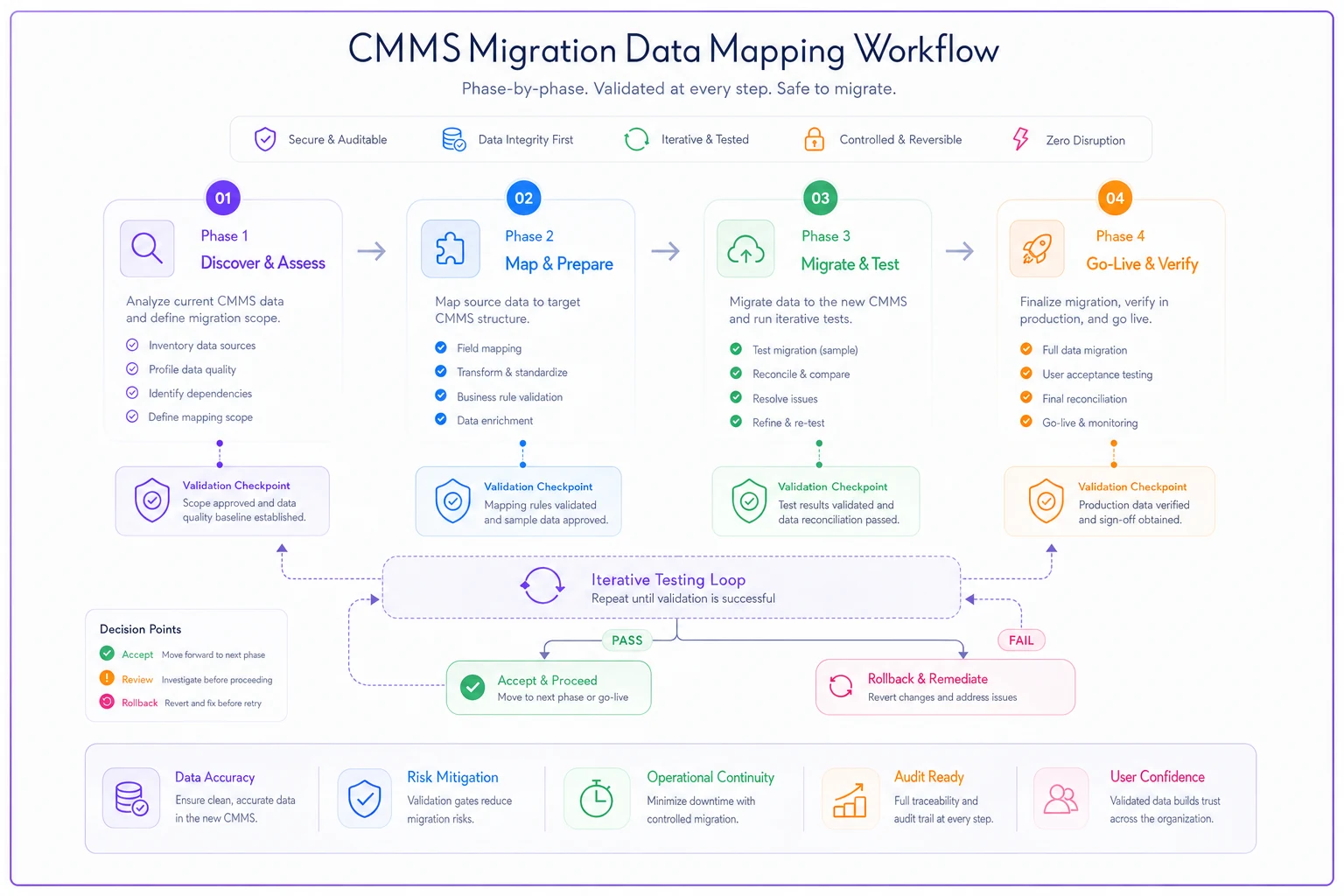
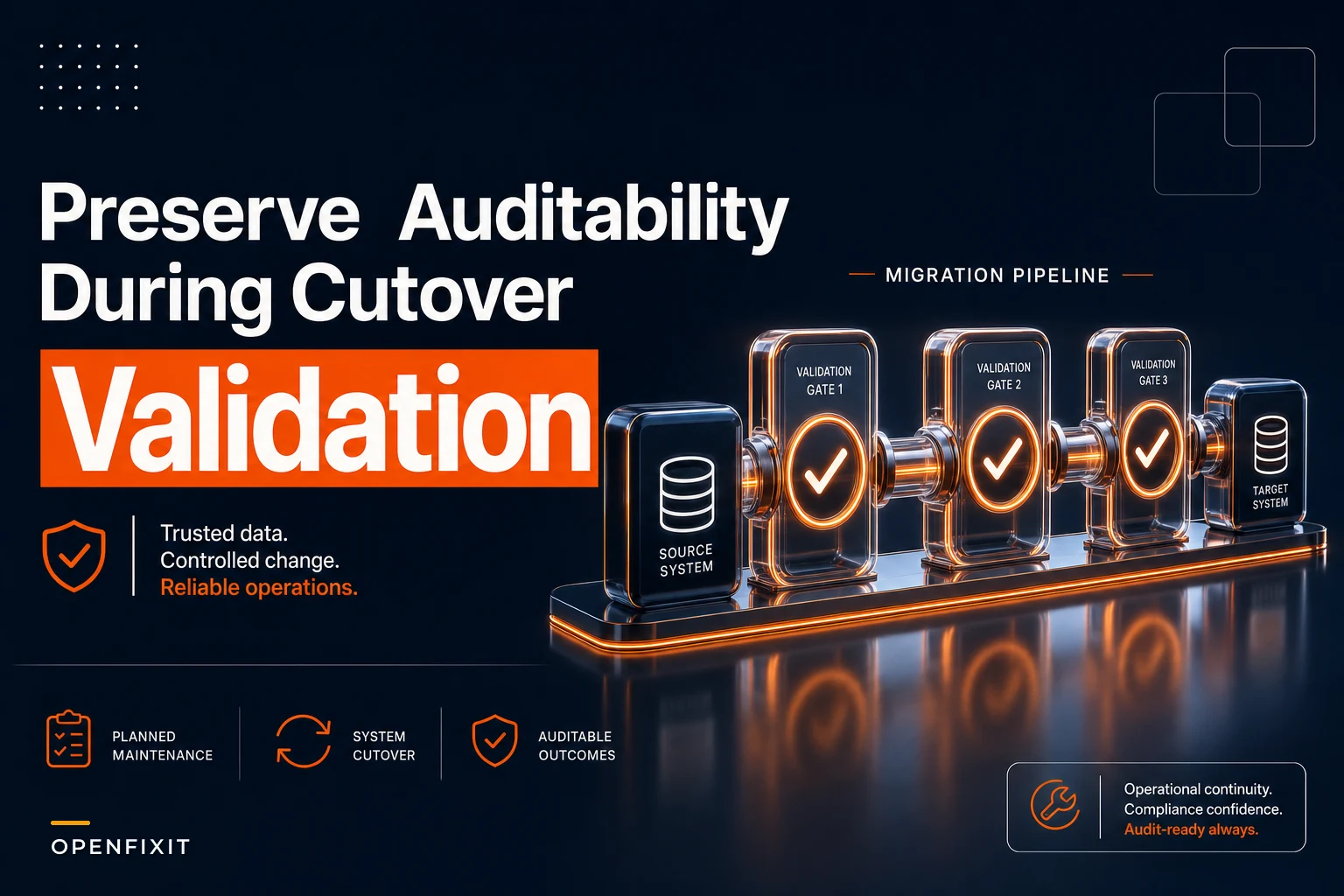
This diagram shows the phased mapping process and where validation checks fit before cutover.
SQL validation scripts that catch corruption early
Write SQL queries that check data integrity at the relationship level, not just the record level. These scripts should run against both systems before migration to identify mismatches.
A basic count validation might show 10,000 work orders transferred. But a relationship query reveals that 800 work orders lost their asset associations, 1,200 lost their completion notes, and 300 have impossible date combinations—completed before created.
Work Order Integrity Checks:
-- Find work orders with missing asset links SELECT COUNT() as orphanedworkorders FROM newworkorders WHERE assetid IS NULL AND oldworkordertype != 'GENERAL' -- Identify priority mapping failures SELECT oldpriority, newpriority, COUNT() FROM migrationmap GROUP BY oldpriority, new_priority ORDER BY COUNT(*) DESC
Labor Hour Validation:
-- Compare total labor hours by month SELECT MONTH(workdate) as month, SUM(oldsystem.laborhours) as oldhours, SUM(newsystem.laborhours) as newhours, ABS(SUM(oldsystem.laborhours) - SUM(newsystem.laborhours)) as difference FROM migrationcomparison GROUP BY MONTH(work_date) HAVING difference > 10
Cost Reconciliation Queries:
-- Flag cost discrepancies over $100 SELECT workorderid, oldtotalcost, newtotalcost, (oldtotalcost - newtotalcost) as variance FROM costmigration WHERE ABS(oldtotalcost - newtotal_cost) > 100 ORDER BY variance DESC
Run your validations on progressively larger sample sets—start with 1,000 recent work orders, then 5,000—so mapping changes scale correctly.
Run these validations on sample data sets first—around 1,000 work orders from last quarter. Fix the mapping rules based on what you find, then validate progressively larger samples. This iterative approach catches systematic errors before they contaminate your entire database.
Rollback criteria and contingency planning
Define specific rollback triggers before migration starts. Not vague criteria like "if there are problems"—measurable thresholds that force a decision.
Immediate Rollback Triggers:
-
More than 5% of work orders fail to migrate
-
Critical safety PM schedules don't transfer
-
Active work orders lose status or assignments
-
Integration with financial system breaks
24-Hour Rollback Triggers:
-
Historical cost data varies by more than 10%
-
More than 100 assets show no maintenance history
-
Compliance reporting queries return empty
-
Mobile app can't access work orders
One-Week Evaluation Points:
-
Labor hour reports show 20%+ variance
-
Parts consumption history incomplete
-
KPI dashboards can't calculate trends
-
Technicians can't find historical notes
Document the rollback procedure itself. Who makes the decision? How long does rollback take? What's the communication plan? And critically—what data gets lost during rollback? Some systems can't cleanly reverse a migration. New work orders created post-migration might disappear, and you need to know that before it happens.
Worked discrepancy reports for audit trails
Every data discrepancy needs documentation, even if you decide to accept it. This worked discrepancy report becomes your audit defense when questions surface months later.
A proper discrepancy report includes:
-
Original value from old system
-
Converted value in new system
-
Reason for difference
-
Business impact assessment
-
Acceptance signature and date
For example: "Labor hours for overtime HVAC calls in Q3 2023 show 312 hours in old system, 287 hours in new system. Difference caused by rounding rules during decimal conversion. Impact: $1,850 understated labor cost. Accepted by Maintenance Manager 3/15/24 due to immaterial variance."
Create categories for your discrepancies:
Category A: Accepted as-is Small variances with minimal operational impact—usually under $500 or a 5% difference. Document but don't correct.
Category B: Flagged for future correction Medium variances that need fixing but aren't migration blockers. Plan to correct these within 30 days post-migration.
Category C: Must fix before cutover Critical discrepancies that break compliance, safety, or financial reporting. These become rollback triggers if not resolved.
Track discrepancies in a structured format that finance and compliance teams can actually review. Include screenshots from both systems, calculation explanations, and impact assessments. This documentation proves you managed the migration professionally, even if perfect data matching wasn't achievable.
Testing with parallel operations
Run both systems in parallel for at least two weeks before cutting over completely. This isn't really about data validation—it's about operational validation. Can technicians actually find historical work orders when troubleshooting? Do supervisors get the reports they need for morning meetings? Does the inventory team have enough history to set reorder points?
During parallel operations, assign specific test scenarios:
Week 1 Tests:
-
Pull last year's equipment history for five critical assets
-
Generate overtime reports for the past quarter
-
Verify PM schedules for next month
-
Check parts consumption for top 10 inventory items
Week 2 Tests:
-
Run compliance reports for last inspection cycle
-
Calculate MTBF for problem equipment
-
Verify warranty claim documentation
-
Test cost allocation to departments
Document every issue, even minor ones. That missing labor note field might seem trivial until a technician needs historical context during an emergency repair.
Historical pattern preservation tactics
Some operational patterns won't survive migration through direct field mapping. You need alternative preservation tactics.
Create summary documents for critical equipment before migration. If that chiller has a complex failure pattern—always fails in August, but only after three days above 95°F, and only when runtime exceeds 14 hours—capture this in a structured format and import these summaries as equipment notes in the new system.
Build reference lookup tables that bridge old and new terminology. When a technician searches for "compressor overload," they should find work orders whether the old system called it "COMP_OVLD," "Compressor Trip," or "C-OVL fault." This translation layer keeps institutional knowledge intact even when exact terms change.
Screenshot critical reports from the old system before migration. That monthly failure analysis, the annual PM compliance summary, the five-year cost trend—capture these as PDFs with timestamps. When someone questions historical data six months later, you have visual proof of what the old system showed.
Department-specific validation checklists
Different stakeholders care about different data integrity issues. Build separate validation checklists for each group.
Operations Manager Checklist:
-
Equipment criticality rankings preserved
-
Failure patterns visible in history
-
Downtime records accurate
-
Production impact codes mapped
Compliance Officer Checklist:
-
Inspection dates and results transferred
-
Inspector certifications documented
-
Corrective action tracking intact
-
Audit trail complete with signatures
Finance Controller Checklist:
-
Labor costs match payroll records (within 2%)
-
Parts costs align with inventory value
-
Department allocations preserved
-
Budget variance reports reproducible
Maintenance Supervisor Checklist:
-
Technician assignments transferred
-
Recurring PM schedules active
-
Work instructions accessible
Department-specific checklists ensure nothing falls through the cracks. The IT team running the migration might not realize that losing safety permit numbers breaks your confined space program. The compliance officer might not know that scrambled asset hierarchies will break your criticality-based PM optimization.
Post-migration monitoring period
The first 90 days after migration reveal problems that testing couldn't catch. Set up specific monitoring routines to catch issues before they compound.
Days 1-30: Daily Checks
-
New work order creation and assignment working
-
PM schedules generating correctly
-
Mobile app syncing properly
-
Cost data accumulating accurately
Days 31-60: Weekly Reviews
-
Historical reports matching expectations
-
KPIs calculating correctly
-
Inventory consumption tracking properly
-
Labor hours aligning with timesheets
Days 61-90: Monthly Analysis
-
Failure trends visible and accurate
-
Compliance reports complete
-
Budget variance explanations possible
-
Predictive maintenance baselines valid
Create a migration scorecard that tracks these metrics—percentage of successful work order completions, report accuracy rates, user adoption. When issues surface, link them back to your migration documentation. That way you can tell whether problems came from the migration or from new operational issues.
Automation opportunities in migration management
AI-powered operational software can reduce a significant chunk of the manual work in CMMS migrations. Instead of spending weeks building SQL scripts and mapping tables by hand, AI automation can analyze both systems and suggest field mappings based on actual data patterns—not just field labels.
The system examines how fields are actually used. It recognizes that your "WO_PRIO" field containing values 1-5 where 90% are 3s probably maps to a "Medium" default, while the 1s consistently correlate with work orders containing "SAFETY" or "DOWN" in descriptions—suggesting they should map to "Critical" instead. That kind of contextual mapping is hard to catch manually when you're staring at thousands of records.
For validation, AI automation can monitor data quality during migration in real time rather than running batch scripts periodically. When 50 work orders suddenly show completion dates before creation dates, you get an alert before 5,000 more records get corrupted the same way.
Post-migration, the same tooling helps maintain data quality by identifying when technicians use inconsistent terminology and suggesting standardization—preventing the gradual data decay that makes future migrations even harder.
Making migration decisions under pressure
CMMS migrations rarely happen at convenient times. Usually you're switching because the old vendor dropped support, costs became unsustainable, or integration requirements changed. That pressure creates real temptation to rush through validation and accept vendor defaults.
Resist it by focusing on preserving specific operational capabilities, not achieving perfect data replication. If you can still identify problem equipment, track compliance, and manage costs effectively, minor field mapping imperfections probably won't matter much. But if you lose visibility into any of those core functions—even temporarily—the operational disruption costs far more than taking an extra week to get migration right.
The investment in proper migration planning pays back quickly. Those SQL validation scripts become ongoing data quality monitors. The mapping templates help onboard new technicians who need to understand historical records. The discrepancy reports defend budget decisions when finance questions maintenance costs. And preserving your historical patterns maintains the institutional knowledge that makes your maintenance program actually work.
A CMMS migration that preserves operational intelligence requires treating historical data as an asset, not just records to transfer. With phase-based mapping, proactive validation, and deliberate pattern preservation, you keep the visibility and auditability that drives maintenance performance. The alternative—discovering broken historical data months after migration—means flying blind right when you need historical insights most.
The investment in proper migration planning pays back quickly. Those SQL validation scripts become ongoing data quality monitors. The mapping templates help onboard new technicians who need to understand historical records. The discrepancy reports defend budget decisions when finance questions maintenance costs. And preserving your historical patterns maintains the institutional knowledge that makes your maintenance program actually work.
A CMMS migration that preserves operational intelligence requires treating historical data as an asset, not just records to transfer. With phase-based mapping, proactive validation, and deliberate pattern preservation, you keep the visibility and auditability that drives maintenance performance. The alternative—discovering broken historical data months after migration—means flying blind right when you need historical insights most.
Ready to optimize your maintenance operations?
Join 2,000+ facilities using Openfixit to reduce unplanned outages, extend asset life, and improve operational efficiency.