


When a senior tech gives notice, the clock that matters isn't two weeks. It's the number of working days you have left to extract what's in their head and put it somewhere the rest of your team can actually reach. Most offboarding goes sideways because facility managers treat it like an HR formality — return the badge, collect the keys, sign the exit form. The maintenance knowledge walks out the door completely untouched.
This is the part nobody plans for. A 14-year chiller tech knows which valve on the condenser loop sticks when it's below 20°F. He knows the breaker in the east mechanical room is mislabeled. He knows which vendor to call for the ancient Trane unit and who to never call again. None of that is in the CMMS. It's in his phone, his truck notebook, and his memory. And when the last day comes, it's gone.
A maintenance offboarding checklist is the only reliable way to catch that leak. But it has to be built around what's actually valuable, not what's easiest to document. Below is how to do it in the time you usually have — which is rarely enough.
Start by ranking the artifacts, not listing them
The mistake most teams make is handing the departing tech a blank "document your knowledge" form. You get three pages of obvious stuff ("change filters quarterly") and zero of the critical stuff, because people naturally write down what's easy to articulate, not what's irreplaceable.
Instead, prioritize artifacts by two questions: how hard is this to recover if it's lost, and how badly does it hurt when you need it and don't have it?
Here's a working triage you can hand to a supervisor on day one of the notice period:
| Artifact | Recovery difficulty | Impact if lost | Priority |
|---|---|---|---|
| Undocumented asset quirks / workarounds | Very high (only in their head) | High | Capture first |
| Vendor/contractor contacts with context | High | High | Capture first |
| Login credentials to BAS, panels, portals | Medium | Critical (locks you out) | Capture first |
| Open/pending work the tech owns | Low–Medium | High | Capture early |
| Spare-part locations & informal stock | High | Medium | Capture early |
| Standard PM procedures already in CMMS | Low (documented) | Low | Skip or verify |
| General skills / training | N/A (hire for it) | Low | Ignore |
The "capture first" rows are where your time goes. Everything already in the system is a verification task, not a capture task. Don't spend the notice period re-documenting PMs that are already written down.
One pattern worth naming: the most valuable knowledge is almost always exceptions. The asset that doesn't behave like the manual says. The shutdown sequence with an extra step nobody else knows about. The pump that needs to be primed a specific way after the seasonal drain. Ask directly — "what do you know about this building that would surprise the next person?" — and you'll pull out more than any generic form ever would.
Shadowing only counts if it's signed off, not scheduled
"We'll have him train his replacement" is where good intentions die. Scheduled shadowing without any verification produces techs who watched a task once and now think they can do it. They usually can't.
Eliminate downtime with proactive maintenance.
Openfixit helps you plan, track, and complete maintenance efficiently—maximizing asset reliability.
- Centralized asset management
- Automated maintenance scheduling
- Inventory and parts tracking
No credit card required
Shadowing has to be structured as a competency transfer with actual sign-offs, not just calendar time. The difference is whether the receiving tech has performed the task under supervision, not whether they were standing nearby while someone else did it.
Build a short shadowing log tied to critical assets only — you can't shadow everything, so pick the systems where a mistake causes real downtime or a safety exposure. For each one, three checkpoints:
-
Observed — the receiving tech watched the full procedure, start to finish, including the weird steps.
-
Performed with oversight — they did it themselves while the departing tech watched and corrected.
-
Signed off independently — the departing tech and a supervisor confirm the receiver can handle it alone.
That third signature is the one that matters. If you only reach step one or two before the last day, flag that asset as a known gap — which is uncomfortable, but far better than discovering it during a failure three weeks later.
A realistic constraint: in a two-week notice, you'll be lucky to get full sign-off on five or six critical procedures. That's fine. It forces you to prioritize systems that actually carry risk. If you've already built out a technician competency matrix, the shadowing plan nearly writes itself — you already know which skills the departing tech holds that nobody else does.
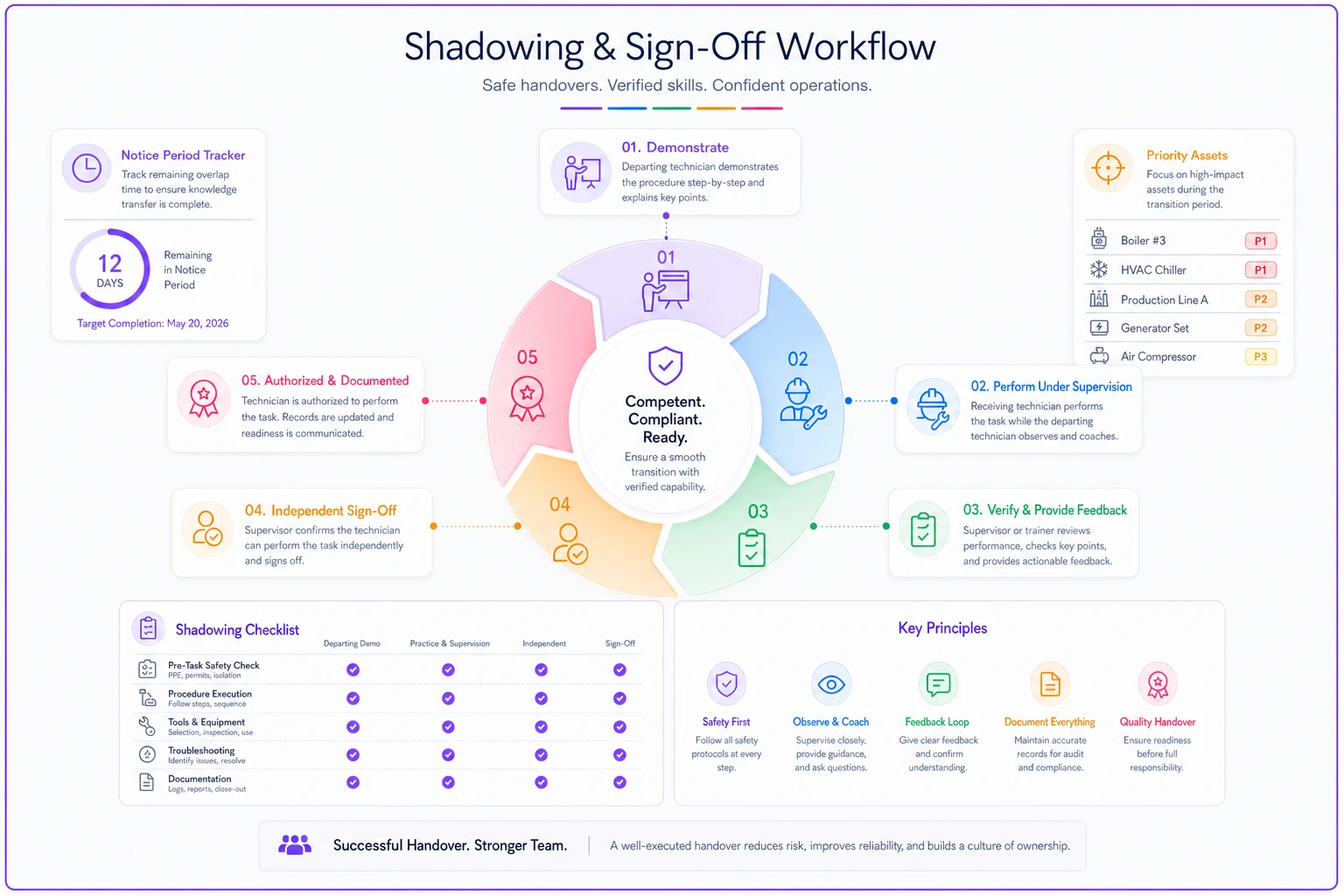
A simple visual like this helps supervisors prioritize which procedures to push for full sign-off during a short notice period.
Credential handover is where you get locked out of your own building
This is the quiet disaster. A tech leaves, and six weeks later someone needs to adjust a schedule in the BAS or pull alarm history, and nobody has the login. The account was tied to his personal email, or the password lived on a sticky note in a truck that's now someone else's.
Credential handover deserves its own tightly controlled section of the checklist because it's both high-impact and surprisingly easy to botch. Walk through every system the tech could access:
-
Building automation system (BAS) — admin and operator logins, plus any local controller passcodes
-
Electrical panel / breaker schedules — including any informal relabeling only they're aware of
-
Vendor and OEM portals — warranty registration accounts, parts ordering logins
-
CMMS and mobile app — reassign their open items before disabling the account, not after
-
Physical access — keys, fobs, lockbox codes, roof and mechanical room access
-
Shared devices — the shop tablet, the thermal camera, anything with a saved password
The critical sequencing detail: transfer and verify credentials before you disable anything. The number of teams that disable the AD account on the last day and then realize the BAS admin login was linked to it is higher than you'd think. Have the receiving tech actually log in to each system and confirm it works before the departing tech leaves the building.
Then change the passwords after. Handover isn't just about getting access — it's making sure the person who left can no longer reach your systems. For anything touching BAS or controls, that's a basic security requirement, not paranoia.
Catch the pending actions before they fall through the gap
Every tech is carrying a mental backlog of half-finished things: a part on order, a vendor callback expected Thursday, a temporary fix that still needs a permanent repair, a warranty claim mid-dispute. When they leave without a handover, those items don't get reassigned — they just disappear until something breaks.
Pull a full list of everything the tech owns or has started:
-
Open work orders assigned to them (reassign these explicitly — don't leave them orphaned)
-
Parts on order and what they were for
-
Temporary repairs that need permanent follow-up
-
Pending vendor callbacks, open quotes, and in-progress warranty claims
-
Any PM they routinely did that isn't scheduled in the system — this is the sneaky one
That last point catches more than you'd expect. Veteran techs often run informal maintenance that never got entered as a recurring PM — they just knew to check the sump pump before spring, or to bleed a certain line monthly. Once they're gone, nobody knows it was ever happening until something fails. Ask directly: "what do you do regularly that isn't in the system?"
If your team is already stretched, how you redistribute the load matters as much as capturing the knowledge. Dumping a departing tech's open work onto whoever's nearest just creates a new bottleneck — the phased backlog approach applies here too. Distribute deliberately.
Where the CMMS does the heavy lifting
Most of this checklist is only durable if it lands somewhere permanent. Verbal handovers and shared docs rot fast. The CMMS is where offboarding knowledge should live, because it attaches information directly to the asset — which is exactly where the next tech will look.
A few moves that make a real difference:
-
Attach quirks to the asset record, not a separate document. The condenser-valve workaround belongs as a note on the condenser's asset page, so it surfaces automatically when someone opens a work order against it.
-
Update vendor contacts in the asset or vendor module with useful context — "use Mike for the old Trane, not the main line."
-
Convert informal PMs into scheduled ones so they survive the person who was doing them.
-
Log credential ownership so the next offboarding isn't a scramble to figure out who holds what access.
Attach quirks directly to the asset record so they appear when someone opens a work order.
AI-assisted CMMS platforms can make the capture step less painful — a tech can dictate a voice note about an asset's weird behavior and have it transcribed and attached to the right record automatically, instead of typing paragraphs on a shop computer they avoid. The friction of documentation is the real reason knowledge doesn't get captured, and lowering that friction is where the tooling earns its keep. But the tool only works if the checklist tells it what to capture — the sequencing and prioritization above is the part no software decides for you.
A real scenario
A mid-size commercial property group — four buildings, six-person maintenance team — lost their lead HVAC tech after eleven years. He gave three weeks' notice. The first week went to normal firefighting; nobody treated the departure as urgent.
In the second week they ran a prioritized offboarding. The biggest catches weren't the obvious ones. He had a personal spreadsheet tracking which rooftop units were under extended warranty and when each expired — information that existed nowhere in the CMMS. He also held the only working login to the BAS front end, tied to his personal Gmail.
They got the warranty data imported, transferred BAS access to two people and verified both could log in, and got independent sign-off on four of the seven critical procedures they'd targeted. The three they didn't finish got flagged as explicit gaps with a plan to bring in the OEM.
About two months later, a rooftop compressor failed. Because the warranty data had been captured during offboarding, the repair went through under warranty instead of becoming a roughly $4k–$5k out-of-pocket job. One catch from one offboarding checklist paid for the whole exercise several times over.
When to go heavier — and when not to bother
Not every departure needs the full treatment. A junior tech who's been on for eight months and works routine PMs under supervision isn't carrying irreplaceable knowledge — a basic handover is plenty.
The full prioritized checklist earns its time when the person leaving is:
-
A long-tenured tech (five-plus years) who's the de facto expert on specific systems
-
The only person who holds certain credentials or vendor relationships
-
Someone running informal processes that never made it into the system
-
Leaving on short notice, where every working day counts
If you're offboarding someone replaceable on general skill, don't over-engineer it. The whole point of prioritizing artifacts is to spend your limited time on knowledge that can't be re-hired.
The thing to remember
Offboarding isn't about the exit paperwork. It's a knowledge-extraction deadline with a hard stop. The teams that handle it well decide — on day one of the notice — what's irreplaceable, what's recoverable, and what doesn't matter, then spend every remaining day on the first category. Rank the artifacts. Get real sign-offs on shadowing, not just scheduled calendar time. Transfer and verify credentials before you disable anything. Reassign the pending work explicitly. And land all of it in the CMMS against the actual assets, so the next person finds it where they'll already be looking. Do that, and the next departure costs you a replacement — not a decade of institutional memory.
Ready to optimize your maintenance operations?
Join 2,000+ facilities using Openfixit to reduce unplanned outages, extend asset life, and improve operational efficiency.