
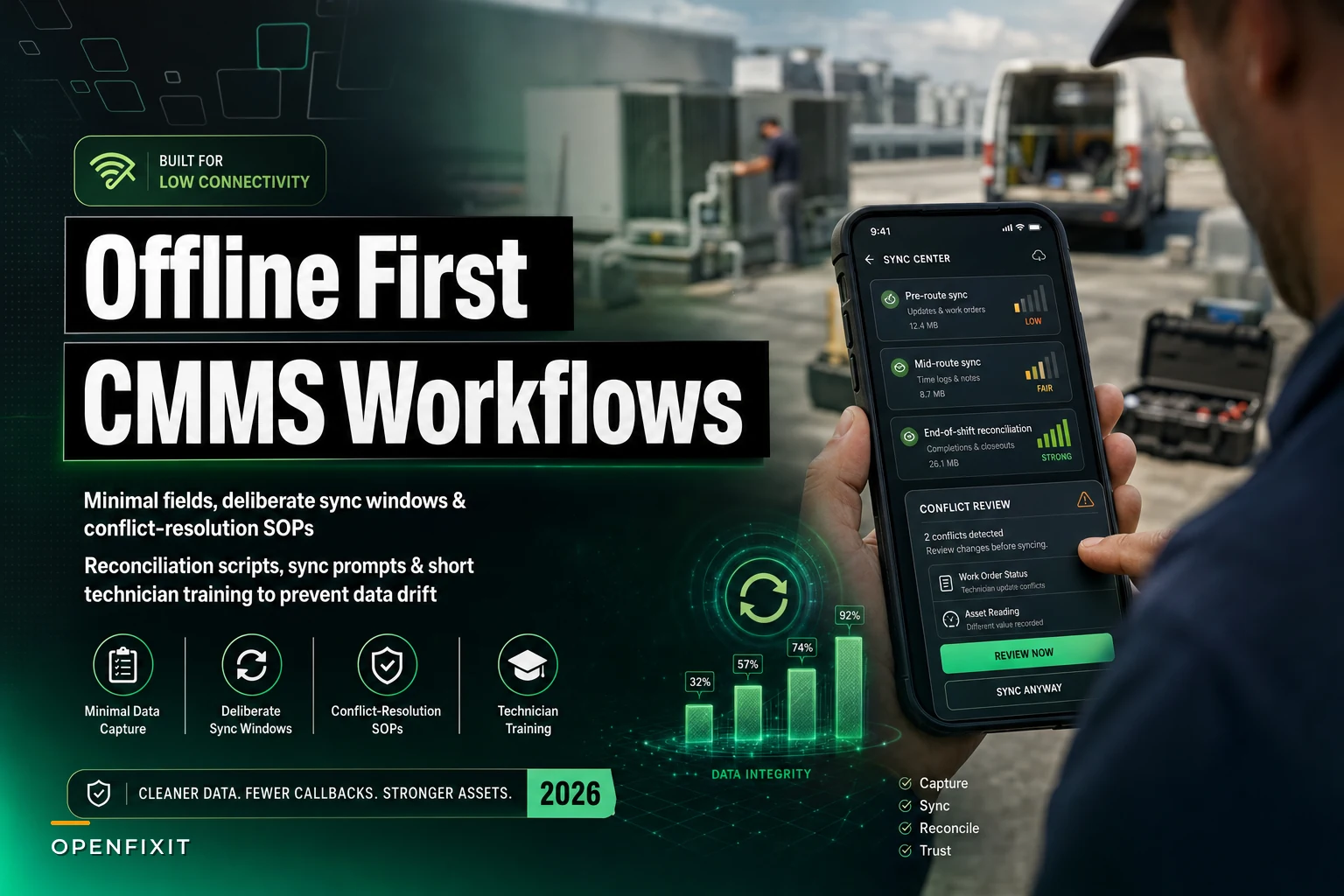

There's a specific failure mode that only shows up after a tech comes back above ground. The work order looks fine on their phone. The photos are there. The meter reading is logged. Then the app syncs, and suddenly the asset status reverts, the labor hours vanish, or the PM they just closed reopens itself because the server already had a newer version from the night-shift tech who touched the same asset an hour earlier.
That's data drift. On low-connectivity sites — mechanical rooms, water plants, parking structures, rural pump stations, cold storage — it's not some rare edge case. It's just the default condition. The question isn't whether your mobile CMMS can work offline. Most of them can, sort of. The real question is whether you've written the rules that keep offline capture from corrupting your records the moment it reconnects.
This is about those rules. Minimal capture fields, sync windows, and reconciliation SOPs that are app-agnostic — meaning they hold up whether you're on one vendor today and a different one in two years.
Why offline capture breaks even when the app "supports offline"
Vendors love the checkbox: works offline. What they mean is the app caches records locally and queues changes. What they don't explain is how it handles two people editing the same record hours apart, or what happens when a tech captures a reading against an asset that got re-numbered that morning.
The breakage almost always traces back to three gaps:
Last-write-wins defaults. Most mobile CMMS tools resolve conflicts by timestamp. Whoever syncs last overwrites. On connected sites that's mostly fine. In offline work, the "last" sync might carry data captured first in real life, so you overwrite good data with stale data and never know it happened.
No field-level merge. Apps sync entire records, not individual fields. If a supervisor updated the asset's location at 9am and a tech closed the work order from the field at 2pm (captured at 10am, synced at 2pm), the tech's whole-record push can clobber the location change entirely.
Free-text everywhere. When a tech working offline can type anything into any field, you get drift of a different kind — the same pump described four different ways, meter units entered as "psi" and "PSI" and "lbs," asset IDs typed from memory because the dropdown wouldn't load without signal.
None of these are solved by buying a better app. They're solved by constraining what gets captured offline and writing down how conflicts resolve.
Start by cutting the offline form down to the bone
The single biggest lever is reducing what a technician can actually capture while disconnected. Every optional field you allow offline is a future reconciliation problem. The goal is a form small enough that it's nearly impossible to fill in wrong, with everything else deferred until the device reconnects.
Eliminate downtime with proactive maintenance.
Openfixit helps you plan, track, and complete maintenance efficiently—maximizing asset reliability.
- Centralized asset management
- Automated maintenance scheduling
- Inventory and parts tracking
No credit card required
A useful way to think about it: offline mode should capture evidence and completion, not classification and routing. Classification needs lookups. Lookups need connectivity. Evidence doesn't.
Here's the split worth pushing every team toward:
| Capture offline (minimal, constrained) | Defer until reconnected (needs server state) |
|---|---|
| Asset ID (scanned, not typed) | Re-assigning the work order |
| Work order status: in-progress / done / can't complete | Changing asset hierarchy or location |
| Meter reading (numeric, fixed unit) | Parts consumption against live inventory |
| Failure code (short picklist, cached locally) | Linking to related/duplicate WOs |
| Labor time (start/stop timer) | Priority or SLA changes |
| Photos (timestamped, geotagged) | Cost center / account coding |
| One free-text note field (capped length) | Creating new assets |
The principle: anything that depends on current server data — inventory counts, who's assigned, whether a duplicate already exists — should never be editable offline, because the device genuinely can't know the truth. Let the tech flag it ("parts used: see note") and reconcile when they sync.
One pattern worth stealing: make the asset ID scan-only in offline mode. The number one source of drift on disconnected sites is techs typing asset IDs from memory because the search won't load. A cached barcode or QR lookup fixes this almost entirely. If the asset isn't in the cached list, the tech captures a photo of the nameplate and the record gets matched later — not guessed at.
Pre-cache the day's asset list during the pre-route sync so scan-only works even if the tag isn't in the local cache.
This connects directly to naming discipline. If your asset IDs aren't standardized, offline scanning won't save you, because the tech won't trust the tag. We've written about how to standardize asset hierarchies and naming conventions elsewhere, and it's a genuine prerequisite here — offline rules sit on top of a clean asset register, not instead of one.
Define sync windows instead of hoping for continuous sync
"Continuous background sync" is a fantasy on low-connectivity sites. The device flaps in and out of signal, retries partial uploads, and you end up with half-synced records that are often worse than no sync at all.
A better model is defined sync windows — explicit moments where the tech is expected to be in coverage and sync deliberately, with the app showing what's pending and what succeeded.
In practice this looks like three windows:
-
Pre-route sync (start of shift). Tech pulls down the day's work orders, cached asset list, picklists, and PM checklists while still at the shop or in the truck with good signal. Nothing starts until this completes.
-
Mid-route sync (opportunistic, but prompted). When the device detects stable signal — back in the truck, near the office, in a covered yard — it prompts the tech to sync the queue. Not silent. Prompted, so the tech actually sees "7 records pending" and confirms.
-
End-of-shift reconciliation sync. The real one. Tech returns to coverage, syncs everything, and then reviews the conflict queue before clocking out. This is where drift gets caught while the work is still fresh.
The mistake most teams make is treating sync as invisible plumbing. On offline-heavy sites, sync should be a visible, acknowledged step — almost like a daily close-out. A tech who ends the shift with 12 records stuck in a queue should see that and deal with it, not discover it three days later when a supervisor asks why a PM is still showing open.
A simple visual helps teams understand the three sync moments and prompts.
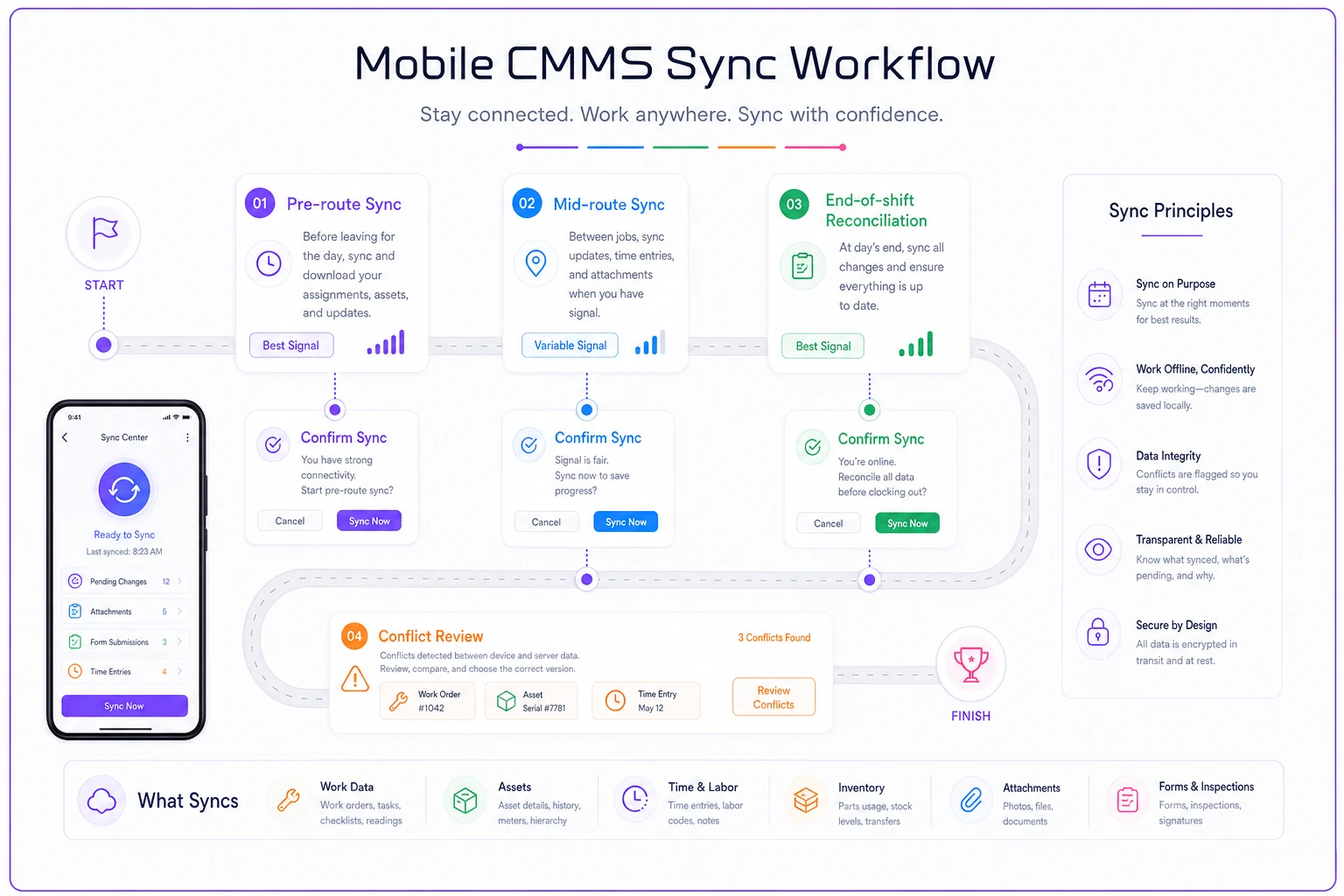
One small but important detail: cap the offline queue age. If a record has been sitting unsynced for more than 48 hours, flag it loudly. Stale offline records are where most catastrophic overwrites come from — the longer a record waits, the more likely the server version has moved on without it.
Writing conflict-resolution SOPs that don't rely on the app
Most teams stop too early here. They tune the app's conflict settings and assume that's the SOP. It isn't. The app resolves conflicts mechanically. Your SOP decides what humans do when the mechanical resolution is wrong.
-
Status conflict (reopened PM / closed-vs-open). Rule
a completion from the field always wins over a server-side open state, unless there's a note indicating the work couldn't be done. Completion is evidence; "still open" is usually just a stale record.
-
Meter reading conflict (two readings, different times). Rule
keep both, keep the later real-world timestamp, never average. A reversed-looking reading — new value lower than old — gets flagged for review, not auto-accepted. It's almost always a wrong asset.
-
Asset re-identification conflict. Rule
if the asset was re-numbered or moved server-side after the offline capture, the field record gets held in a reconciliation queue and matched by a human, never auto-merged.
-
Parts/labor conflict. Rule
field labor time wins, the tech was there. Parts are never auto-posted from offline; they're always reconciled against live inventory on sync.
The throughline across all of these: evidence beats state, and ambiguity gets queued, not guessed. The app's job is to flag the conflict. The SOP's job is to say who looks at it and when.
For this to actually work, you need one named role per shift who owns the conflict queue — not "whoever notices." On small teams that's often the lead tech or supervisor doing a five-minute end-of-day pass. The reconciliation itself is fast when the rules are written. It turns into a debate every single time when they're not.
A reconciliation script you can actually run
Reconciliation shouldn't be vague. It should be a repeatable sequence someone runs at end of shift or start of the next. Here's the process in order:
-
Pull the conflict queue. Everything the app couldn't auto-resolve, plus anything your rules flagged — reversed meters, stale records, unmatched assets.
-
Match unidentified assets first. Any field record captured against a nameplate photo instead of a scanned ID gets matched to the real asset now, before anything else, because downstream fields depend on it.
-
Resolve status conflicts using the evidence rule. Completion with photos and notes wins. Open-without-evidence loses. Document the override in a comment so the audit trail shows a human decided.
-
Verify meter readings. Accept normal progressions. Hold reversals and anomalies for a quick second look — usually a wrong asset or a transposed digit.
-
Post parts and labor against live data. Now that you're connected, consume parts against real inventory and confirm labor hours. This is where offline "see note" placeholders get turned into actual transactions.
-
Clear the queue to zero. The shift isn't closed until the queue is empty or every remaining item has an owner and a reason it's still open.
The discipline of ending at zero is what keeps drift from compounding. One unresolved conflict is a nuisance. Thirty of them, three weeks deep, is a data integrity project nobody wants to run.
A real scenario: a water utility with four unmanned pump stations
A small municipal water team ran four remote pump stations, all in genuine dead zones — no cell signal, no site Wi-Fi worth trusting. Two techs rotated through on rounds. They'd been using a mobile CMMS "in offline mode," which in practice meant records synced whenever the phones felt like it, usually hours later in the parking lot.
The symptoms were familiar. Runtime meter readings showed up out of order, so trend charts were basically useless. PMs occasionally reopened after being closed because a second tech had opened the same record. And roughly one in ten readings was logged against the wrong pump, because techs typed station and asset IDs from memory when the lookup wouldn't load underground.
They didn't switch apps. They rewrote the rules:
-
Offline form cut to seven fields, asset ID scan-only, failure codes from a cached picklist.
-
Three defined sync windows, with an enforced end-of-shift sync-and-review before clock-out.
-
A one-page conflict SOP kept in both trucks, with the lead tech owning the end-of-day queue pass.
Within about two months, wrong-asset readings dropped from around 10% to under 2% — basically the residual human error you'd expect regardless of process. Reopened-PM incidents mostly disappeared because the sync-window prompt stopped two techs from carrying stale copies of the same record for hours. The trend charts became trustworthy again, which was the whole point of collecting runtime data in the first place.
Nothing exotic. Fewer fields, clearer timing, a written rule for conflicts, and one person responsible for closing the queue.
When strict offline rules make sense — and when they don't
This makes sense when:
-
A meaningful share of your work happens in true dead zones.
-
Multiple techs can touch the same assets within a short window.
-
Your data feeds something downstream — compliance records, trend analysis, SLA reporting — where drift has real cost.
This is overkill when:
-
Your sites have reliable Wi-Fi and techs are rarely disconnected for more than a few minutes. You'd be adding friction to solve a problem you don't actually have.
-
You're a single-tech operation. With one person, "last write wins" is almost always correct, because there's no second editor to conflict with.
Who should not start here: teams whose asset register is still a mess. If half your assets are mistagged or duplicated, offline scanning and reconciliation rules will just encode the chaos faster. Fix the register first.
One more honest caveat: strict offline rules raise the bar on technician habits. Techs have to actually sync at the windows and actually review the queue. That's a behavior change, and it won't stick without the right groundwork. If mobile adoption is shaky to begin with, start with the broader mobile technician adoption plan and layer these offline rules on once the basic habits are holding.
The quick-start checklist
Before your next shift in a low-connectivity site, make sure you've got these in place:
-
[ ] Offline capture form trimmed to evidence-and-completion fields only
-
[ ] Asset ID set to scan-only offline, with nameplate-photo fallback
-
[ ] All connectivity-dependent fields (inventory, assignment, hierarchy) locked offline
-
[ ] Three defined sync windows, with end-of-shift sync-and-review enforced
-
[ ] Offline queue age cap with a loud flag past 48 hours
-
[ ] Written conflict rules
evidence beats state, ambiguity gets queued
-
[ ] One named owner per shift for the reconciliation queue
-
[ ] A reconciliation script that ends at queue-zero
Offline mobile CMMS workflows don't fail because the technology can't handle disconnection. They fail because nobody decided, in advance, what happens when the disconnected record and the server record disagree. Write that down, constrain what gets captured in the dark, sync on a schedule people actually follow — and the drift that's been quietly rotting your field data mostly stops on its own.
Offline mobile CMMS workflows don't fail because the technology can't handle disconnection. They fail because nobody decided, in advance, what happens when the disconnected record and the server record disagree. Write that down, constrain what gets captured in the dark, sync on a schedule people actually follow — and the drift that's been quietly rotting your field data mostly stops on its own.
Ready to optimize your maintenance operations?
Join 2,000+ facilities using Openfixit to reduce unplanned outages, extend asset life, and improve operational efficiency.