



The dispute almost never starts at the invoice. It starts three weeks earlier, at 7:42 AM, when a contractor's tech pulls into the wrong side of a two-building campus, texts your coordinator "on site," and starts a two-hour clock that nobody can actually verify later.
By the time the invoice lands showing four hours of labor plus a trip charge, you have no clean way to prove they were there for two, or that they were even on your property versus the identical office park next door. So you either eat it, or you burn 40 minutes of your afternoon arguing over a $180 line item you can't disprove. Arrival verification is the least glamorous part of contractor management and quietly one of the highest-leverage. Get the first fifteen minutes of a visit documented correctly and most billing fights disappear before they form. It's also the piece that most contractor onboarding SOP maintenance programs skip entirely — they focus on insurance certs and W-9s and forget the part that actually protects the budget: proving who arrived, where, when, and that they got the safety brief before touching anything.
Where arrival disputes actually come from
If you break down contested contractor invoices, most trace back to a handful of verification holes. None of them are dramatic. They're all small and boring, which is exactly why they survive.
-
"On site" is self-reported. The tech texts or taps a button when they say they arrived. There's often a 20–30 minute gap between the reported arrival and any actual work. That gap gets billed.
-
No proof of location. A timestamp with no GPS could be from the parking lot, the wrong building, or a Wendy's a mile away. On multi-tenant sites this isn't paranoia — it's a genuine problem.
-
No proof of who. The company you contracted sent a sub. Or a trainee. Or someone nobody vetted. You're paying journeyman rates for an apprentice and can't tell.
-
The safety brief is a fiction. Someone "covered" the site-specific hazards verbally, or didn't. When something goes wrong — a tech opens the wrong panel, trips a system, gets hurt — there's no record that anyone told them not to.
-
Evidence gets attached to nothing. Photos live in a text thread. The sign-in sheet is in a binder at the front desk. The work order in the CMMS has none of it. Three weeks later, reassembling the timeline is archaeology.
The through-line: everything is captured in separate places, controlled by the person being billed, and none of it is tied to the actual work order. Arrival verification fixes this by making arrival evidence a precondition for the work order clock to start — and by putting that evidence somewhere the contractor doesn't own.
The three checks that do 90% of the work
You don't need biometrics or turnstiles. Three lightweight checks, stacked, close almost every gap. The trick is requiring all three, not treating them as optional.
Eliminate downtime with proactive maintenance.
Openfixit helps you plan, track, and complete maintenance efficiently—maximizing asset reliability.
- Centralized asset management
- Automated maintenance scheduling
- Inventory and parts tracking
No credit card required
1. Photo verification (proves what and condition on arrival)
A timestamped photo of the asset or work area before any work begins. It does two things at once: confirms the tech is physically at the right equipment, and establishes baseline condition. That second part quietly kills a whole category of dispute — "it was already broken when I got here" and "you damaged our unit" both die when there's a dated before-photo. The rule that makes this work: the photo has to show something site-specific. A shot of a generic gray HVAC unit proves nothing. A shot showing your asset tag, the equipment nameplate, or a recognizable landmark ties it to your asset.
2. Geofence verification (proves where)
A GPS check against a boundary you draw around the actual work location — not just the property line. On a single small building, a 100-meter radius is fine. On a campus, draw per-building fences so "arrived" at Building A doesn't count when the work order is for Building C. The mistake most people make here is setting the fence too tight. GPS on a phone inside a building with a metal roof drifts 30–50 meters routinely. Set a fence at 15 meters and you'll generate false "not on site" flags constantly, and your techs will start resenting the whole system. Give it room.
Set geofences wide enough to accommodate typical phone GPS drift so you avoid false "not on site" flags.
3. Badge / identity verification (proves who)
The tech confirms identity against what you have on file — a scanned company badge, a PIN tied to a pre-registered individual, or at minimum a name selected from the approved-personnel list for that vendor. This is the check most facility teams skip, and it's the one that catches rate fraud and unvetted subs. If your contractor onboarding SOP maintenance process already captures approved individuals per vendor during onboarding, this check is nearly free — you're just matching arrival to a list you already built.
Here's how the three stack against the disputes they actually prevent:
| Check | Proves | Dispute it kills |
|---|---|---|
| Photo (before-work, asset-specific) | Right equipment, arrival condition | "Already damaged," "we broke something," "wrong asset" |
| Geofence | On the correct site/building | "Billed for a visit that didn't happen here," trip-charge padding |
| Badge/identity | Correct, vetted person | Apprentice billed at journeyman rate, unapproved subs |
| All three, timestamped, on the work order | Clean, defensible timeline | Labor-hour inflation, "on site" gaps |
Any single check has a hole. A photo with no location could be from another job. A geofence hit with no identity could be the wrong person on the right site. Stacked, they're hard to game and straightforward to defend.
The safety brief that actually gets read
The safety brief is where arrival verification stops being a billing tool and becomes a liability tool. Most site briefs fail the same way: they're a laminated sheet the contractor signs without reading, or a verbal "watch yourself around the electrical room" that leaves no trace.
A brief that holds up has three properties: it's site-specific, it's acknowledged per person per visit, and the acknowledgment is captured with the arrival record — not on a separate form.
Keep the script short. Long briefs don't get read; they get scrolled past and rubber-stamped. Something like:
> Site Safety Brief — [Building / Area]
-
Check-in required. No work begins until arrival is verified and this brief is acknowledged.
-
Site-specific hazards today [e.g., "Roof access requires fall protection. Electrical room 2B is energized — lockout required before any panel work."]
-
Systems you must NOT touch without coordinator sign-off [fire panel, BAS controls, main disconnect].
-
Emergency [muster point, site emergency contact, nearest exit].
-
Isolation / LOTO confirm required isolations with [name] before starting.
-
Acknowledgment By checking in, [tech name] confirms they've read the above for work order [#].
Line two is the whole point. It changes per visit. "Electrical room 2B is energized today, use the disconnect on the north wall" is worth ten pages of generic PPE boilerplate, because it's the thing that actually prevents an incident.
When a brief is tied to the arrival record, you get something you can't get any other way: proof that this specific person acknowledged this specific hazard before they started. When a tech opens the wrong panel anyway, the conversation about liability looks very different.
Required evidence fields — what has to be on the work order before it closes
The reason arrival evidence disappears is that nobody made it mandatory on the work order itself. If a work order can be marked complete without arrival proof, a lot of them will be. The fix is a required-field gate: certain fields must be populated before status can move to "complete."
A working checklist of evidence fields tied to the work order:
-
[ ] Verified arrival timestamp (system-captured, not manually typed)
-
[ ] Geofence result (pass / manual-override with reason)
-
[ ] Technician identity (matched to approved-personnel list for the vendor)
-
[ ] Before-work photo(s) showing asset tag or nameplate
-
[ ] Safety brief acknowledgment (person + work order + timestamp)
-
[ ] Required isolations confirmed (yes / N-A)
-
[ ] After-work photo(s) for anything physical
-
[ ] Verified departure timestamp (this is what actually bounds billable time)
Two fields on that list punch above their weight. The departure timestamp matters as much as arrival — arrival-only tracking still lets labor hours float at the end of the visit. And the manual-override with reason field matters because you will have legitimate exceptions (dead phone, no signal in a basement mechanical room). The goal isn't to make overrides impossible; it's to make them logged and reviewable so a pattern of overrides from one vendor becomes visible.
This is the same principle behind a solid work-order-centric vendor governance system — the work order is the single record everything attaches to, so accountability doesn't live in someone's text thread.
How the whole thing flows on a single visit
Walking through one visit end-to-end makes the pieces click:
-
Work order is dispatched to the vendor with the site, asset, and that day's site-specific hazard notes attached.
-
Tech arrives, opens the work order on their phone. The app checks GPS against the building geofence — pass.
-
Tech selects their name from the approved-personnel list (or scans their badge). Identity matched.
-
Safety brief for that building loads. Tech reads, acknowledges. Acknowledgment stamps to the work order with their name and time.
-
Tech takes the required before-photo showing the asset tag. The verified clock starts here.
-
Work happens.
-
Tech takes after-photos, marks isolations restored, checks out. Departure timestamp captured.
-
Work order can't close until all required evidence fields are populated. It closes clean.
This diagram shows the visit flow end-to-end.
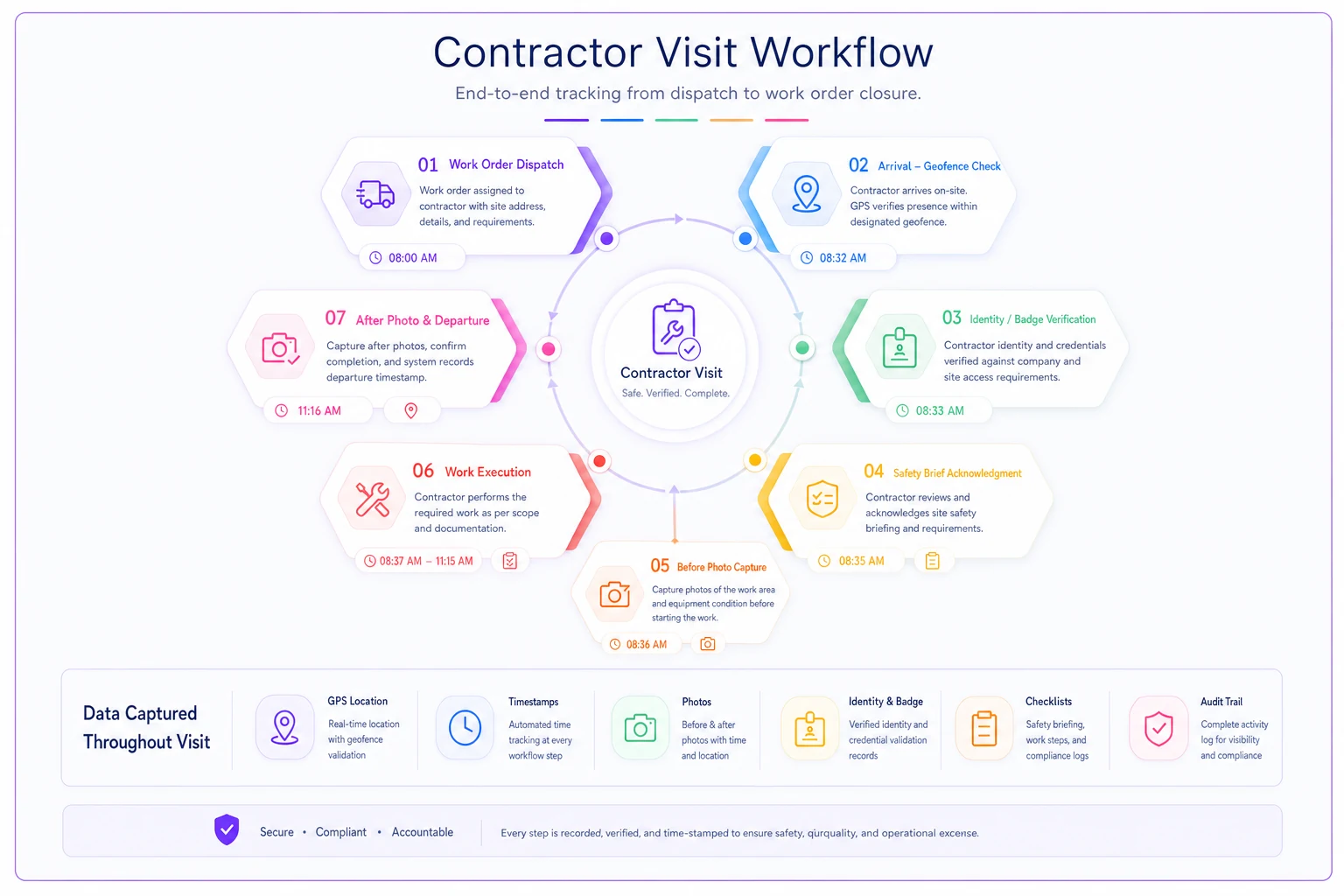
When the invoice arrives, you're not reconstructing anything. Arrival, identity, location, brief, and departure are already on the work order. A modern CMMS or maintenance platform can enforce this gate automatically — requiring evidence fields before status changes and flagging overrides for review. That's really the only way it survives contact with a busy Tuesday. Nobody keeps a manual arrival-verification discipline alive for long; the system has to hold the line.
A real scenario
A regional property-management group ran maintenance across seven office buildings with a rotating bench of roughly a dozen HVAC and electrical contractors. Disputed invoices were a steady background cost — usually padded trip charges and labor hours nobody could disprove. On a rough count they were writing off or grinding through somewhere around $1,800–$2,500 a month in contested lines, plus coordinator time chasing photos through text messages.
They added an arrival gate to their work orders: geofence per building, identity against the approved-personnel list built during onboarding, one before-photo showing the asset tag, and a departure timestamp. No new hardware — just rules on the existing platform and a two-line site brief per building.
Inside about two months, the change wasn't subtle. Trip-charge disputes basically stopped, because "arrived at Building C" was now a verifiable fact instead of a claim. A couple of instances of the wrong, uncredentialed tech showing up got caught at check-in and kicked back to the vendor before any billable time started. Contested invoices dropped to a few hundred dollars a month, and the coordinator got most of an afternoon back each week. The quieter win: two vendors who'd been the source of most disputes cleaned up their billing on their own once they realized arrival was actually being tracked.
When this makes sense — and when it's overkill
Do this when: you've got multi-tenant or multi-building sites, a rotating set of contractors, recurring trip-charge or labor-hour disputes, or any work touching energized or hazardous systems where a documented safety brief protects you legally.
Probably overkill when: you use one or two long-trusted contractors on a single small building where you can literally see them arrive. Forcing a geofence-and-badge ritual on the guy you've known for eight years, working a building you can watch from your desk, just adds friction with no dispute to prevent.
Who should not roll this out cold: teams that haven't done the onboarding groundwork. If you don't have an approved-personnel list per vendor, the identity check has nothing to match against, and the whole thing degrades into a photo requirement. Build vendor and personnel records first, then turn on the gate. It also pairs badly with a chaotic dispatch process — if work orders go out without the right asset or site attached, arrival verification just documents the confusion faster. Get your dispatch and work-order triage clean enough that the right work order is reaching the right person before you bolt verification onto the front of it.
The point
Arrival verification isn't about distrusting your contractors. Most of them are fine. It's about removing the ambiguity that turns an honest paperwork mistake into a 40-minute argument you can't win. When arrival, identity, location, and the safety brief all live on the work order — captured automatically, owned by you, not by the vendor being billed — disputes don't get resolved faster. They mostly stop happening, because there's nothing left to argue about.
Ready to optimize your maintenance operations?
Join 2,000+ facilities using Openfixit to reduce unplanned outages, extend asset life, and improve operational efficiency.